mirror of
https://github.com/joBr99/nspanel-lovelace-ui.git
synced 2026-01-02 21:04:20 +01:00

69 lines
2.1 KiB
Markdown
69 lines
2.1 KiB
Markdown
# NSPanel Lovelance UI
|
|
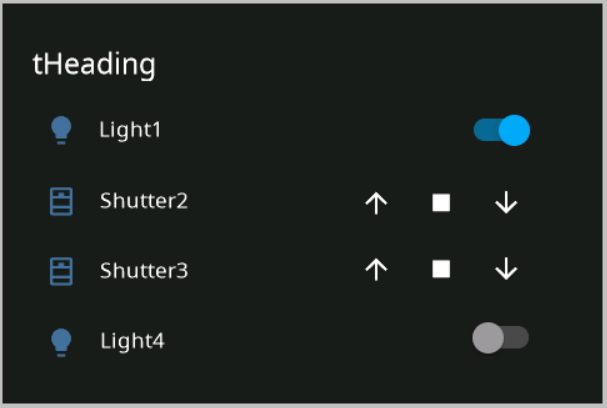
This is a custom UI for the NSPanel, with HomeAssistant Lovelance UI Design.
|
|
|
|
# Current State
|
|
This is at a really early stage, I started on the implementation of a gui that looks like lovelance. The Nextion HMI Project File will be uploaded soon and also an ESP Home Component to control this UI.
|
|
|
|
|
|
|
|
|
|
# NsPanel Custom Widget UI
|
|
|
|
This is a replacement for the stock ui on nspanel, it can be controlled via custom serial command, like the stock one (but with different commands). This enables a user experiance, where it's possible to use nspanel with custom UI, but without messing around with Nextion Editor, because it's possible to configure widgets.
|
|
|
|
# Custom Protocol
|
|
```
|
|
55 BB [payload length] [payload] [crc] [crc]
|
|
```
|
|
|
|
Payload length contains the number of bytes of the payload.
|
|
|
|
CRC is "CRC-16 (MODBUS) Big Endian" calculated over the whole message
|
|
|
|
This protocol does not try to implement broken JSON Commands with a specified type (lol).
|
|
Instead the commands are plain text commands with parameters.
|
|
|
|
## Example for valid Message
|
|
This message has to be generated for the Message "1337" (1337 is not a valid command, this is just an example)
|
|
```
|
|
55 BB 04 31 33 33 37 5F 5B
|
|
```
|
|
## Messages to Nextion Display
|
|
|
|
### cardEntities Page
|
|
|
|
The following message can be used to update the content on the cardEntities Page
|
|
|
|
entityUpdHeading,heading1337
|
|
|
|
entityUpd,*id*,*iconId*,*nameOfEntity*,*type*,*optionalValue*
|
|
|
|
entityUpd,1,1,Light1,light,0
|
|
|
|
entityUpd,2,0,Shutter2,shutter
|
|
|
|
|
|
## Messages from Nextion Display
|
|
|
|
### cardEntities Page
|
|
|
|
event,pageOpen,0
|
|
|
|
event,*PageNumber*,*PageHeading*,*entityName*,*buttonId*,*actionName*,*optionalValue*
|
|
|
|
event,1,tHeading,tEntityName,1,up
|
|
|
|
event,1,tHeading,tEntityName,1,down
|
|
|
|
event,1,tHeading,tEntityName,1,stop
|
|
|
|
|
|
# Design Guidelines for Nextion HMI Project
|
|
|
|
Background Color is
|
|
- RGB565: 6371 [18e3] (HEX: #1C1C1C, RGB: 28,28,28)
|
|
|
|
Source for Icons is the Material Design Font, used by HASPone
|
|
https://github.com/HASwitchPlate/HASPone
|
|
|