mirror of
https://github.com/joBr99/nspanel-lovelace-ui.git
synced 2026-01-05 22:25:48 +01:00

95 lines
3.5 KiB
Markdown
95 lines
3.5 KiB
Markdown
# NSPanel Lovelance UI
|
|
This is a custom UI for the NSPanel, with HomeAssistant Lovelance UI Design.
|
|
The general idea is that the Nextion Display cycles though a page counter and the esp32 tells the display what to do.
|
|
If you are changeing the page the nextion display will send and event to the esp32 and it has to answer with the messages, that will update the current page with it's desired components. This enables easy changes, without touching the HMI Project.
|
|
|
|
# Current State
|
|
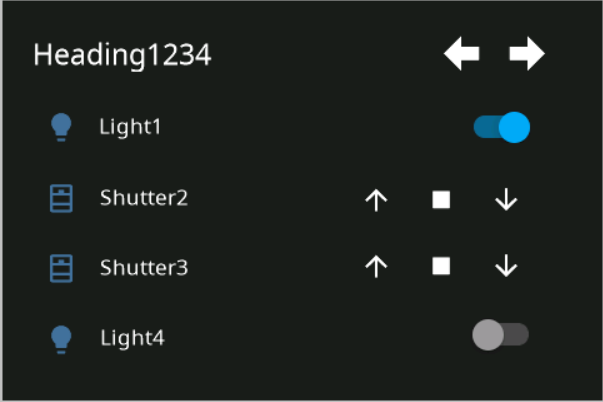
This is at a early stage, it is possible to set entities on the pages on the nspanel through custom commands.
|
|
And the buttons are also sending an event in case they are pressed.
|
|
|
|
|
|
|
|
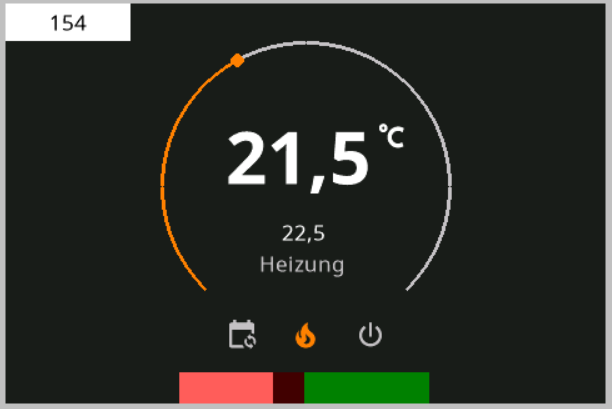
## Halfway done upcoming pages :)
|
|
|
|
|
|
|
|
Yes, I implemented a circle drawing algorithim for this in nextion ...
|
|
|
|

|
|
|
|
|
|
# EspHome component
|
|
|
|
See my esphome.yaml for the config used on the nspanel device.
|
|
Messages are currently handled on the "on_incoming_msg" lambda.
|
|
An proper implementation where you can configure the pages within esphome yaml is currently missing.
|
|
It should be possible to recact to buttonPress Events within this lambda. (through calling a home assistant service or something like that)
|
|
|
|
To flash a new tft file I'm currently switching to the offical nextion component, which is also in the esphome.yaml
|
|
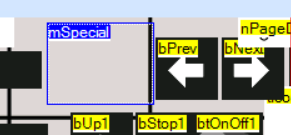
It might be needed to switch to hidden page and disable recmod/reparse mod. To access hidden page press the hidden button 10 times.
|
|
|
|
|
|
|
|
|
|
# NsPanel Custom UI
|
|
|
|
This is a replacement for the stock ui on nspanel, it can be controlled via custom serial command, like the stock one (but with different commands). This enables a user experiance, where it's possible to use nspanel with custom UI, but without messing around with Nextion Editor, because it's possible to configure widgets.
|
|
|
|
# Custom Protocol
|
|
```
|
|
55 BB [payload length] [payload] [crc] [crc]
|
|
```
|
|
|
|
Payload length contains the number of bytes of the payload.
|
|
|
|
CRC is "CRC-16 (MODBUS) Big Endian" calculated over the whole message
|
|
|
|
This protocol does not try to implement broken JSON Commands with a specified type (lol).
|
|
Instead the commands are plain text commands with parameters.
|
|
|
|
## Example for valid Message
|
|
This message has to be generated for the Message "1337" (1337 is not a valid command, this is just an example)
|
|
```
|
|
55 BB 04 31 33 33 37 5F 5B
|
|
```
|
|
## Messages to Nextion Display
|
|
|
|
### cardEntities Page
|
|
|
|
The following message can be used to update the content on the cardEntities Page
|
|
|
|
entityUpdHeading,heading1337
|
|
|
|
entityUpd,*id*,*iconId*,*nameOfEntity*,*type*,*optionalValue*
|
|
|
|
entityUpd,1,1,Light1,light,0
|
|
|
|
entityUpd,2,0,Shutter2,shutter
|
|
|
|
|
|
## Messages from Nextion Display
|
|
|
|
### cardEntities Page
|
|
|
|
event,*eventName*,*PageNumber*,*PageHeading*,*entityName*,*buttonId*,*actionName*,*optionalValue*
|
|
|
|
event,pageOpen,0
|
|
|
|
event,buttonPress,1,tHeading,tEntityName,1,up
|
|
|
|
event,buttonPress,1,tHeading,tEntityName,1,down
|
|
|
|
event,buttonPress,1,tHeading,tEntityName,1,stop
|
|
|
|
event,buttonPress,1,tHeading,tEntityName,1,OnOff,1
|
|
|
|
|
|
# Design Guidelines for Nextion HMI Project
|
|
|
|
Background Color is
|
|
- RGB565: 6371 [18e3] (HEX: #1C1C1C, RGB: 28,28,28)
|
|
|
|
Source for Icons is the Material Design Font, used by HASPone
|
|
https://github.com/HASwitchPlate/HASPone
|
|
|