mirror of
https://github.com/joBr99/nspanel-lovelace-ui.git
synced 2025-12-19 14:14:12 +01:00

98 lines
3.1 KiB
Markdown
98 lines
3.1 KiB
Markdown
# Configure MQTT on Tasmota
|
|
|
|
Configure your MQTT Server in Tasmota.
|
|
See Tasmota [MQTT Documentation](https://tasmota.github.io/docs/MQTT/) for more details.
|
|
|
|

|
|
|
|
Please leave the Full Topic as it is in default configuration (and on the screenshot).
|
|
|
|
Change the topic to something unique for your panel, you will need this topic later in the configuration of your panel in appdaemon / apps.yaml
|
|
|
|
# Note for Appdeamon Addon Version >= 15
|
|
|
|
The configuration has been moved out of the config folder from homeassistant. This is how you can access it with the VSCode Addon.
|
|
|
|
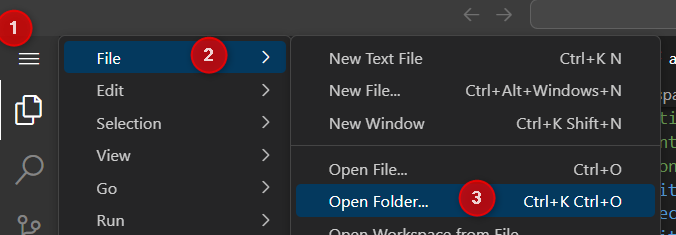
|
|
|
|

|
|
|
|
|
|
# Configure MQTT Connection on AppDaemon
|
|
|
|
For the app to work you need a working MQTT Configuration in AppDaemon. Please add the configuration of your mqtt server, user and password to your existing `appdaemon.yaml` Restart your AppDaemon Container (not HomeAssistant) after adding the MQTT Configuration.
|
|
|
|
You will find this file in the following location: `/addon_configs/a0d7b954_appdaemon/appdeamon.yaml`
|
|
|
|
```yaml
|
|
---
|
|
secrets: /homeassistant/secrets.yaml
|
|
appdaemon:
|
|
latitude: 52.0
|
|
longitude: 4.0
|
|
elevation: 2
|
|
time_zone: Europe/Berlin
|
|
app_dir: /homeassistant/appdaemon/apps/ # !!! This is really important for AppDaemon HA Addon >= 15
|
|
plugins:
|
|
HASS:
|
|
type: hass
|
|
MQTT:
|
|
type: mqtt
|
|
namespace: mqtt
|
|
client_id: "appdaemon"
|
|
client_host: core-mosquitto.local.hass.io # This should work if you are using supervised HomeAssistant; if not use the IP Address instead.
|
|
#client_host: 192.168.75.30
|
|
client_port: 1883
|
|
client_user: "mqttuser"
|
|
client_password: "mqttpassword"
|
|
client_topics: NONE
|
|
http:
|
|
url: http://127.0.0.1:5050
|
|
admin:
|
|
api:
|
|
hadashboard:
|
|
```
|
|
|
|
# Configure NsPanel on AppDaemon
|
|
|
|
Please add the following minimal configuration to your apps.yaml, which is located in `config/appdaemon/apps/apps.yaml`
|
|
|
|
Note: You need to move your `apps.yaml` to this location if it isn't there.
|
|
|
|
```yaml
|
|
---
|
|
nspanel-1:
|
|
module: nspanel-lovelace-ui
|
|
class: NsPanelLovelaceUIManager
|
|
config:
|
|
panelRecvTopic: "tele/tasmota_your_mqtt_topic/RESULT"
|
|
panelSendTopic: "cmnd/tasmota_your_mqtt_topic/CustomSend"
|
|
model: eu
|
|
```
|
|
|
|
Please adjust `tasmota_your_mqtt_topic` to the topic used in Tasmota MQTT Configuration.
|
|
|
|
If your configuration is correct you should get the following screens on your panel:
|
|
|
|

|
|
|
|
<details>
|
|
<summary>Note: You can add multiple panels to this configuration:</summary>
|
|
<br>
|
|
```yaml
|
|
---
|
|
nspanel-1:
|
|
module: nspanel-lovelace-ui
|
|
class: NsPanelLovelaceUIManager
|
|
config:
|
|
panelRecvTopic: "tele/first-nspanel-topic/RESULT"
|
|
panelSendTopic: "cmnd/first-nspanel-topic/CustomSend"
|
|
nspanel-2:
|
|
module: nspanel-lovelace-ui
|
|
class: NsPanelLovelaceUIManager
|
|
config:
|
|
panelRecvTopic: "tele/second-nspanel-topic/RESULT"
|
|
panelSendTopic: "cmnd/second-nspanel-topic/CustomSend"
|
|
```
|
|
</details>
|