Initial keyboard shortcuts configuration implementation #496

Merged
franknoirot merged 11 commits from keyboard-shortcuts into main 2021-09-10 00:12:59 +02:00
franknoirot commented 2021-09-08 04:07:04 +02:00 (Migrated from github.com)

Creates a system for adding new IDE Editor menus and menu items, as well as keyboard shortcuts for those items.

Add a menu item to an existing menu

  1. Open app/web/src/components/EditorMenu/menuConfig.tsx

  2. Identify the config for the menu you want to add to: at time of writing there are fileMenuConfig, editMenuConfig, and viewMenuConfig

  3. Add an object to the items array of the config, matching the EditorMenuItemConfig type. The order of this array determines the order of the menu's items within the Editor. The component property must return a React component, and has access to state, thunkDispatch, and the rest of the config of the item. Within the React component, config.callback must be set to a function. Typically the DropdownItem component is used for menu items, but any React component that integrates useHotkeys() could work.

  4. Be sure to check that any keyboard shortcuts defined on these items are not already taken by another item (TODO write tests for this?)

Add a menu to the Editor

  1. Create a config object (naming convention is [nameOfMenu]MenuConfig that meets the criteria for the EditorMenuConfig type.
  2. Add any needed menu items within the config's items array
  3. Add the menu to the editorMenuConfig array. The order of this array determines the order of the menus within the Editor.
Creates a system for adding new IDE Editor menus and menu items, as well as keyboard shortcuts for those items. ## Add a menu item to an existing menu 1. Open `app/web/src/components/EditorMenu/menuConfig.tsx` 2. Identify the config for the menu you want to add to: at time of writing there are `fileMenuConfig`, `editMenuConfig`, and `viewMenuConfig` 3. Add an object to the `items` array of the config, matching the `EditorMenuItemConfig` type. The order of this array determines the order of the menu's items within the Editor. The `component` property must return a React component, and has access to `state`, `thunkDispatch`, and the rest of the `config` of the item. Within the React component, `config.callback` must be set to a function. Typically the `DropdownItem` component is used for menu items, but any React component that integrates `useHotkeys()` could work. 4. Be sure to check that any keyboard shortcuts defined on these items are not already taken by another item (TODO write tests for this?) ## Add a menu to the Editor 1. Create a config object (naming convention is `[nameOfMenu]MenuConfig` that meets the criteria for the `EditorMenuConfig` type. 2. Add any needed menu items within the config's `items` array 3. Add the menu to the `editorMenuConfig` array. The order of this array determines the order of the menus within the Editor.
franknoirot commented 2021-09-08 04:09:54 +02:00 (Migrated from github.com)

Hey @Irev-Dev I messaged on Discord about this but I'm sorry I'm really not sure how to merge your branch with tweaks into this. I know you had a corrected implementation of my EditorMenuItemConfig type and a few other things. Is there a more elegant way to pick out those parts with a merge of some sort?

Hey @Irev-Dev I messaged on Discord about this but I'm sorry I'm really not sure how to merge your branch with tweaks into this. I know you had a corrected implementation of my `EditorMenuItemConfig` type and a few other things. Is there a more elegant way to pick out those parts with a merge of some sort?
franknoirot commented 2021-09-08 04:11:28 +02:00 (Migrated from github.com)

Yup so I just implemented this concept
896baf0#r56024396
except I just copied the menu entirely, tested it with the menu reset, I can use that hotkey straight away on page load. Though I did have a problem with the monaco edit swallowing the hotkeys if I were focused on it.

It's definitely somewhat hacky bit I don't see a problem with is having a menu thats not visible permanently in the dom, for what these components are they shouldn't cause any performance issues.

Diff here:
d0b2f49

Display: none (hidden tailwind class) should also hide this fake menu from screen readers 👍

This was a great workaround! I found a way to make the original MenuItems always render and only visually/audio show/hide here, which works very similarly: https://headlessui.dev/react/menu#showing-hiding-the-menu

> Yup so I just implemented this concept > [896baf0#r56024396](https://github.com/Irev-Dev/cadhub/commit/896baf08d1a7fe2e25d96e29e08ccf8649b7b98d#r56024396) > except I just copied the menu entirely, tested it with the menu reset, I can use that hotkey straight away on page load. Though I did have a problem with the monaco edit swallowing the hotkeys if I were focused on it. > > It's definitely somewhat hacky bit I don't see a problem with is having a menu thats not visible permanently in the dom, for what these components are they shouldn't cause any performance issues. > > Diff here: > [d0b2f49](https://github.com/Irev-Dev/cadhub/commit/d0b2f49a25e2b18494d1513c748c8ef12bb05ebd) > > Display: none (hidden tailwind class) should also hide this fake menu from screen readers 👍 This was a great workaround! I found a way to make the original `MenuItems` always render and only visually/audio show/hide here, which works very similarly: https://headlessui.dev/react/menu#showing-hiding-the-menu
Irev-Dev (Migrated from github.com) requested changes 2021-09-08 10:03:55 +02:00
Irev-Dev (Migrated from github.com) left a comment

Hey, code looks good.

One or two changes would be good (mostly just fixing up the dependancies, I'm not worried about the modal corner).
But Im not sure what to do about the issue of the monaco editor competing for hotkeys?

oh and might as well run yarn rw lint --fix too, does that work for you?

Hey, code looks good. One or two changes would be good (mostly just fixing up the dependancies, I'm not worried about the modal corner). But Im not sure what to do about the issue of the monaco editor competing for hotkeys? oh and might as well run `yarn rw lint --fix` too, does that work for you?
Irev-Dev (Migrated from github.com) commented 2021-09-08 09:42:56 +02:00

Could you please

  • remove these lines
  • remove app/package-lock.json
  • cd into /app and run yarn workspace web add hotkeys-js react-hotkeys-hook.
Could you please - remove these lines - remove `app/package-lock.json` - cd into `/app` and run `yarn workspace web add hotkeys-js react-hotkeys-hook`.
Irev-Dev (Migrated from github.com) commented 2021-09-08 10:00:35 +02:00

Should this also have a button in the menu, how will users learn how to get this modal up?

Why did you choose this combo, is this a pattern elsewhere? I'm concerned that is the same hotkey as commenting a line in the editor, since the editor is currently swallowing this hotkey so it still works in the editor but seems weird having two different behaviour depending on where you're focused.

Maybe it's a mac only thing, but similar to the above cmd alt R only resets the viewer when I'm not focused on the edit, because its already a hotkey in the editor. Seems like we're going to be competing for hotkeys from the monaco editor.

Should this also have a button in the menu, how will users learn how to get this modal up? Why did you choose this combo, is this a pattern elsewhere? I'm concerned that is the same hotkey as commenting a line in the editor, since the editor is currently swallowing this hotkey so it still works in the editor but seems weird having two different behaviour depending on where you're focused. Maybe it's a mac only thing, but similar to the above cmd alt R only resets the viewer when I'm not focused on the edit, because its already a hotkey in the editor. Seems like we're going to be competing for hotkeys from the monaco editor.
@@ -0,0 +23,4 @@
return useContext(ShortcutsModalContext)
}
const AllShortcutsModal = () => {
Irev-Dev (Migrated from github.com) commented 2021-09-08 09:53:33 +02:00

Seems to be a weird artifact on the rounded corner, not sure if worth fixing?
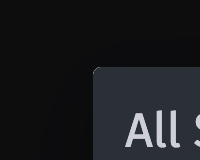
image

Seems to be a weird artifact on the rounded corner, not sure if worth fixing? ![image](https://user-images.githubusercontent.com/29681384/132469191-d50fe9aa-dfed-43ca-8cbc-b83a198182e3.png)
Irev-Dev commented 2021-09-08 10:04:36 +02:00 (Migrated from github.com)

I found a way to make the original MenuItems always render . . .

Nice, that's a much better approach.

> I found a way to make the original MenuItems always render . . . Nice, that's a much better approach.
Irev-Dev (Migrated from github.com) reviewed 2021-09-08 10:35:59 +02:00
Irev-Dev (Migrated from github.com) commented 2021-09-08 10:35:59 +02:00

if you make this:

const fileMenuConfig: EditorMenuConfig = {

Thdn the linter (assuming you've got ts setup with your editor) should tell you if your obeying your own types for this menu, and I think you're not since component doesn't exist on EditorMenuItemConfig.

if you make this: ```suggestion const fileMenuConfig: EditorMenuConfig = { ``` Thdn the linter (assuming you've got ts setup with your editor) should tell you if your obeying your own types for this menu, and I think you're not since `component` doesn't exist on `EditorMenuItemConfig`.
Irev-Dev (Migrated from github.com) reviewed 2021-09-08 10:38:24 +02:00
Irev-Dev (Migrated from github.com) commented 2021-09-08 10:38:23 +02:00

I think callback is not needed now and component is?

I think callback is not needed now and component is?
franknoirot (Migrated from github.com) reviewed 2021-09-08 15:23:49 +02:00
franknoirot (Migrated from github.com) commented 2021-09-08 15:23:49 +02:00

Ah dang I used NPM again 🤦🏻‍♂️ thanks @Irev-Dev I'll fix this

Ah dang I used NPM again 🤦🏻‍♂️ thanks @Irev-Dev I'll fix this
franknoirot (Migrated from github.com) reviewed 2021-09-08 15:27:02 +02:00
@@ -0,0 +23,4 @@
return useContext(ShortcutsModalContext)
}
const AllShortcutsModal = () => {
franknoirot (Migrated from github.com) commented 2021-09-08 15:27:02 +02:00

Oh yeah lemme check it out, I bet it's a difference between the Modal and the inner content, and maybe I rounded the inner stuff as well and they're basically overlapping.

Oh yeah lemme check it out, I bet it's a difference between the Modal and the inner content, and maybe I rounded the inner stuff as well and they're basically overlapping.
franknoirot (Migrated from github.com) reviewed 2021-09-08 15:38:07 +02:00
franknoirot (Migrated from github.com) commented 2021-09-08 15:38:07 +02:00

Ah crap this is all good consideration @Irev-Dev.

Here are my recommendations for these 2:

  • All Shortcuts:command+/ 👉🏻 ctrl+shift+?. This is what Figma's shortcut to show shortcuts is. I agree this should have a button in the menu. Would it go under View?
  • Reset Layout: command+alt+R 👉🏻 ctrl+shift+R. It appears that ctrl+shift is a fairly reliable key combination.

Separately, should we have a part of this component or its tests have a list of the Monaco shortcuts to verify any new ones aren't stepping on them?

Ah crap this is all good consideration @Irev-Dev. Here are my recommendations for these 2: - **All Shortcuts**:`command+/` 👉🏻 `ctrl+shift+?`. This is what Figma's shortcut to show shortcuts is. I agree this should have a button in the menu. Would it go under View? - **Reset Layout**: `command+alt+R` 👉🏻 `ctrl+shift+R`. It appears that `ctrl+shift` is a fairly reliable key combination. Separately, should we have a part of this component or its tests have a list of the Monaco shortcuts to verify any new ones aren't stepping on them?
franknoirot (Migrated from github.com) reviewed 2021-09-08 15:53:44 +02:00
franknoirot (Migrated from github.com) commented 2021-09-08 15:53:44 +02:00

One thing that's weird to me is that HotKeys treats Ctrl and Cmd as the Windows/Mac alternatives, but it's really Cmd and Win keys that are analogous, usually called the OS key within the browser, and Ctrl is a key that both OSes have.

One thing that's weird to me is that HotKeys treats `Ctrl` and `Cmd` as the Windows/Mac alternatives, but it's really `Cmd` and `Win` keys that are analogous, usually called the OS key within the browser, and `Ctrl` is a key that both OSes have.
franknoirot (Migrated from github.com) reviewed 2021-09-08 16:00:31 +02:00
franknoirot (Migrated from github.com) commented 2021-09-08 16:00:31 +02:00

Yup it yelled at me now!

Yup it yelled at me now!
franknoirot (Migrated from github.com) reviewed 2021-09-08 16:39:51 +02:00
@@ -0,0 +1,109 @@
import React from 'react'
import { useRender } from 'src/components/IdeWrapper/useRender'
import { makeStlDownloadHandler, PullTitleFromFirstLine } from './helpers'
import { useSaveCode } from 'src/components/IdeWrapper/useSaveCode'
franknoirot (Migrated from github.com) commented 2021-09-08 16:39:40 +02:00

This won't work currently because I backed out of writing it, but @Irev-Dev should I use a React Context to make the AllShortcutsModal able to be opened from outside of the component? I could make its own little context to provide around the IdeWrapper component, or the page component itself. I might try that and see if you like it.

This won't work currently because I backed out of writing it, but @Irev-Dev should I use a React Context to make the `AllShortcutsModal` able to be opened from outside of the component? I could make its own little context to provide around the `IdeWrapper` component, or the page component itself. I might try that and see if you like it.
franknoirot (Migrated from github.com) reviewed 2021-09-08 17:38:45 +02:00
@@ -0,0 +46,4 @@
.map((menu) => (
<section key={'allshortcuts-' + menu.name} className="my-6">
<h3 className="text-xl border-b-2 pb-2 mb-2">{menu.label}</h3>
{menu.items.map((item) => (
franknoirot (Migrated from github.com) commented 2021-09-08 17:36:58 +02:00

Yeah overwriting MaterialUI's default styles is not intuitive

Yeah overwriting MaterialUI's default styles is not intuitive
franknoirot (Migrated from github.com) commented 2021-09-08 17:38:34 +02:00

@Irev-Dev let me know if this isn't the right approach. I needed to provide a hook to toggle that dialog from elsewhere in the app, so I used a Context scoped to the IdeWrapper

@Irev-Dev let me know if this isn't the right approach. I needed to provide a hook to toggle that dialog from elsewhere in the app, so I used a Context scoped to the `IdeWrapper`
franknoirot (Migrated from github.com) reviewed 2021-09-08 17:39:09 +02:00
@@ -0,0 +1,109 @@
import React from 'react'
import { useRender } from 'src/components/IdeWrapper/useRender'
import { makeStlDownloadHandler, PullTitleFromFirstLine } from './helpers'
import { useSaveCode } from 'src/components/IdeWrapper/useSaveCode'
franknoirot (Migrated from github.com) commented 2021-09-08 17:39:09 +02:00

Tried this approach below.

Tried this approach below.
Irev-Dev (Migrated from github.com) reviewed 2021-09-09 10:54:34 +02:00
Irev-Dev (Migrated from github.com) commented 2021-09-09 10:54:34 +02:00
  • ctrl shift ? I think make sense for the modal :)
  • test might be good, but not sure if there is a way it pull hotkeys out of monaco without hardcoding them ourselves.
  • I think the library does that for practical reasons since ctrl is the most common key used for hotkey for win and cmd is the most common for mac, for example cmd c, cmd v is copy paste.
- ctrl shift ? I think make sense for the modal :) - test might be good, but not sure if there is a way it pull hotkeys out of monaco without hardcoding them ourselves. - I think the library does that for practical reasons since ctrl is the most common key used for hotkey for win and cmd is the most common for mac, for example cmd c, cmd v is copy paste.
Irev-Dev (Migrated from github.com) reviewed 2021-09-09 11:01:15 +02:00
Irev-Dev (Migrated from github.com) commented 2021-09-09 11:01:15 +02:00

Seems good

Seems good
Irev-Dev (Migrated from github.com) reviewed 2021-09-09 11:04:16 +02:00
Irev-Dev (Migrated from github.com) commented 2021-09-09 11:04:16 +02:00

Would still be good to delete the dependencies from this file now that they're in app/web/package.json

Would still be good to delete the dependencies from this file now that they're in app/web/package.json
Irev-Dev (Migrated from github.com) reviewed 2021-09-09 11:05:28 +02:00
@@ -0,0 +46,4 @@
.map((menu) => (
<section key={'allshortcuts-' + menu.name} className="my-6">
<h3 className="text-xl border-b-2 pb-2 mb-2">{menu.label}</h3>
{menu.items.map((item) => (
Irev-Dev (Migrated from github.com) commented 2021-09-09 11:05:28 +02:00

Mmm, we'll move towards headlessui where possible in future. Very tailwind friendly, and friendly to customising styles in general too.

Mmm, we'll move towards headlessui where possible in future. Very tailwind friendly, and friendly to customising styles in general too.
franknoirot (Migrated from github.com) reviewed 2021-09-09 13:27:39 +02:00
franknoirot (Migrated from github.com) commented 2021-09-09 13:27:39 +02:00

Removed now, my bad just skipped a step.

Removed now, my bad just skipped a step.
franknoirot (Migrated from github.com) reviewed 2021-09-09 16:23:00 +02:00
franknoirot (Migrated from github.com) commented 2021-09-09 16:23:00 +02:00

Yeah doesn't appear to be a great way to pull them out programmatically, only was able to find this GH issue comment about it. There doesn't appear to be like KeybindingsRegistry.getAll() method or anything like that.

The Monaca online editor is built on top of Monaco and has this hardcoded list of shortcuts that we could pull from for a hardcoded solution. I think they'll be pretty stable so that might not be too bad? And this issue has been raised in Monaco for an easy API for swapping out keyboard shortcuts, I couldn't find a clean holistic API for keybindings at all really.

Want me to open an issue for the tests? I feel like we can do that a bit later, right?

Yeah doesn't appear to be a great way to pull them out programmatically, only was able to find [this GH issue comment about it](https://github.com/microsoft/monaco-editor/issues/823#issuecomment-470754000). There doesn't appear to be like `KeybindingsRegistry.getAll()` method or anything like that. The Monaca online editor is built on top of Monaco and has this hardcoded [list of shortcuts](https://docs.monaca.io/en/products_guide/monaca_ide/editor/) that we could pull from for a hardcoded solution. I think they'll be pretty stable so that might not be too bad? And [this issue has been raised](https://github.com/microsoft/monaco-editor/issues/102) in Monaco for an easy API for swapping out keyboard shortcuts, I couldn't find a clean holistic API for keybindings at all really. Want me to open an issue for the tests? I feel like we can do that a bit later, right?
Irev-Dev (Migrated from github.com) reviewed 2021-09-09 21:20:29 +02:00
Irev-Dev (Migrated from github.com) commented 2021-09-09 21:20:29 +02:00

Yeah sure, sounds good.

Yeah sure, sounds good.
Irev-Dev (Migrated from github.com) approved these changes 2021-09-09 21:26:26 +02:00
franknoirot (Migrated from github.com) reviewed 2021-09-10 00:12:40 +02:00
franknoirot (Migrated from github.com) commented 2021-09-10 00:12:40 +02:00

Added issue #499 to track this

Added issue #499 to track this
Irev-Dev commented 2021-09-10 10:55:36 +02:00 (Migrated from github.com)

Live now.

Live now.
Sign in to join this conversation.
No Label
1 Participants
Notifications
Due Date
No due date set.
Dependencies

No dependencies set.

Reference: h3n3/cadhub#496