IDE redesign, initial implementation #362
@@ -42,6 +42,7 @@
|
||||
"react-helmet": "^6.1.0",
|
||||
"react-image-crop": "^8.6.6",
|
||||
"react-mosaic-component": "^4.1.1",
|
||||
"react-tabs": "^3.2.2",
|
||||
"react-three-fiber": "^5.3.19",
|
||||
"rich-markdown-editor": "^11.0.2",
|
||||
"styled-components": "^5.2.0",
|
||||
|
||||
126
app/web/src/components/EditorMenu/EditorMenu.tsx
Normal file
@@ -0,0 +1,126 @@
|
||||
import { Menu } from '@headlessui/react'
|
||||
|
||||
import { useIdeContext, ideTypeNameMap } from 'src/helpers/hooks/useIdeContext'
|
||||
import Svg from 'src/components/Svg/Svg'
|
||||
import { useRender } from 'src/components/IdeWrapper/useRender'
|
||||
import { makeStlDownloadHandler, PullTitleFromFirstLine } from './helpers'
|
||||
|
||||
const EditorMenu = () => {
|
||||
|
|
||||
const handleRender = useRender()
|
||||
const { state, thunkDispatch } = useIdeContext()
|
||||
const handleStlDownload = makeStlDownloadHandler({
|
||||
type: state.objectData?.type,
|
||||
geometry: state.objectData?.data,
|
||||
fileName: PullTitleFromFirstLine(state.code || ''),
|
||||
thunkDispatch,
|
||||
})
|
||||
const cadName = ideTypeNameMap[state.ideType] || ''
|
||||
const isOpenScad = state.ideType === 'openScad'
|
||||
const isCadQuery = state.ideType === 'cadQuery'
|
||||
return (
|
||||
<div className="flex justify-between bg-gray-500 text-gray-100">
|
||||
<div className="flex items-center h-9 w-full cursor-grab">
|
||||
<div className=" text-gray-500 bg-gray-300 cursor-grab px-2 h-full flex items-center">
|
||||
<Svg name="drag-grid" className="w-4 p-px" />
|
||||
</div>
|
||||
<div className="flex gap-6 px-5">
|
||||
<FileDropdown
|
||||
handleRender={handleRender}
|
||||
handleStlDownload={handleStlDownload}
|
||||
/>
|
||||
<button className="cursor-not-allowed" disabled>
|
||||
Edit
|
||||
</button>
|
||||
<ViewDropdown handleLayoutReset={() => thunkDispatch({type: 'resetLayout'})} />
|
||||
</div>
|
||||
<button
|
||||
className="text-gray-300 h-full cursor-not-allowed"
|
||||
aria-label="editor settings"
|
||||
disabled
|
||||
>
|
||||
<Svg name="gear" className="w-6 p-px" />
|
||||
</button>
|
||||
</div>
|
||||
<div className="flex items-center cursor-default">
|
||||
<div
|
||||
className={`${isOpenScad && 'bg-yellow-200'} ${
|
||||

With the additional background I added in the latest Figma designs we may want to start aliasing the CAD packages to class names in the next round so several elements can inherit styles. With the additional background I added in the latest Figma designs we may want to start aliasing the CAD packages to class names in the next round so several elements can inherit styles.
Oh right, yeah that's a good idea. Oh right, yeah that's a good idea.
|
||||
isCadQuery && 'bg-blue-800'
|
||||
} w-5 h-5 rounded-full`}
|
||||
/>
|
||||
<div className="px-2">{cadName}</div>
|
||||
</div>
|
||||
</div>
|
||||
)
|
||||
}
|
||||
|
||||
export default EditorMenu
|
||||
|
||||
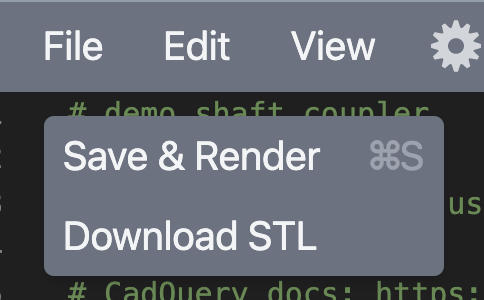
function FileDropdown({ handleRender, handleStlDownload }) {
|
||||
|
|
||||
return (
|
||||
<Dropdown name="File">
|
||||
<Menu.Item>
|
||||
{({ active }) => (
|
||||
<button
|
||||
className={`${active && 'bg-gray-600'} px-2 py-1`}
|
||||
onClick={handleRender}
|
||||
>
|
||||
Save & Render{' '}
|
||||
<span className="text-gray-400 pl-4">
|
||||
{/(Mac|iPhone|iPod|iPad)/i.test(navigator.platform) ? (
|
||||
<>
|
||||
<Svg
|
||||
name="mac-cmd-key"
|
||||
className="h-3 w-3 inline-block text-left"
|
||||
/>
|
||||
S
|
||||
</>
|
||||
) : (
|
||||
'Ctrl S'
|
||||
)}
|
||||
</span>
|
||||
</button>
|
||||
)}
|
||||
</Menu.Item>
|
||||
<Menu.Item>
|
||||
{({ active }) => (
|
||||
<button
|
||||
className={`${active && 'bg-gray-600'} px-2 py-1 text-left`}
|
||||
onClick={handleStlDownload}
|
||||
>
|
||||
Download STL
|
||||
</button>
|
||||
)}
|
||||
</Menu.Item>
|
||||
</Dropdown>
|
||||
)
|
||||
}
|
||||
|
||||
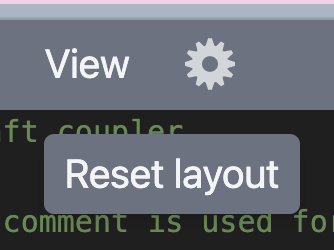
function ViewDropdown({ handleLayoutReset }) {
|
||||
|
|
||||
return (
|
||||
<Dropdown name="View">
|
||||
<Menu.Item>
|
||||
{({ active }) => (
|
||||
<button
|
||||
className={`${active && 'bg-gray-600'} px-2 py-1`}
|
||||
onClick={handleLayoutReset}
|
||||
>
|
||||
Reset layout
|
||||
</button>
|
||||
)}
|
||||
</Menu.Item>
|
||||
</Dropdown>
|
||||
)
|
||||
}
|
||||
|
||||
function Dropdown({ name, children }: {name: string, children: React.ReactNode}) {
|
||||
return (
|
||||
<div className="relative">
|
||||
<Menu>
|
||||
<Menu.Button className="text-gray-100">{name}</Menu.Button>
|
||||
<Menu.Items className="absolute flex flex-col mt-4 bg-gray-500 rounded shadow-md text-gray-100 overflow-hidden whitespace-nowrap">
|
||||
{children}
|
||||
</Menu.Items>
|
||||
</Menu>
|
||||
</div>
|
||||
)
|
||||
}
|
||||


61
app/web/src/components/EditorMenu/helpers.ts
Normal file
@@ -0,0 +1,61 @@
|
||||
import { flow, identity } from 'lodash/fp'
|
||||
import { fileSave } from 'browser-fs-access'
|
||||
import { MeshBasicMaterial, Mesh, Scene } from 'three'
|
||||
import { STLExporter } from 'three/examples/jsm/exporters/STLExporter'
|
||||
import { requestRender } from 'src/helpers/hooks/useIdeState'
|
||||
|
||||
export const PullTitleFromFirstLine = (code = '') => {
|
||||
const firstLine = code.split('\n').filter(identity)[0] || ''
|
||||
if (!(firstLine.startsWith('//') || firstLine.startsWith('#'))) {
|
||||
return 'object.stl'
|
||||
}
|
||||
return (
|
||||
(firstLine.replace(/^(\/\/|#)\s*(.+)/, (_, __, titleWithSpaces) =>
|
||||
titleWithSpaces.replaceAll(/\s/g, '-')
|
||||
) || 'object') + '.stl'
|
||||
)
|
||||
}
|
||||
|
||||
export const makeStlDownloadHandler =
|
||||
({ geometry, fileName, type, thunkDispatch }) =>
|
||||
() => {
|
||||
const makeStlBlobFromGeo = flow(
|
||||
(geo) => new Mesh(geo, new MeshBasicMaterial()),
|
||||
(mesh) => new Scene().add(mesh),
|
||||
(scene) => new STLExporter().parse(scene),
|
||||
(stl) =>
|
||||
new Blob([stl], {
|
||||
type: 'text/plain',
|
||||
})
|
||||
)
|
||||
const saveFile = (geometry) => {
|
||||
const blob = makeStlBlobFromGeo(geometry)
|
||||
fileSave(blob, {
|
||||
fileName,
|
||||
extensions: ['.stl'],
|
||||
})
|
||||
}
|
||||
if (geometry) {
|
||||
if (type === 'geometry') {
|
||||
saveFile(geometry)
|
||||
} else {
|
||||
thunkDispatch((dispatch, getState) => {
|
||||
const state = getState()
|
||||
if (state.ideType === 'openScad') {
|
||||
thunkDispatch((dispatch, getState) => {
|
||||
const state = getState()
|
||||
dispatch({ type: 'setLoading' })
|
||||
requestRender({
|
||||
state,
|
||||
dispatch,
|
||||
code: state.code,
|
||||
viewerSize: state.viewerSize,
|
||||
camera: state.camera,
|
||||
specialCadProcess: 'stl',
|
||||
}).then((result) => result && saveFile(result.data))
|
||||
})
|
||||
}
|
||||
})
|
||||
}
|
||||
}
|
||||
}
|
||||
126
app/web/src/components/EncodedUrl/ExternalScript.tsx
Normal file
@@ -0,0 +1,126 @@
|
||||
import { useState } from 'react'
|
||||
import { useIdeContext, ideTypeNameMap } from 'src/helpers/hooks/useIdeContext'
|
||||
import OutBound from 'src/components/OutBound/OutBound'
|
||||
import { prepareEncodedUrl, makeExternalUrl } from './helpers'
|
||||
import { copyTextToClipboard } from 'src/helpers/clipboard'
|
||||
import { useRender } from 'src/components/IdeWrapper/useRender'
|
||||
import { toast } from '@redwoodjs/web/toast'
|
||||
|
||||
const ExternalScript = () => {
|
||||
|
and
|
||||
const { state, thunkDispatch } = useIdeContext()
|
||||
const handleRender = useRender()
|
||||
const [rawUrl, setRawUrl] = useState('')
|
||||
const [script, setScript] = useState('')
|
||||
const [asyncState, setAsyncState] =
|
||||
useState<'INIT' | 'SUCCESS' | 'ERROR' | 'LOADING'>('INIT')
|
||||
|
||||
const cadName = ideTypeNameMap[state.ideType]
|
||||
|
||||
const onPaste: React.ClipboardEventHandler<HTMLInputElement> = async ({
|
||||
clipboardData,
|
||||
}) => {
|
||||
const url = clipboardData.getData('Text')
|
||||
processUserUrl(url)
|
||||
}
|
||||
const onChange: React.ChangeEventHandler<HTMLInputElement> = async ({
|
||||
target,
|
||||
}) => setRawUrl(target.value)
|
||||
const onKeyDown = async ({ key, target }) =>
|
||||
key === 'Enter' && processUserUrl(target.value)
|
||||
|
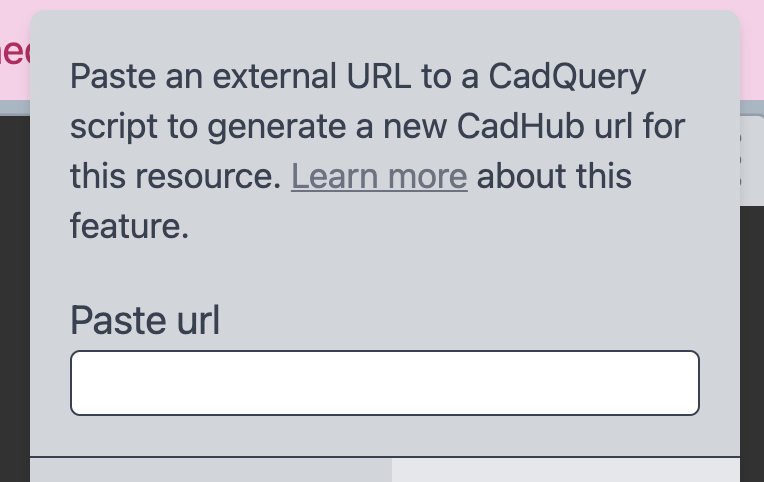
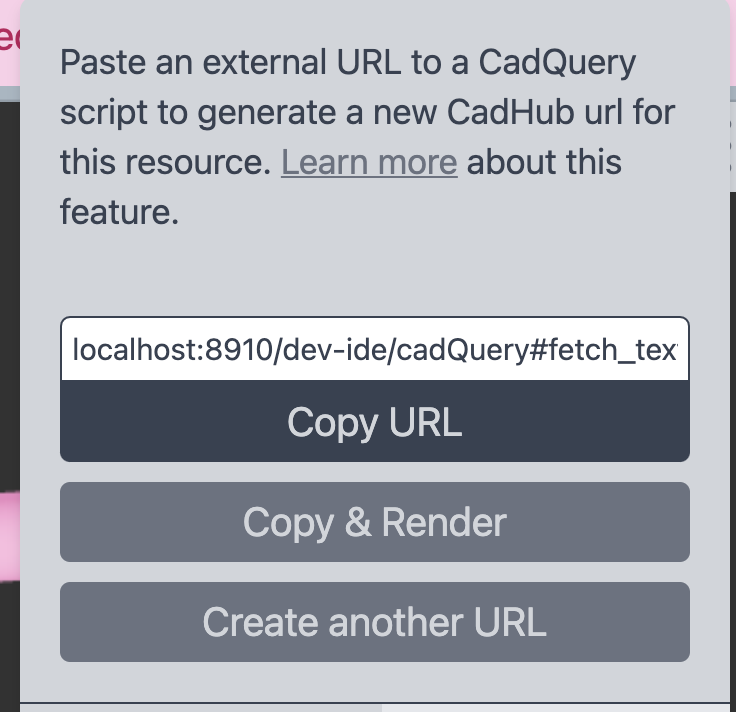
When a user pastes a url it will immediately start processing it without having a "submit" button. I think this is appropriate since the whole point is to link to an external URL and no one will be typing those, you can type and hit enter though. When a user pastes a url it will immediately start processing it without having a "submit" button. I think this is appropriate since the whole point is to link to an external URL and no one will be typing those, you can type and hit enter though.
|
||||
|
||||
async function processUserUrl(url: string) {
|
||||
setRawUrl(url)
|
||||
try {
|
||||
setAsyncState('LOADING')
|
||||
const response = await fetch(prepareEncodedUrl(url))
|
||||
if (response.status === 404) throw new Error("couldn't find script")
|
||||
const script2 = await response.text()
|
||||
if (script2.startsWith('<!DOCTYPE html>'))
|
||||
throw new Error('got html document, not a script')
|
||||
setScript(script2)
|
||||
setAsyncState('SUCCESS')
|
||||
} catch (e) {
|
||||
setAsyncState('ERROR')
|
||||
toast.error(
|
||||
"We had trouble with you're URL, are you sure it was correct?"
|
||||
)
|
||||
}
|
||||
}
|
||||
const onCopyRender: React.MouseEventHandler<HTMLButtonElement> = () => {
|
||||
copyTextToClipboard(makeExternalUrl(rawUrl))
|
||||
thunkDispatch({ type: 'updateCode', payload: script })
|
||||
setTimeout(handleRender)
|
||||
}
|
||||
return (
|
||||
<div className="p-4">
|
||||
<p className="text-sm pb-4">
|
||||
Paste an external url containing a {cadName} script to generate a new
|
||||
CadHub url for this resource.{' '}
|
||||
<OutBound
|
||||
className="underline text-gray-500"
|
||||
to="https://learn.cadhub.xyz/docs/general-cadhub/external-resource-url"
|
||||
>
|
||||
Learn more
|
||||
</OutBound>{' '}
|
||||
about this feature.
|
||||
</p>
|
||||
{['INIT', 'ERROR'].includes(asyncState) && (
|
||||
<>
|
||||
<p>Paste url</p>
|
||||
<input
|
||||
className="p-1 text-xs rounded border border-gray-700 w-full"
|
||||
value={rawUrl}
|
||||
onChange={onChange}
|
||||
onPaste={onPaste}
|
||||
onKeyDown={onKeyDown}
|
||||
/>
|
||||
</>
|
||||
)}
|
||||
{asyncState === 'ERROR' && (
|
||||
<p className="text-sm text-red-800">That didn't work, try again.</p>
|
||||
)}
|
||||
{asyncState === 'LOADING' && (
|
||||
<div className="h-10 relative">
|
||||
<div className="inset-0 absolute flex items-center justify-center">
|
||||
<div className="h-6 w-6 bg-pink-600 rounded-full animate-ping"></div>
|
||||
</div>
|
||||
</div>
|
||||
)}
|
||||
{asyncState === 'SUCCESS' && (
|
||||
<>
|
||||
<input
|
||||
value={makeExternalUrl(rawUrl).replace(/^.+:\/\//g, '')}
|
||||
readOnly
|
||||
className="p-1 mt-4 text-xs rounded-t border border-gray-700 w-full"
|
||||
/>
|
||||
<button
|
||||
className="w-full bg-gray-700 py-1 rounded-b text-gray-300"
|
||||
onClick={() => copyTextToClipboard(makeExternalUrl(rawUrl))}
|
||||
>
|
||||
Copy URL
|
||||
</button>
|
||||
<div className="flex flex-col gap-2 pt-2">
|
||||
<button
|
||||
className="bg-gray-500 p-1 px-2 rounded text-gray-300"
|
||||
onClick={onCopyRender}
|
||||
>
|
||||
Copy & Render
|
||||
</button>
|
||||
<button
|
||||
className="bg-gray-500 p-1 px-2 rounded text-gray-300"
|
||||
onClick={() => {
|
||||
setAsyncState('INIT')
|
||||
setRawUrl('')
|
||||
setScript('')
|
||||
}}
|
||||
>
|
||||
Create another URL
|
||||
</button>
|
||||
</div>
|
||||
</>
|
||||
)}
|
||||
</div>
|
||||
)
|
||||
}
|
||||
|
||||
export default ExternalScript
|
||||


28
app/web/src/components/EncodedUrl/FullScriptEncoding.tsx
Normal file
@@ -0,0 +1,28 @@
|
||||
import { makeEncodedLink } from './helpers'
|
||||
import { copyTextToClipboard } from 'src/helpers/clipboard'
|
||||
import { useIdeContext } from 'src/helpers/hooks/useIdeContext'
|
||||
|
||||
const FullScriptEncoding = () => {
|
||||
|
|
||||
const { state } = useIdeContext()
|
||||
const encodedLink = makeEncodedLink(state.code)
|
||||
return (
|
||||
<div className="p-4">
|
||||
<p className="text-sm pb-4 border-b border-gray-700">
|
||||
Encodes your CodeCad script into a URL so that you can share your work
|
||||
</p>
|
||||
<input
|
||||
value={encodedLink.replace(/^.+:\/\//g, '')}
|
||||
readOnly
|
||||
className="p-1 mt-4 text-xs rounded-t border border-gray-700 w-full"
|
||||
/>
|
||||
<button
|
||||
className="w-full bg-gray-700 py-1 rounded-b text-gray-300"
|
||||
onClick={() => copyTextToClipboard(encodedLink)}
|
||||
>
|
||||
Copy URL
|
||||
</button>
|
||||
</div>
|
||||
)
|
||||
}
|
||||
|
||||
export default FullScriptEncoding
|
||||

75
app/web/src/components/EncodedUrl/helpers.ts
Normal file
@@ -0,0 +1,75 @@
|
||||
import { useEffect } from 'react'
|
||||
import { flow } from 'lodash/fp'
|
||||
|
||||
import { useIdeContext } from 'src/helpers/hooks/useIdeContext'
|
||||
import { useRender } from 'src/components/IdeWrapper/useRender'
|
||||
import { encode, decode } from 'src/helpers/compress'
|
||||
import { isBrowser } from '@redwoodjs/prerender/browserUtils'
|
||||
|
||||
const scriptKey = 'encoded_script'
|
||||
const scriptKeyV2 = 'encoded_script_v2'
|
||||
const fetchText = 'fetch_text_v1'
|
||||
|
||||
export const githubSafe = (url: string): string =>
|
||||
url.includes('github.com')
|
||||
? url
|
||||
.replace('github.com', 'raw.githubusercontent.com')
|
||||
.replace('/blob/', '/')
|
||||
: url
|
||||
|
||||
export const prepareEncodedUrl = flow(decodeURIComponent, githubSafe)
|
||||
|
||||
const prepareDecodedUrl = flow(githubSafe, encodeURIComponent)
|
||||
|
||||
export function makeEncodedLink(code: string): string {
|
||||
const encodedScript = encode(code)
|
||||
return `${location.origin}${location.pathname}#${scriptKeyV2}=${encodedScript}`
|
||||
}
|
||||
|
||||
export function makeExternalUrl(resourceUrl: string): string {
|
||||
return `${location.origin}${
|
||||
location.pathname
|
||||
}#${fetchText}=${prepareDecodedUrl(resourceUrl)}`
|
||||
}
|
||||
|
||||
export function useIdeInit(cadPackage: string) {
|
||||
|
All of the logic in this hook I had in the I've also now rename All of the logic in this hook I had in the `IdeToolbarNew` because that was the main wrapping component that had the context provider, so it made sense to have init useEffects there. However since most of the logic relates to checking if there is something encoded in the URL, I thought it made sense to bundle the logic here with the rest of the encoded url code, and bring it into `IdeToolbarNew` as a custom hook.
I've also now rename `IdeToolbarNew` to `IdeWrapper`
|
||||
const { thunkDispatch } = useIdeContext()
|
||||
const handleRender = useRender()
|
||||
useEffect(() => {
|
||||
thunkDispatch({
|
||||
type: 'initIde',
|
||||
payload: { cadPackage },
|
||||
})
|
||||
// load code from hash if it's there
|
||||
const triggerRender = () =>
|
||||
setTimeout(() => {
|
||||
// definitely a little hacky, timeout with no delay is just to push it into the next event loop.
|
||||
handleRender()
|
||||
})
|
||||
let hash
|
||||
if (isBrowser) {
|
||||
hash = window.location.hash
|
||||
}
|
||||
const [key, encodedScript] = hash.slice(1).split('=')
|
||||
if (key === scriptKey) {
|
||||
const script = atob(encodedScript)
|
||||
thunkDispatch({ type: 'updateCode', payload: script })
|
||||
triggerRender()
|
||||
} else if (key === scriptKeyV2) {
|
||||
const script = decode(encodedScript)
|
||||
thunkDispatch({ type: 'updateCode', payload: script })
|
||||
triggerRender()
|
||||
} else if (key === fetchText) {
|
||||
const url = prepareEncodedUrl(encodedScript)
|
||||
fetch(url).then((response) =>
|
||||
response.text().then((script) => {
|
||||
thunkDispatch({ type: 'updateCode', payload: script })
|
||||
triggerRender()
|
||||
})
|
||||
)
|
||||
} else {
|
||||
triggerRender()
|
||||
}
|
||||
window.location.hash = ''
|
||||
}, [cadPackage])
|
||||
}
|
||||
@@ -1,9 +1,9 @@
|
||||
import { useContext, useEffect } from 'react'
|
||||
import { IdeContext } from 'src/components/IdeToolbarNew'
|
||||
import { useEffect } from 'react'
|
||||
import { useIdeContext } from 'src/helpers/hooks/useIdeContext'
|
||||
import { matchEditorVsDarkTheme } from 'src/components/IdeEditor'
|
||||
|
||||
const IdeConsole = () => {
|
||||
const { state } = useContext(IdeContext)
|
||||
const { state } = useIdeContext()
|
||||
useEffect(() => {
|
||||
const element = document.querySelector('.console-tile .mosaic-window-body')
|
||||
if (element) {
|
||||
@@ -12,13 +12,16 @@ const IdeConsole = () => {
|
||||
}, [state.consoleMessages])
|
||||
|
||||
return (
|
||||
<div className="p-2 px-4 min-h-full" style={matchEditorVsDarkTheme.Bg}>
|
||||
<div
|
||||
className="p-2 px-8 pt-14 min-h-full"
|
||||
style={matchEditorVsDarkTheme.Bg}
|
||||
>
|
||||
<div>
|
||||
{state.consoleMessages?.map(({ type, message, time }, index) => (
|
||||
<pre
|
||||
className="font-mono text-sm"
|
||||
style={matchEditorVsDarkTheme.Text}
|
||||
key={message + index}
|
||||
key={`${message} ${index}`}
|
||||
>
|
||||
<div
|
||||
className="text-xs font-bold pt-2"
|
||||
|
||||
@@ -1,11 +1,13 @@
|
||||
import { useContext, useRef, useEffect } from 'react'
|
||||
import { useRef, useEffect } from 'react'
|
||||
import { Mosaic, MosaicWindow } from 'react-mosaic-component'
|
||||
import { IdeContext } from 'src/components/IdeToolbarNew'
|
||||
import { useIdeContext } from 'src/helpers/hooks/useIdeContext'
|
||||
import { requestRender } from 'src/helpers/hooks/useIdeState'
|
||||
import IdeEditor, { matchEditorVsDarkTheme } from 'src/components/IdeEditor'
|
||||
import IdeEditor from 'src/components/IdeEditor'
|
||||
import IdeViewer from 'src/components/IdeViewer'
|
||||
import IdeConsole from 'src/components/IdeConsole'
|
||||
import 'react-mosaic-component/react-mosaic-component.css'
|
||||
import EditorMenu from 'src/components/EditorMenu/EditorMenu'
|
||||
import PanelToolbar from 'src/components/PanelToolbar'
|
||||
|
||||
const ELEMENT_MAP = {
|
||||
Editor: <IdeEditor />,
|
||||
@@ -13,8 +15,26 @@ const ELEMENT_MAP = {
|
||||
Console: <IdeConsole />,
|
||||
}
|
||||
|
||||
const TOOLBAR_MAP = {
|
||||
Editor: (
|
||||
<div className="w-full">
|
||||
<EditorMenu />
|
||||
</div>
|
||||
),
|
||||
Viewer: (
|
||||
<div>
|
||||
<PanelToolbar panelName="Viewer" />
|
||||
</div>
|
||||
),
|
||||
Console: (
|
||||
<div>
|
||||
<PanelToolbar panelName="Console" />
|
||||
</div>
|
||||
),
|
||||
}
|
||||
|
||||
const IdeContainer = () => {
|
||||
const { state, thunkDispatch } = useContext(IdeContext)
|
||||
const { state, thunkDispatch } = useIdeContext()
|
||||
const viewerDOM = useRef(null)
|
||||
const debounceTimeoutId = useRef
|
||||
|
||||
@@ -64,15 +84,7 @@ const IdeContainer = () => {
|
||||
return (
|
||||
<MosaicWindow
|
||||
path={path}
|
||||
renderToolbar={() => (
|
||||
<div
|
||||
className="text-xs text-gray-400 pl-4 w-full py-px font-bold leading-loose border-b border-gray-700"
|
||||
style={matchEditorVsDarkTheme.lighterBg}
|
||||
>
|
||||
{id}
|
||||
{id === 'Editor' && ` (${state.ideType})`}
|
||||
</div>
|
||||
)}
|
||||
renderToolbar={() => TOOLBAR_MAP[id]}
|
||||
className={`${id.toLowerCase()} ${id.toLowerCase()}-tile`}
|
||||
>
|
||||
{id === 'Viewer' ? (
|
||||
|
||||
@@ -1,5 +1,5 @@
|
||||
import { useContext, Suspense, lazy } from 'react'
|
||||
import { IdeContext } from 'src/components/IdeToolbarNew'
|
||||
import { Suspense, lazy } from 'react'
|
||||
import { useIdeContext } from 'src/helpers/hooks/useIdeContext'
|
||||
import { makeCodeStoreKey } from 'src/helpers/hooks/useIdeState'
|
||||
import { requestRender } from 'src/helpers/hooks/useIdeState'
|
||||
const Editor = lazy(() => import('@monaco-editor/react'))
|
||||
@@ -7,13 +7,12 @@ const Editor = lazy(() => import('@monaco-editor/react'))
|
||||
export const matchEditorVsDarkTheme = {
|
||||
// Some colors to roughly match the vs-dark editor theme
|
||||
Bg: { backgroundColor: 'rgb(30,30,30)' },
|
||||
lighterBg: { backgroundColor: 'rgb(55,55,55)' },
|
||||
Text: { color: 'rgb(212,212,212)' },
|
||||
TextBrown: { color: 'rgb(206,144,120)' },
|
||||
}
|
||||
|
||||
const IdeEditor = () => {
|
||||
const { state, thunkDispatch } = useContext(IdeContext)
|
||||
const { state, thunkDispatch } = useIdeContext()
|
||||
const ideTypeToLanguageMap = {
|
||||
cadQuery: 'python',
|
||||
openScad: 'cpp',
|
||||
|
||||
78
app/web/src/components/IdeHeader/IdeHeader.tsx
Normal file
@@ -0,0 +1,78 @@
|
||||
import { Popover } from '@headlessui/react'
|
||||
import { Tab, Tabs, TabList, TabPanel } from 'react-tabs'
|
||||
import FullScriptEncoding from 'src/components/EncodedUrl/FullScriptEncoding'
|
||||
import ExternalScript from 'src/components/EncodedUrl/ExternalScript'
|
||||
|
||||
const TopButton = ({
|
||||
onClick,
|
||||
children,
|
||||
className,
|
||||
iconColor,
|
||||
}: {
|
||||
onClick?: () => void
|
||||
children: React.ReactNode
|
||||
className?: string
|
||||
iconColor: string
|
||||
}) => (
|
||||
<button
|
||||
onClick={onClick}
|
||||
className={`flex bg-gray-200 h-10 justify-center items-center px-4 rounded ${className}`}
|
||||
>
|
||||
<div className={`rounded-full h-6 w-6 mr-4 ${iconColor}`} />
|
||||
{children}
|
||||
</button>
|
||||
)
|
||||
|
||||
const IdeHeader = ({ handleRender }: { handleRender: () => void }) => {
|
||||
|

|
||||
return (
|
||||
<div className="h-16 w-full bg-gray-900 flex justify-between items-center">
|
||||
<div className="bg-gray-700 pr-48 h-full"></div>
|
||||
<div className="text-gray-200 flex gap-4 mr-4">
|
||||
<TopButton
|
||||
className="bg-gray-600 text-gray-200"
|
||||
iconColor="bg-gray-300"
|
||||
onClick={handleRender}
|
||||
>
|
||||
Render
|
||||
</TopButton>
|
||||
|
||||
<Popover className="relative outline-none w-full h-full">
|
||||
{({ open }) => {
|
||||
return (
|
||||
<>
|
||||
<Popover.Button className="h-full w-full outline-none">
|
||||
<TopButton iconColor="bg-gray-600" className="text-gray-700">
|
||||
Share
|
||||
</TopButton>
|
||||
</Popover.Button>
|
||||
{open && (
|
||||
<Popover.Panel className="absolute z-10 mt-4 right-0">
|
||||
<Tabs
|
||||
className="bg-gray-300 rounded-md shadow-md overflow-hidden text-gray-700"
|
||||
selectedTabClassName="bg-gray-200"
|
||||
>
|
||||
<TabPanel>
|
||||
<FullScriptEncoding />
|
||||
</TabPanel>
|
||||
<TabPanel>
|
||||
<ExternalScript />
|
||||
</TabPanel>
|
||||
|
||||
<TabList className="flex whitespace-nowrap text-gray-700 border-t border-gray-700">
|
||||
<Tab className="p-3 px-5">encoded script</Tab>
|
||||
<Tab className="p-3 px-5">external script</Tab>
|
||||
</TabList>
|
||||
</Tabs>
|
||||
</Popover.Panel>
|
||||
)}
|
||||
</>
|
||||
)
|
||||
}}
|
||||
</Popover>
|
||||
{/* <TopButton>Fork</TopButton> */}
|
||||
</div>
|
||||
</div>
|
||||
)
|
||||
}
|
||||
|
||||
export default IdeHeader
|
||||

23
app/web/src/components/IdeSideBar/IdeSideBar.tsx
Normal file
@@ -0,0 +1,23 @@
|
||||
import { Link, routes } from '@redwoodjs/router'
|
||||
import Svg from 'src/components/Svg/Svg'
|
||||
|
||||
const IdeSideBar = () => {
|
||||
|

|
||||
return (
|
||||
<div className="h-full flex flex-col justify-between">
|
||||
<div className="w-16 h-16 flex items-center justify-center bg-gray-900">
|
||||
<Link to={routes.home()}>
|
||||
<Svg className="w-12" name="favicon" />
|
||||
</Link>
|
||||
</div>
|
||||
<button
|
||||
className="text-gray-300 p-2 pb-4 flex justify-center cursor-not-allowed"
|
||||
aria-label="IDE settings"
|
||||
disabled
|
||||
>
|
||||
<Svg name="big-gear" />
|
||||
</button>
|
||||
</div>
|
||||
)
|
||||
}
|
||||
|
||||
export default IdeSideBar
|
||||

@@ -1,173 +0,0 @@
|
||||
import { createContext, useEffect } from 'react'
|
||||
import IdeContainer from 'src/components/IdeContainer'
|
||||
import { isBrowser } from '@redwoodjs/prerender/browserUtils'
|
||||
import { useIdeState, makeCodeStoreKey } from 'src/helpers/hooks/useIdeState'
|
||||
import { copyTextToClipboard } from 'src/helpers/clipboard'
|
||||
import { requestRender } from 'src/helpers/hooks/useIdeState'
|
||||
import { encode, decode } from 'src/helpers/compress'
|
||||
import { flow, identity } from 'lodash/fp'
|
||||
import { fileSave } from 'browser-fs-access'
|
||||
import { MeshBasicMaterial, Mesh, Scene } from 'three'
|
||||
import { STLExporter } from 'three/examples/jsm/exporters/STLExporter'
|
||||
|
||||
export const githubSafe = (url) =>
|
||||
url.includes('github.com')
|
||||
? url
|
||||
.replace('github.com', 'raw.githubusercontent.com')
|
||||
.replace('/blob/', '/')
|
||||
: url
|
||||
|
||||
const prepareEncodedUrl = flow(decodeURIComponent, githubSafe)
|
||||
|
||||
export const IdeContext = createContext()
|
||||
const IdeToolbarNew = ({ cadPackage }) => {
|
||||
const [state, thunkDispatch] = useIdeState()
|
||||
const scriptKey = 'encoded_script'
|
||||
const scriptKeyV2 = 'encoded_script_v2'
|
||||
const fetchText = 'fetch_text_v1'
|
||||
useEffect(() => {
|
||||
thunkDispatch({
|
||||
type: 'initIde',
|
||||
payload: { cadPackage },
|
||||
})
|
||||
// load code from hash if it's there
|
||||
const triggerRender = () =>
|
||||
setTimeout(() => {
|
||||
// definitely a little hacky, timeout with no delay is just to push it into the next event loop.
|
||||
handleRender()
|
||||
})
|
||||
let hash
|
||||
if (isBrowser) {
|
||||
hash = window.location.hash
|
||||
}
|
||||
const [key, encodedScript] = hash.slice(1).split('=')
|
||||
if (key === scriptKey) {
|
||||
const script = atob(encodedScript)
|
||||
thunkDispatch({ type: 'updateCode', payload: script })
|
||||
triggerRender()
|
||||
} else if (key === scriptKeyV2) {
|
||||
const script = decode(encodedScript)
|
||||
thunkDispatch({ type: 'updateCode', payload: script })
|
||||
triggerRender()
|
||||
} else if (key === fetchText) {
|
||||
const url = prepareEncodedUrl(encodedScript)
|
||||
fetch(url).then((response) =>
|
||||
response.text().then((script) => {
|
||||
thunkDispatch({ type: 'updateCode', payload: script })
|
||||
triggerRender()
|
||||
})
|
||||
)
|
||||
} else {
|
||||
triggerRender()
|
||||
}
|
||||
window.location.hash = ''
|
||||
}, [cadPackage])
|
||||
function handleRender() {
|
||||
thunkDispatch((dispatch, getState) => {
|
||||
const state = getState()
|
||||
dispatch({ type: 'setLoading' })
|
||||
requestRender({
|
||||
state,
|
||||
dispatch,
|
||||
code: state.code,
|
||||
viewerSize: state.viewerSize,
|
||||
camera: state.camera,
|
||||
})
|
||||
})
|
||||
localStorage.setItem(makeCodeStoreKey(state.ideType), state.code)
|
||||
}
|
||||
function handleMakeLink() {
|
||||
if (isBrowser) {
|
||||
const encodedScript = encode(state.code)
|
||||
window.location.hash = `${scriptKeyV2}=${encodedScript}`
|
||||
copyTextToClipboard(window.location.href)
|
||||
}
|
||||
}
|
||||
const PullTitleFromFirstLine = (code = '') => {
|
||||
const firstLine = code.split('\n').filter(identity)[0] || ''
|
||||
if (!(firstLine.startsWith('//') || firstLine.startsWith('#'))) {
|
||||
return 'object.stl'
|
||||
}
|
||||
return (
|
||||
(firstLine.replace(/^(\/\/|#)\s*(.+)/, (_, __, titleWithSpaces) =>
|
||||
titleWithSpaces.replaceAll(/\s/g, '-')
|
||||
) || 'object') + '.stl'
|
||||
)
|
||||
}
|
||||
|
||||
const handleStlDownload = (({ geometry, fileName, type }) => () => {
|
||||
const makeStlBlobFromGeo = flow(
|
||||
(geo) => new Mesh(geo, new MeshBasicMaterial()),
|
||||
(mesh) => new Scene().add(mesh),
|
||||
(scene) => new STLExporter().parse(scene),
|
||||
(stl) =>
|
||||
new Blob([stl], {
|
||||
type: 'text/plain',
|
||||
})
|
||||
)
|
||||
const saveFile = (geometry) => {
|
||||
const blob = makeStlBlobFromGeo(geometry)
|
||||
fileSave(blob, {
|
||||
fileName,
|
||||
extensions: ['.stl'],
|
||||
})
|
||||
}
|
||||
if (geometry) {
|
||||
if (type === 'geometry') {
|
||||
saveFile(geometry)
|
||||
} else {
|
||||
thunkDispatch((dispatch, getState) => {
|
||||
const state = getState()
|
||||
if (state.ideType === 'openScad') {
|
||||
thunkDispatch((dispatch, getState) => {
|
||||
const state = getState()
|
||||
dispatch({ type: 'setLoading' })
|
||||
requestRender({
|
||||
state,
|
||||
dispatch,
|
||||
code: state.code,
|
||||
viewerSize: state.viewerSize,
|
||||
camera: state.camera,
|
||||
specialCadProcess: 'stl',
|
||||
}).then((result) => result && saveFile(result.data))
|
||||
})
|
||||
}
|
||||
})
|
||||
}
|
||||
}
|
||||
})({
|
||||
type: state.objectData?.type,
|
||||
geometry: state.objectData?.data,
|
||||
fileName: PullTitleFromFirstLine(state.code),
|
||||
})
|
||||
|
||||
return (
|
||||
<IdeContext.Provider value={{ state, thunkDispatch }}>
|
||||
<div className="h-full flex flex-col">
|
||||
<nav className="flex">
|
||||
<button
|
||||
onClick={handleRender}
|
||||
className="border-2 px-2 text-gray-700 text-sm m-1"
|
||||
>
|
||||
Render
|
||||
</button>
|
||||
<button
|
||||
onClick={handleMakeLink}
|
||||
className="border-2 text-gray-700 px-2 text-sm m-1 ml-2"
|
||||
>
|
||||
Copy link
|
||||
</button>
|
||||
<button
|
||||
onClick={handleStlDownload}
|
||||
className="border-2 text-gray-700 px-2 text-sm m-1 ml-2"
|
||||
>
|
||||
Download STL
|
||||
</button>
|
||||
</nav>
|
||||
<IdeContainer />
|
||||
</div>
|
||||
</IdeContext.Provider>
|
||||
)
|
||||
}
|
||||
|
||||
export default IdeToolbarNew
|
||||
@@ -1,5 +1,5 @@
|
||||
import { IdeContext } from 'src/components/IdeToolbarNew'
|
||||
import { useRef, useState, useEffect, useContext } from 'react'
|
||||
import { useIdeContext } from 'src/helpers/hooks/useIdeContext'
|
||||
import { useRef, useState, useEffect } from 'react'
|
||||
import {
|
||||
Canvas,
|
||||
extend,
|
||||
@@ -137,7 +137,7 @@ function Sphere(props) {
|
||||
)
|
||||
}
|
||||
const IdeViewer = () => {
|
||||
const { state, thunkDispatch } = useContext(IdeContext)
|
||||
const { state, thunkDispatch } = useIdeContext()
|
||||
const [isDragging, setIsDragging] = useState(false)
|
||||
const [image, setImage] = useState()
|
||||
|
||||
|
||||
51
app/web/src/components/IdeWrapper/IdeWrapper.tsx
Normal file
@@ -0,0 +1,51 @@
|
||||
import { useState } from 'react'
|
||||
import IdeContainer from 'src/components/IdeContainer/IdeContainer'
|
||||
import { useRender } from './useRender'
|
||||
import OutBound from 'src/components/OutBound/OutBound'
|
||||
import IdeSideBar from 'src/components/IdeSideBar/IdeSideBar'
|
||||
import IdeHeader from 'src/components/IdeHeader/IdeHeader'
|
||||
import Svg from 'src/components/Svg/Svg'
|
||||
import { useIdeInit } from 'src/components/EncodedUrl/helpers'
|
||||
|
||||
const IdeToolbarNew = ({ cadPackage }) => {
|
||||
const [shouldShowConstructionMessage, setShouldShowConstructionMessage] =
|
||||
useState(true)
|
||||
const handleRender = useRender()
|
||||
useIdeInit(cadPackage)
|
||||
|
||||
return (
|
||||
<div className="h-full flex">
|
||||
<div className="w-16 bg-gray-700 flex-shrink-0">
|
||||
<IdeSideBar />
|
||||
</div>
|
||||
<div className="h-full flex flex-grow flex-col">
|
||||
<nav className="flex">
|
||||
<IdeHeader handleRender={handleRender} />
|
||||
</nav>
|
||||
{shouldShowConstructionMessage && (
|
||||
<div className="py-2 bg-pink-200 flex">
|
||||
<div className="flex-grow text-center">
|
||||
We're still working on this. Since you're here, have a look what{' '}
|
||||
<OutBound
|
||||
className="text-pink-700"
|
||||
to="https://github.com/Irev-Dev/cadhub/discussions/212"
|
||||
>
|
||||
we've got planned
|
||||
</OutBound>
|
||||
.
|
||||
</div>
|
||||
<button
|
||||
className="flex mr-3"
|
||||
onClick={() => setShouldShowConstructionMessage(false)}
|
||||
>
|
||||
<Svg className="h-4 w-6 text-gray-500 items-center" name="x" />
|
||||
</button>
|
||||
</div>
|
||||
)}
|
||||
<IdeContainer />
|
||||
</div>
|
||||
</div>
|
||||
)
|
||||
}
|
||||
|
||||
export default IdeToolbarNew
|
||||
21
app/web/src/components/IdeWrapper/useRender.ts
Normal file
@@ -0,0 +1,21 @@
|
||||
import { makeCodeStoreKey } from 'src/helpers/hooks/useIdeState'
|
||||
import { requestRender } from 'src/helpers/hooks/useIdeState'
|
||||
import { useIdeContext } from 'src/helpers/hooks/useIdeContext'
|
||||
|
||||
export const useRender = () => {
|
||||
const { state, thunkDispatch } = useIdeContext()
|
||||
return () => {
|
||||
thunkDispatch((dispatch, getState) => {
|
||||
const state = getState()
|
||||
dispatch({ type: 'setLoading' })
|
||||
requestRender({
|
||||
state,
|
||||
dispatch,
|
||||
code: state.code,
|
||||
viewerSize: state.viewerSize,
|
||||
camera: state.camera,
|
||||
})
|
||||
})
|
||||
localStorage.setItem(makeCodeStoreKey(state.ideType), state.code)
|
||||
}
|
||||
}
|
||||
@@ -6,7 +6,7 @@ import ReactCrop from 'react-image-crop'
|
||||
import { Dialog } from '@material-ui/core'
|
||||
import { Image as CloudinaryImage } from 'cloudinary-react'
|
||||
import 'react-image-crop/dist/ReactCrop.css'
|
||||
import Svg from 'src/components/Svg/Svg.js'
|
||||
import Svg from 'src/components/Svg'
|
||||
|
||||
const CLOUDINARY_UPLOAD_PRESET = 'CadHub_project_images'
|
||||
const CLOUDINARY_UPLOAD_URL = 'https://api.cloudinary.com/v1_1/irevdev/upload'
|
||||
|
||||
25
app/web/src/components/PanelToolbar/PanelToolbar.tsx
Normal file
@@ -0,0 +1,25 @@
|
||||
import { useContext } from 'react'
|
||||
import { MosaicWindowContext } from 'react-mosaic-component'
|
||||
import Svg from 'src/components/Svg/Svg'
|
||||
|
||||
const PanelToolbar = ({ panelName }: { panelName: string }) => {
|
||||
const { mosaicWindowActions } = useContext(MosaicWindowContext)
|
||||
return (
|
||||
<div className="absolute top-0 right-0 flex items-center h-9">
|
||||
<button
|
||||
className="bg-gray-500 text-gray-300 px-3 rounded-bl-lg h-full cursor-not-allowed"
|
||||
aria-label={`${panelName} settings`}
|
||||
disabled
|
||||
>
|
||||
<Svg name="gear" className="w-7 p-px" />
|
||||
</button>
|
||||
{mosaicWindowActions.connectDragSource(
|
||||
|
Also rad! Also rad!
|
||||
<div className=" text-gray-500 bg-gray-300 cursor-grab px-2 h-full flex items-center">
|
||||
<Svg name="drag-grid" className="w-4 p-px" />
|
||||
</div>
|
||||
)}
|
||||
</div>
|
||||
)
|
||||
}
|
||||
|
||||
export default PanelToolbar
|
||||
@@ -1,5 +1,7 @@
|
||||
function fallbackCopyTextToClipboard(text) {
|
||||
var textArea = document.createElement('textarea')
|
||||
import { toast } from '@redwoodjs/web/toast'
|
||||
|
||||
function fallbackCopyTextToClipboard(text: string) {
|
||||
const textArea = document.createElement('textarea')
|
||||
textArea.value = text
|
||||
|
||||
// Avoid scrolling to bottom
|
||||
@@ -12,8 +14,8 @@ function fallbackCopyTextToClipboard(text) {
|
||||
textArea.select()
|
||||
|
||||
try {
|
||||
var successful = document.execCommand('copy')
|
||||
var msg = successful ? 'successful' : 'unsuccessful'
|
||||
const successful = document.execCommand('copy')
|
||||
const msg = successful ? 'successful' : 'unsuccessful'
|
||||
console.log('Fallback: Copying text command was ' + msg)
|
||||
} catch (err) {
|
||||
console.error('Fallback: Oops, unable to copy', err)
|
||||
@@ -21,17 +23,29 @@ function fallbackCopyTextToClipboard(text) {
|
||||
|
||||
document.body.removeChild(textArea)
|
||||
}
|
||||
export function copyTextToClipboard(text) {
|
||||
|
||||
const clipboardSuccessToast = (text: string) =>
|
||||
toast.success(() => (
|
||||
<div className="overflow-hidden">
|
||||
<p>link added to clipboard.</p>
|
||||
</div>
|
||||
))
|
||||
|
||||
const makeClipboardCopier = (success: Function) => (text: string) => {
|
||||
if (!navigator.clipboard) {
|
||||
fallbackCopyTextToClipboard(text)
|
||||
success(text)
|
||||
return
|
||||
}
|
||||
navigator.clipboard.writeText(text).then(
|
||||
function () {
|
||||
console.log('Async: Copying to clipboard was successful!')
|
||||
success(text)
|
||||
},
|
||||
function (err) {
|
||||
console.error('Async: Could not copy text: ', err)
|
||||
}
|
||||
)
|
||||
}
|
||||
|
||||
export const copyTextToClipboard = makeClipboardCopier(clipboardSuccessToast)
|
||||
11
app/web/src/helpers/hooks/useIdeContext.ts
Normal file
@@ -0,0 +1,11 @@
|
||||
import { IdeContext } from 'src/pages/DevIdePage/DevIdePage'
|
||||
import { useContext } from 'react'
|
||||
|
||||
export function useIdeContext() {
|
||||
return useContext(IdeContext)
|
||||
}
|
||||
|
||||
export const ideTypeNameMap = {
|
||||
openScad: 'OpenSCAD',
|
||||
cadQuery: 'CadQuery',
|
||||
}
|
||||
@@ -47,6 +47,16 @@ let mutableState = null
|
||||
|
||||
export const useIdeState = () => {
|
||||
const code = ''
|
||||
const initialLayout = {
|
||||
direction: 'row',
|
||||
first: 'Editor',
|
||||
second: {
|
||||
direction: 'column',
|
||||
first: 'Viewer',
|
||||
second: 'Console',
|
||||
splitPercentage: 70,
|
||||
},
|
||||
}
|
||||
const initialState = {
|
||||
ideType: 'INIT',
|
||||
consoleMessages: [
|
||||
@@ -57,16 +67,7 @@ export const useIdeState = () => {
|
||||
type: 'INIT',
|
||||
data: null,
|
||||
},
|
||||
layout: {
|
||||
direction: 'row',
|
||||
first: 'Editor',
|
||||
second: {
|
||||
direction: 'column',
|
||||
first: 'Viewer',
|
||||
second: 'Console',
|
||||
splitPercentage: 70,
|
||||
},
|
||||
},
|
||||
layout: initialLayout,
|
||||
camera: {},
|
||||
viewerSize: { width: 0, height: 0 },
|
||||
isLoading: false,
|
||||
@@ -129,6 +130,11 @@ export const useIdeState = () => {
|
||||
...state,
|
||||
isLoading: false,
|
||||
}
|
||||
case 'resetLayout':
|
||||
return {
|
||||
...state,
|
||||
layout: initialLayout,
|
||||
}
|
||||
default:
|
||||
return state
|
||||
}
|
||||
|
||||
@@ -1,33 +1,23 @@
|
||||
import MainLayout from 'src/layouts/MainLayout'
|
||||
import { createContext } from 'react'
|
||||
import Seo from 'src/components/Seo/Seo'
|
||||
import IdeToolbar from 'src/components/IdeToolbarNew'
|
||||
import OutBound from 'src/components/OutBound'
|
||||
import IdeWrapper from 'src/components/IdeWrapper'
|
||||
import { Toaster } from '@redwoodjs/web/toast'
|
||||
import { useIdeState } from 'src/helpers/hooks/useIdeState'
|
||||
|
||||
export const IdeContext = createContext()
|
||||
const DevIdePage = ({ cadPackage }) => {
|
||||
const [state, thunkDispatch] = useIdeState()
|
||||
return (
|
||||
<div className="h-screen flex flex-col">
|
||||
<MainLayout shouldRemoveFooterInIde>
|
||||
<Seo
|
||||
title="new ide in development"
|
||||
description="new ide in development"
|
||||
lang="en-US"
|
||||
/>
|
||||
<div className="py-2 bg-pink-200">
|
||||
<div className="mx-auto max-w-3xl">
|
||||
We're still working on this. Since you're here, have a look what{' '}
|
||||
<OutBound
|
||||
className="text-pink-700"
|
||||
to="https://github.com/Irev-Dev/cadhub/discussions/212"
|
||||
>
|
||||
we've got planned
|
||||
</OutBound>
|
||||
.
|
||||
</div>
|
||||
</div>
|
||||
</MainLayout>
|
||||
<div className="flex-auto">
|
||||
<IdeToolbar cadPackage={cadPackage} />
|
||||
</div>
|
||||
<Seo
|
||||
title="new ide in development"
|
||||
description="new ide in development"
|
||||
lang="en-US"
|
||||
/>
|
||||
<Toaster timeout={9000} />
|
||||
<IdeContext.Provider value={{ state, thunkDispatch }}>
|
||||
<IdeWrapper cadPackage={cadPackage} />
|
||||
</IdeContext.Provider>
|
||||
</div>
|
||||
)
|
||||
}
|
||||
|
||||
@@ -10,6 +10,9 @@ module.exports = {
|
||||
'bounce-sm-slow': 'bounce-sm 5s linear infinite',
|
||||
'twist-sm-slow': 'twist-sm 10s infinite',
|
||||
},
|
||||
cursor: {
|
||||
grab: 'grab'
|
||||
},
|
||||
keyframes: {
|
||||
'bounce-sm': {
|
||||
'0%, 100%': {
|
||||
|
||||
@@ -6827,7 +6827,7 @@ cloudinary@^1.23.0:
|
||||
lodash "^4.17.11"
|
||||
q "^1.5.1"
|
||||
|
||||
clsx@^1.0.4, clsx@^1.1.1:
|
||||
clsx@^1.0.4, clsx@^1.1.0, clsx@^1.1.1:
|
||||
version "1.1.1"
|
||||
resolved "https://registry.yarnpkg.com/clsx/-/clsx-1.1.1.tgz#98b3134f9abbdf23b2663491ace13c5c03a73188"
|
||||
integrity sha512-6/bPho624p3S2pMyvP5kKBPXnI3ufHLObBFCfgx+LkeR5lg2XYy2hqZqUf45ypD8COn2bhgGJSUE+l5dhNBieA==
|
||||
@@ -14898,7 +14898,7 @@ prompts@2.4.1, prompts@^2.0.1:
|
||||
kleur "^3.0.3"
|
||||
sisteransi "^1.0.5"
|
||||
|
||||
prop-types@^15.5.10, prop-types@^15.5.8, prop-types@^15.6.0, prop-types@^15.6.1, prop-types@^15.6.2, prop-types@^15.7.2:
|
||||
prop-types@^15.5.0, prop-types@^15.5.10, prop-types@^15.5.8, prop-types@^15.6.0, prop-types@^15.6.1, prop-types@^15.6.2, prop-types@^15.7.2:
|
||||
version "15.7.2"
|
||||
resolved "https://registry.yarnpkg.com/prop-types/-/prop-types-15.7.2.tgz#52c41e75b8c87e72b9d9360e0206b99dcbffa6c5"
|
||||
integrity sha512-8QQikdH7//R2vurIJSutZ1smHYTcLpRWEOlHnzcWHmBYrOGUysKwSsrC89BCiFj3CbrfJ/nXFdJepOVrY1GCHQ==
|
||||
@@ -15610,6 +15610,14 @@ react-syntax-highlighter@^13.5.0, react-syntax-highlighter@^13.5.3:
|
||||
prismjs "^1.21.0"
|
||||
refractor "^3.1.0"
|
||||
|
||||
react-tabs@^3.2.2:
|
||||
version "3.2.2"
|
||||
resolved "https://registry.yarnpkg.com/react-tabs/-/react-tabs-3.2.2.tgz#07bdc3cdb17bdffedd02627f32a93cd4b3d6e4d0"
|
||||
integrity sha512-/o52eGKxFHRa+ssuTEgSM8qORnV4+k7ibW+aNQzKe+5gifeVz8nLxCrsI9xdRhfb0wCLdgIambIpb1qCxaMN+A==
|
||||
dependencies:
|
||||
clsx "^1.1.0"
|
||||
prop-types "^15.5.0"
|
||||
|
||||
react-textarea-autosize@^8.1.1:
|
||||
version "8.3.3"
|
||||
resolved "https://registry.yarnpkg.com/react-textarea-autosize/-/react-textarea-autosize-8.3.3.tgz#f70913945369da453fd554c168f6baacd1fa04d8"
|
||||
|
||||
37
docs/docs/general-cadhub/external-resource-url.mdx
Normal file
@@ -0,0 +1,37 @@
|
||||
---
|
||||
title: External resoure URLs
|
||||
---
|
||||
|
||||
import Image from '@theme/IdealImage';
|
||||
|
||||
import spaceDonut from '../../static/img/general-cadhub/space-donut.png';
|
||||
import openscadSelect from '../../static/img/getting-started/openscad-select.jpg';
|
||||
import externalScript1 from '../../static/img/general-cadhub/external-script-1.png';
|
||||
import externalScript2 from '../../static/img/general-cadhub/external-script-2.png';
|
||||
|
||||
CadHub allows you to generate a URL that links to a script hosted on an external URL.
|
||||
The typical usecase for this as a CodeCad script hosted on github, this way the repo can continue to update and the link will stay up-to-date.
|
||||
Any URL that returns the script as plain text will work.
|
||||
|
||||
Here's how to use it using github as an example.
|
||||
Find the file you want on Github, in this case ToastedIce's [space donut](https://github.com/toastedice/random_openscad_creations_I_made/blob/main/donut/spacedonut.scad).
|
||||
|
||||
<Image img={spaceDonut} style={{backgroundSize: 'contain', paddingBottom: '2rem'}} />
|
||||
|
||||
Copy the URL.
|
||||
|
||||
Open the IDE for the Cad package to match your script, in this case OpenSCAD.
|
||||
|
||||
<Image img={openscadSelect} style={{backgroundSize: 'contain', paddingBottom: '2rem', width: '400px', margin: '0 auto'}} />
|
||||
|
||||
Click the share button in the top right, then select the "external srcipt" tab.
|
||||
|
||||
<Image img={externalScript1} style={{backgroundSize: 'contain', paddingBottom: '2rem', width: '400px', margin: '0 auto'}} />
|
||||
|
||||
Paste in the Github URL.
|
||||
|
||||
<Image img={externalScript2} style={{backgroundSize: 'contain', paddingBottom: '2rem', width: '400px', margin: '0 auto'}} />
|
||||
|
||||
From there you can copy the generated URL, or "copy and Render" to check the script is working as intended.
|
||||
|
||||
Here's the [URL](http://cadhub.xyz/dev-ide/cadQuery#fetch_text_v1=https%3A%2F%2Fraw.githubusercontent.com%2Ftoastedice%2Frandom_openscad_creations_I_made%2Fmain%2Fdonut%2Fspacedonut.scad) from this example.
|
||||
@@ -27,5 +27,6 @@ module.exports = {
|
||||
'round-anything/radii-conflict',
|
||||
],
|
||||
},
|
||||
'general-cadhub/external-resource-url'
|
||||
],
|
||||
}
|
||||
|
||||
BIN
docs/static/img/general-cadhub/external-script-1.png
vendored
Normal file

|
After Width: | Height: | Size: 94 KiB |
BIN
docs/static/img/general-cadhub/external-script-2.png
vendored
Normal file

|
After Width: | Height: | Size: 109 KiB |
BIN
docs/static/img/general-cadhub/space-donut.png
vendored
Normal file

|
After Width: | Height: | Size: 224 KiB |
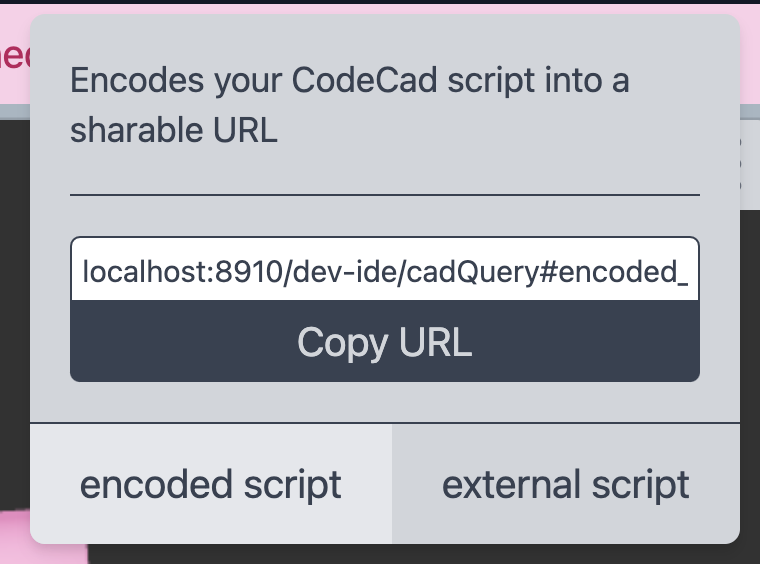
Did you do all these snippet images manually? They're very helpful!
:)
Yeah I did.
CContext is super important when trying to look at other's code. You could have figured this out yourself but 20x quicker for me to add a few screen shots.