Make top right avatar into a drop down menu with the following two options: [profile, sign out] #81

Closed
opened 2020-11-08 21:52:09 +01:00 by Irev-Dev · 13 comments
Irev-Dev commented 2020-11-08 21:52:09 +01:00 (Migrated from github.com)

image
The same popover component from material ui that's used in web/src/components/EmojiReaction/EmojiReaction.js can be used for this.
atm the button immediately signs the user out which is not intuitive, plus there's no easy way for a user to get to their profile so this helps with both

This avatar is located within: web/src/layouts/MainLayout/MainLayout.js

to link to the user profile use <Link to={routes.user2({userName: user.userName})}>...</Link> similar to what's used in web/src/components/PartProfile/PartProfile.js

![image](https://user-images.githubusercontent.com/29681384/98483989-8647f680-2260-11eb-9f09-bd4a60530c09.png) The same popover component from material ui that's used in `web/src/components/EmojiReaction/EmojiReaction.js` can be used for this. atm the button immediately signs the user out which is not intuitive, plus there's no easy way for a user to get to their profile so this helps with both This avatar is located within: `web/src/layouts/MainLayout/MainLayout.js` to link to the user profile use `<Link to={routes.user2({userName: user.userName})}>...</Link>` similar to what's used in `web/src/components/PartProfile/PartProfile.js`
Irev-Dev commented 2020-11-09 08:58:45 +01:00 (Migrated from github.com)

Hey @Yash-R, I've assigned this one to you. I think it will be good because it's adding a bit of new functionality, and there's an example of something similar being used with the popover. Though another good issue might be #83. Let me know if you want to that instead or neither.

Hey @Yash-R, I've assigned this one to you. I think it will be good because it's adding a bit of new functionality, and there's an example of something similar being used with the popover. Though another good issue might be #83. Let me know if you want to that instead or neither.
Yash-R commented 2020-11-09 09:04:45 +01:00 (Migrated from github.com)

okay, I can do both let me do this one first is that okay @Irev-Dev
And please give me all the details for installing.

okay, I can do both let me do this one first is that okay @Irev-Dev And please give me all the details for installing.
Irev-Dev commented 2020-11-09 09:11:12 +01:00 (Migrated from github.com)

Great,
And yup thanks for the reminder, working on that now.

Great, And yup thanks for the reminder, working on that now.
Yash-R commented 2020-11-09 10:01:25 +01:00 (Migrated from github.com)

@Irev-Dev how long will it take?

@Irev-Dev how long will it take?
Irev-Dev commented 2020-11-09 11:02:44 +01:00 (Migrated from github.com)

Sorry @Yash-R took me a while because I was setting a database seed #85 . not the quickest way to get you up and running but good to have for future.
So you'll need to pull the latest main branch to get the changes I just made. Then you need to delete the sqlite db. it will be located at api/prisma/dev.db, so just delete this file.

Then run

yarn rw db up
yarn rw db seed
yarn rw dev

sign into the app with

email: localUser1@kurthutten.com

password: abc123

and you should be good to go. Let me know if you have any problems.

Sorry @Yash-R took me a while because I was setting a database seed #85 . not the quickest way to get you up and running but good to have for future. So you'll need to pull the latest main branch to get the changes I just made. Then you need to delete the sqlite db. it will be located at `api/prisma/dev.db`, so just delete this file. Then run ```terminal yarn rw db up yarn rw db seed yarn rw dev ``` sign into the app with email: localUser1@kurthutten.com password: abc123 and you should be good to go. Let me know if you have any problems.
Yash-R commented 2020-11-09 11:15:37 +01:00 (Migrated from github.com)

thanks its working good now

thanks its working good now
Yash-R commented 2020-11-09 17:49:13 +01:00 (Migrated from github.com)

@Irev-Dev how can i access userName i have tried all posiible solution but the only error i got is userName is not defined

@Irev-Dev how can i access userName i have tried all posiible solution but the only error i got is userName is not defined
Irev-Dev commented 2020-11-09 19:17:45 +01:00 (Migrated from github.com)

@Yash-R,
UserName is: local-user-1 and 2

http://localhost:8910/u/local-user-1

You can see the details of what seed data was added in api/prisma/seeds.js

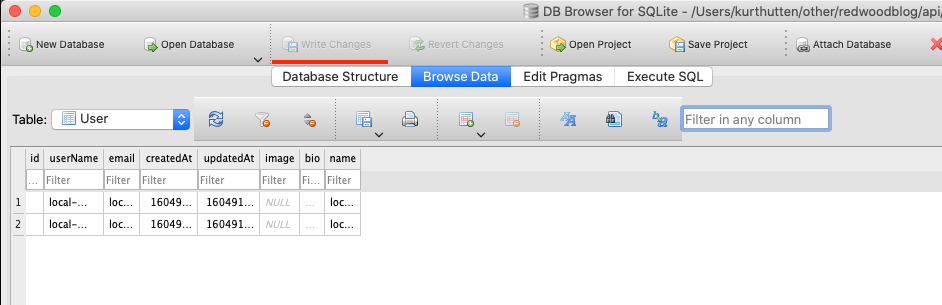
Not directly related, but the sqlite browser can be handy for directly checking what's in the db. https://sqlitebrowser.org/dl/ once installed use it to open api/prisma/dev.db, just be aware that if you make changes to the data with sqlite brower this button write changes
image
Will light up, and if you don't click it than it's like the sqlite browser takes control of the db and it can start blocking our code from doing writes and you'll start getting errors out of now where. Can be confusing unless you know the two can conflict.

@Yash-R, UserName is: `local-user-1` and 2 http://localhost:8910/u/local-user-1 You can see the details of what seed data was added in `api/prisma/seeds.js` Not directly related, but the sqlite browser can be handy for directly checking what's in the db. https://sqlitebrowser.org/dl/ once installed use it to open `api/prisma/dev.db`, just be aware that if you make changes to the data with sqlite brower this button `write changes` ![image](https://user-images.githubusercontent.com/29681384/98580110-9c62bf00-2313-11eb-9c37-a3f1cd86917d.png) Will light up, and if you don't click it than it's like the sqlite browser takes control of the db and it can start blocking our code from doing writes and you'll start getting errors out of now where. Can be confusing unless you know the two can conflict.
Yash-R commented 2020-11-09 19:24:33 +01:00 (Migrated from github.com)

Okay but I think there is some problem in useAuth because the new button is not working and current User is also not accessible.

Okay but I think there is some problem in useAuth because the new button is not working and current User is also not accessible.
Yash-R commented 2020-11-09 19:25:14 +01:00 (Migrated from github.com)

The problem is how to access user data in main file.

The problem is how to access user data in main file.
Irev-Dev commented 2020-11-09 19:38:40 +01:00 (Migrated from github.com)

Hmm, okay I'm not sure.
If I add a console log into MainLayout like so
image
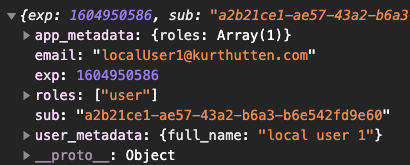
Then I get an object like this in the console.
image
Does that work for you?
I don't know if signing out and back in might help 🤷

Hmm, okay I'm not sure. If I add a console log into MainLayout like so ![image](https://user-images.githubusercontent.com/29681384/98582255-d4b7cc80-2316-11eb-9858-973d036d9504.png) Then I get an object like this in the console. ![image](https://user-images.githubusercontent.com/29681384/98582317-eef1aa80-2316-11eb-8a43-6f12de97acb2.png) Does that work for you? I don't know if signing out and back in might help 🤷
Yash-R commented 2020-11-10 11:50:45 +01:00 (Migrated from github.com)

Screenshot (18)
Screenshot (17)

@Irev-Dev its looking like this do you want me to change anything?

![Screenshot (18)](https://user-images.githubusercontent.com/41328269/98664509-791a2d00-2370-11eb-85bc-735b374b177e.png) ![Screenshot (17)](https://user-images.githubusercontent.com/41328269/98664597-92bb7480-2370-11eb-8f66-4fc4e040df81.png) @Irev-Dev its looking like this do you want me to change anything?
Irev-Dev commented 2020-11-10 16:00:28 +01:00 (Migrated from github.com)

@Yash-R Looks great. Really glad to see you've got some design chops. Even simple things like a decent amount of padding to text can breath is not something I take for granted. Only tweak I'm thinking of is it might be good to align the right edge of the avatar with the right edge of the popover, what do you think?
I think that would be:

anchorOrigin={{
    vertical: 'bottom',
    horizontal: 'right',
  }}
  transformOrigin={{
    vertical: 'top',
    horizontal: 'right',
  }}

In the materialUi popover.

@Yash-R Looks great. Really glad to see you've got some design chops. Even simple things like a decent amount of padding to text can breath is not something I take for granted. Only tweak I'm thinking of is it might be good to align the right edge of the avatar with the right edge of the popover, what do you think? I think that would be: ``` anchorOrigin={{ vertical: 'bottom', horizontal: 'right', }} transformOrigin={{ vertical: 'top', horizontal: 'right', }} ``` In the materialUi popover.
Sign in to join this conversation.
No Label
1 Participants
Notifications
Due Date
No due date set.
Dependencies

No dependencies set.

Reference: h3n3/cadhub#81