JSCAD integration #411

Closed
opened 2021-07-18 00:22:25 +02:00 by Irev-Dev · 3 comments
Irev-Dev commented 2021-07-18 00:22:25 +02:00 (Migrated from github.com)

I've been talking to @hrgdavor about the a possible JSCAD integration. I think what I'd like to do is setup a branch for you with a bunch of things setup in the UI ready for you so you can focus on the "kernel" so to speak.
I'm going to try and describe our architecture below so hopefully I can put into the readme as well. (you might notice that the following ignores the customizer, that's just because we haven't worked that detail out yet)


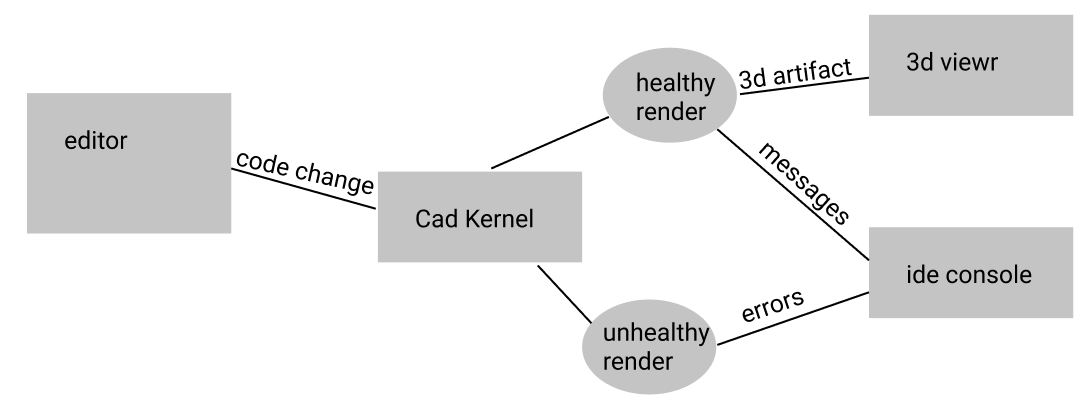
Visually our the setup looks like this
image
Because we want to have a lot of consistency from one package to the other and to make integrations easier, theoretically when integrating a new package, the only new things that need to be added is the Cad Kernel. So long as it takes code and produces a 3d artifact as well as any logs or error messages it should work fine.

Existing packages (OpenSCAD, and CadQuery) make sever requests to get the 3d artifacts, but this is not a requirement, however we at least want to have the ability to run things outside the browser for future features (such as github integration producing new artifacts on push to master).

New cad kernals should be added into app/web/src/helpers/cadPackages/ using the naming convention <kernalName>Controller.ts. The default export for this file, as well as the return types of the render function have TS definitions already sorted, See the demoController for boilerplate on adding a new CAD kernel.

Note that if the typescript definitions are too strict for an edge case specific to your package, raise it and we'll figure out a way of making the definitions more flexible.

The new cad kernel controller then should be imported into app/web/src/helpers/cadPackages/index.ts from there the rest of the integration into the UI itself, for the time being it's probably best to get @Irev-Dev to handle it.

I've been talking to @hrgdavor about the a possible JSCAD integration. I think what I'd like to do is setup a branch for you with a bunch of things setup in the UI ready for you so you can focus on the "kernel" so to speak. I'm going to try and describe our architecture below so hopefully I can put into the readme as well. (you might notice that the following ignores the customizer, that's just because we haven't worked that detail out yet) ------ Visually our the setup looks like this ![image](https://user-images.githubusercontent.com/29681384/126050005-ad130a96-ce7c-4a8f-a79f-5360dfc6e9a2.png) Because we want to have a lot of consistency from one package to the other and to make integrations easier, theoretically when integrating a new package, the only new things that need to be added is the Cad Kernel. So long as it takes code and produces a 3d artifact as well as any logs or error messages it should work fine. Existing packages (OpenSCAD, and CadQuery) make sever requests to get the 3d artifacts, but this is not a requirement, however we at least want to have the ability to run things outside the browser for future features (such as github integration producing new artifacts on push to master). New cad kernals should be added into `app/web/src/helpers/cadPackages/` using the naming convention `<kernalName>Controller.ts`. The default export for this file, as well as the return types of the render function have TS definitions already sorted, See [the demoController](https://github.com/Irev-Dev/cadhub/blob/main/app/web/src/helpers/cadPackages/demoController.ts) for boilerplate on adding a new CAD kernel. Note that if the typescript definitions are too strict for an edge case specific to your package, raise it and we'll figure out a way of making the definitions more flexible. The new cad kernel controller then should be imported into `app/web/src/helpers/cadPackages/index.ts` from there the rest of the integration into the UI itself, for the time being it's probably best to get @Irev-Dev to handle it.
hrgdavor commented 2021-07-18 11:49:55 +02:00 (Migrated from github.com)

jscad definitely works on server-side, so when the time comes for that part of integration it should not be a problem.

jscad definitely works on server-side, so when the time comes for that part of integration it should not be a problem.
Irev-Dev commented 2021-07-25 13:07:46 +02:00 (Migrated from github.com)

I finally got around to adding a branch for you @hrgdavor, it's at kurt/411-demo-branch
and the diff is here https://github.com/Irev-Dev/cadhub/compare/kurt/411-demo-branch?expand=1

Basically all I've done is made it so you can navigate to http://localhost:8910/dev-ide/jscad
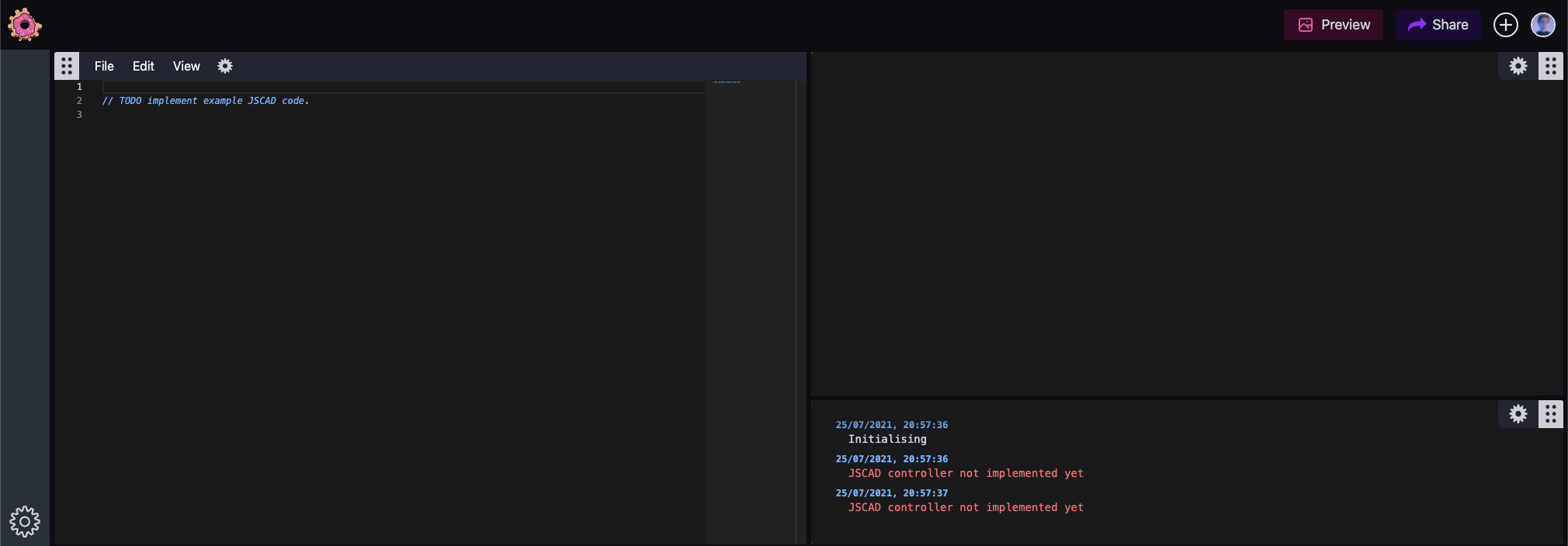
and but since I've only implemented a dumby jscad controller it will only ever look like this.
image
But as soon as your able to return geometry from that controller it should work 🤞 (I'm sure there's something I'm forgetting)

Is that helpful?

app/web/src/helpers/cadPackages/jsCadController.ts is a typescript file, but as we spoke about earlier feel free to strip out the types and work is js, the function basically just needs to return an object of this shape for it to work (I think):

{
  status: 'healthy'
  message: {
    type: 'message'
    message: 'string'
    time: new Date()
  }
  objectData: {
    data: threejsGeoBuffer
    type:  'geometry'
  }
}
I finally got around to adding a branch for you @hrgdavor, it's at `kurt/411-demo-branch` and the diff is here https://github.com/Irev-Dev/cadhub/compare/kurt/411-demo-branch?expand=1 Basically all I've done is made it so you can navigate to http://localhost:8910/dev-ide/jscad and but since I've only implemented a dumby jscad controller it will only ever look like this. ![image](https://user-images.githubusercontent.com/29681384/126896821-adb68554-4fb5-401d-9558-e2697fd95f48.png) But as soon as your able to return geometry from that controller it should work 🤞 (I'm sure there's something I'm forgetting) Is that helpful? `app/web/src/helpers/cadPackages/jsCadController.ts` is a typescript file, but as we spoke about earlier feel free to strip out the types and work is js, the function basically just needs to return an object of this shape for it to work (I think): ``` { status: 'healthy' message: { type: 'message' message: 'string' time: new Date() } objectData: { data: threejsGeoBuffer type: 'geometry' } } ```
Irev-Dev commented 2021-09-12 13:14:57 +02:00 (Migrated from github.com)

I think this should be closed now that projects can be saved #506

Sill a few points in #444

I think this should be closed now that projects can be saved #506 Sill a few points in #444
Sign in to join this conversation.
No Label
1 Participants
Notifications
Due Date
No due date set.
Dependencies

No dependencies set.

Reference: h3n3/cadhub#411