
160 lines
6.6 KiB
Markdown
160 lines
6.6 KiB
Markdown
# NSPanel Custom with HA Blueprint
|
|
Custom Firmware for NsPanel (esphome) and HA Blueprint with configuration of button, light settings, thermostate, colorwheel, colortemp, cover, weather preview, automatic TFT upload etc.
|
|
|
|
Why another version for the NSPanel?
|
|
Well - all versions I've seen have been missing something everywhere.
|
|
That's why I decided to create something myself.
|
|
|
|
My thanks to Masto, Marcfager, lovejoy777, Hellis81 and SmartHome yourself ( link see below) for sharing your code. Give them the credit they deserve, I'm merely a copy paste ninja. XDD
|
|
|
|
|
|
### GOAL:
|
|
My goal was to create a version that could be quickly adopted for multiple NSPanels.
|
|
In addition, the configuration should be as simple as possible. Therefore I decided to put most of it into a HA Blueprint
|
|
|
|
In addition, another NSPanel can be configured very quickly. But have a look yourself ;)
|
|
|
|

|
|

|
|
|
|
(Home / Thermostat - more pictures see below)
|
|
|
|
## Features:
|
|
- easy to use and simple configuration via Blueprint
|
|
- 40 buttons on 5 button pages with long press function for settings (more buttons are also possible)
|
|
- Weather + 5 days weather forcast
|
|
- Thermostat + Touch + Relay control for floor heating
|
|
- Light control (brightness-slider, colorwheel, TempColor-slider) - via Long Press
|
|
- Cover control (open, close, position-slider) - via long press
|
|
- Settings page (display brightness, display dim brightness, auto-dim, sleep mode, reboot NSPanel)
|
|
- Swipe between pages
|
|
- Top menu with 10 icons for specific states
|
|
- Heating control (hot water)
|
|
- Auto Upload TFT File to Nextion Display
|
|
- Swipe between pages
|
|
- modern design - design easy to change via Adobe Express (free + design template)
|
|
- 2 pysical switches
|
|
- and much more ;)
|
|
|
|
|
|
## NSPanel:
|
|

|
|

|
|
|
|
(Home / Weather Forcast)
|
|
|
|

|
|

|
|
|
|
(Thermostat / Settings Page)
|
|
|
|

|
|

|
|
|
|
(Light Settings Colorwheel / Light Settings TempColor)
|
|
|
|

|
|

|
|
|
|
(Cover Settings / Button Page)
|
|
|
|

|
|
|
|
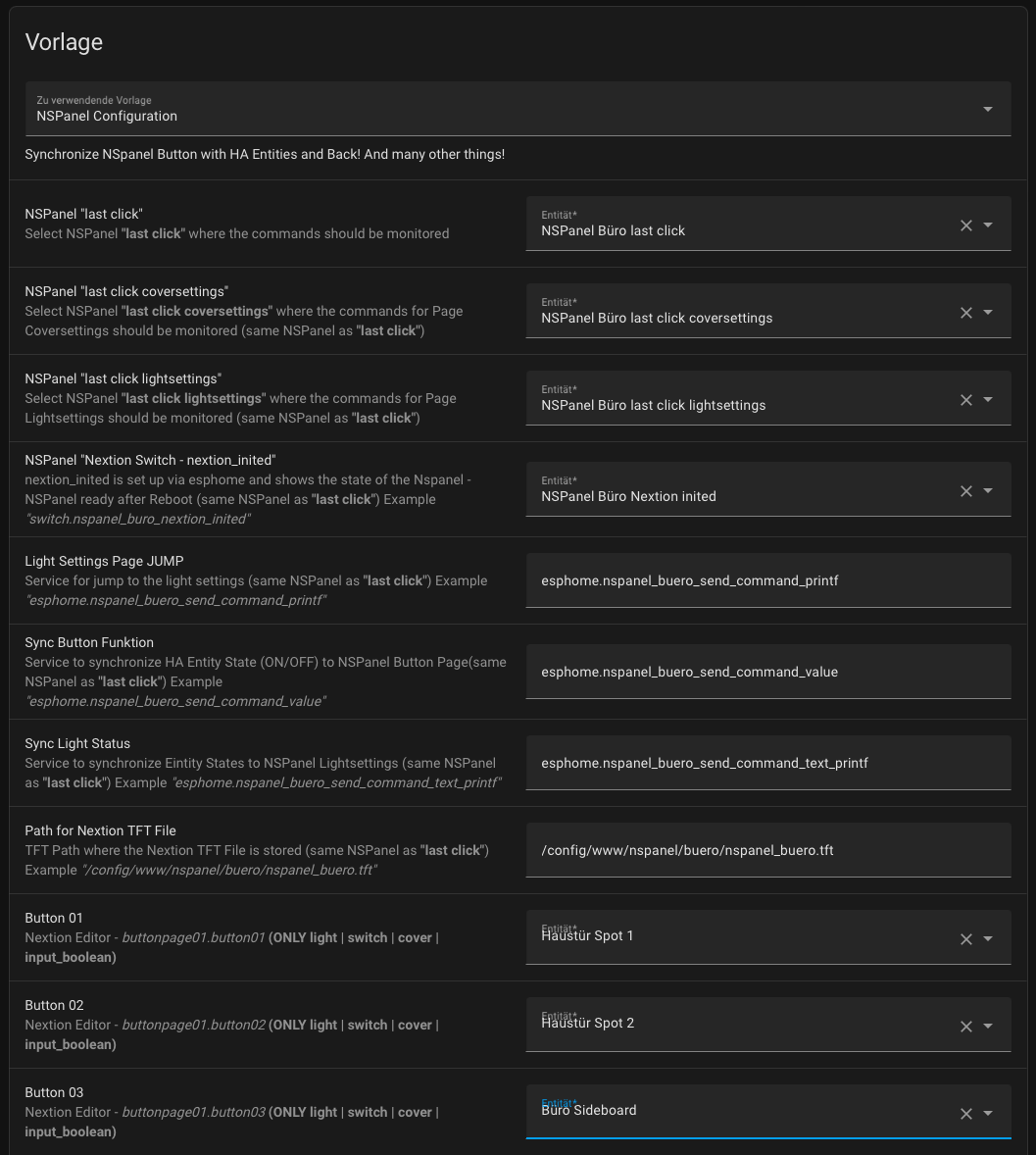
## Blueprint:
|
|
|
|
|
|
# Pages
|
|
|
|
## Home
|
|
- current weather with button to Weather Forcast page
|
|
- Temperature outside
|
|
- Status icons at the top
|
|
- Room temperature with button to thermostat page
|
|
- Room humidity
|
|
- Hot water temperature
|
|
- Button to display settings page
|
|
|
|
## Weather Forcast
|
|
- 5 days Weather Forcast via swipe (Integration Accuweather - but should also go with another integration)
|
|
- Lowest and highest temperature outside
|
|
- Date
|
|
- Rain probability
|
|
- Sunshine hours
|
|
- Sun pressure
|
|
- Thunderstorm probability
|
|
- Wind speed
|
|
- Night thunderstorm probability and wind speed
|
|
|
|
## Thermostat
|
|
- Touch Temp control
|
|
- Outside temperature
|
|
- Hot water
|
|
- Floor heating on, off and idle
|
|
- Hot water button
|
|
- Status icons
|
|
|
|
## Display Settings
|
|
- Restart NSPanel
|
|
- Sleep mode - display off after time X
|
|
- Display brightness slider
|
|
- Display dim brightness slider
|
|
- Status Brightness in %
|
|
|
|
## Light Settings
|
|
- Light on and off (alignment with HA)
|
|
- Light color with Colorwheel
|
|
- Light color with TempColor slider
|
|
- Brightness Slider
|
|
- Brightness in %.
|
|
- Tempcolor value
|
|
- Jump back to the right button page
|
|
|
|
## Cover Settings
|
|
- Open and close cover
|
|
- Cover position via slider
|
|
- Cover battery value (I use Ikea roller blind)
|
|
- jump back to the right button page
|
|
|
|
## Button Page
|
|
- 40 Button
|
|
- 5 Button pages
|
|
- all buttons with long press function
|
|
- automatic detection by long press if it is a light or cover for submenu
|
|
- swipe between all pages
|
|
- swipe also down and up for fast access to certain pages
|
|
- number of buttons and button pages can be extended - functions like long press, light settings and cover settings stay the same
|
|
|
|
## Upcoming Features
|
|
- Shorten Esphome code and transfer to Blueprint
|
|
- Cover page with window open status as image
|
|
- small design adjustments
|
|
- Notifications on Home Page
|
|
- Energy and Gas consumption on home page
|
|
- Extra page for energy dashboard
|
|
- Garbage plan with icon on home page
|
|
- Let's see what ideas I still have ;)
|
|
|
|
## HowTo Deutsch
|
|
1. den Code aus der Datei esphome.yaml kopieren und in HA unter esphome einfügen. Vorher muss natürlich ein Device erstellt werden.
|
|
1.2 in der ESPhome Datei müssen Passwörter eingesetzt werden. Entweder in der ESPHome Secret oder einfach in der ESPhome Datei
|
|
1.3 Einige Entities sind aktuell noch in der Esphome Datei angegeben (direkt unter den Passwörtern. Diese Entities müssen noch angepasst werden. In zukunft will ich aber auch diese ins Bluebrint einbauen
|
|
3. den Code aus der Datei blueprint.yaml kopieren und eine neue yaml Datei unter config/blueprints erstellen und den Code einfügen
|
|
4. HA Automationen neu starten -> Enticklerwerkzege -> YAML -> Automatisierungen
|
|
5. den Code aus der Datei sensor.yaml und climate.yaml kopieren und eine eigenen yaml Datei erstellen. Der Code wird in zukunft direkt im Blueprint eingebaut.
|
|
6. den Code aus der Datei folder_wather kopieren und in der coniguration.yaml einfügen
|
|
7. TFT File auf Home Assistant hochladen (Der Pfad kann später im Blueprint angegeben werden
|
|
8. Blueprint unter Automationen auswählen und und Felder ausfüllen.
|
|
|
|
|
|
|
|
## Thanks to:
|
|
SmartHome yourself: https://www.youtube.com/c/SmarthomeyourselfDe_DIY
|
|
|
|
Masto: https://github.com/masto/NSPanel-Demo-Files
|
|
|
|
Marcfager: https://github.com/marcfager/nspanel-mf
|
|
|
|
lovejoy77: https://github.com/lovejoy777/NSpanel
|
|
|
|
Hellis81: https://github.com/Hellis81/NS-panel
|