
222 lines
16 KiB
Markdown
222 lines
16 KiB
Markdown
# v4.3 - Welcome to Framework ESP-IDF, an Utilities Dashboard and Enhanced Localization
|
||
## General
|
||
This milestone release is not just about adopting a new technical foundation;
|
||
it's about enhancing the capabilities and experiences of our users through significant performance improvements,
|
||
more comprehensive API documentation, customizable user interfaces and improved localization.
|
||
|
||
And with a nice Utilities Dashboard as a bonus!!
|
||
|
||
Our dedication to refining the user experience and expanding customization options continues, with this release featuring:
|
||
|
||
- **Utilities Dashboard**: A new addition, offering a customizable overview for essential utility metrics such as solar production,
|
||
wind energy, EV charging status, battery levels, and water or gas consumption.
|
||
|
||
- **Comprehensive API Documentation**: Simplifying customization and integration for developers and users, enabling tailored experiences with detailed service documentation.
|
||
|
||
- **Localization and Personalization**: Advances in user-defined settings, like decimal separators and value translations, contribute to a more intuitive interface.
|
||
We’ve also streamlined the display to exclude empty pages, making navigation more efficient.
|
||
|
||
- **Performance and Functionality**: The shift to the ESP-IDF framework not only boosts performance but also paves the way for future enhancements,
|
||
keeping NSPanel at the forefront of smart control technology.
|
||
|
||
As we embrace the ESP-IDF framework, we're excited to explore the new horizons it brings to the NSPanel firmware. Dive into v4.3 and discover the advancements that await.
|
||
|
||
## ESP-IDF Framework Transition
|
||
With this release, we've officially transitioned to the **ESP-IDF** framework.
|
||
This move is part of our ongoing efforts to enhance the memory capacity and expand the features available on the ESP, facilitating broader customization and new functionalities.
|
||
|
||
For users updating to this version:
|
||
- **Flashing Required**: To adopt the ESP-IDF framework, flashing your device using a serial cable is necessary. This step mirrors the initial custom firmware setup process.
|
||
- **Arduino Framework Still Available**: For those who prefer the `arduino` framework or require Over-The-Air (OTA) updates, it remains an option.
|
||
Detailed guidance on how to choose your framework is provided in our [customization documentation](https://github.com/Blackymas/NSPanel_HA_Blueprint/blob/main/docs/customization.md#frameworks).
|
||
|
||
This transition is a significant milestone for us, promising a robust platform for our community.
|
||
We're here to help with any questions or assistance needed during this change.
|
||
For more details and support, visit our [community discussion](https://github.com/Blackymas/NSPanel_HA_Blueprint/discussions/1756).
|
||
|
||
## Updating
|
||
Please review your settings post-update to ensure compatibility.
|
||
Refer to the update procedures [here](https://github.com/Blackymas/NSPanel_HA_Blueprint/blob/main/docs/howto.md#update-blueprint).
|
||
|
||
## Breaking Changes and Guidance
|
||
With this release, we're implementing several important changes.
|
||
While we strive to improve the panel, we understand that changes can affect your setups.
|
||
Here's a detailed overview and guidance for a smooth transition:
|
||
|
||
1. **Home Assistant v2024.3.0 is required**. You can see the full version compatibility list [here](docs/version_compatibility.md).
|
||
|
||
2. **Transition to ESP-IDF Framework**: This release marks the official switch to the ESP-IDF framework, enhancing performance and allowing for more complex features.
|
||
- **What to Do**: You'll need to flash your device with the new firmware using a serial connection.
|
||
Detailed instructions are available in our [installation guide](docs/install.md#flashing-the-device-for-the-first-time).
|
||
- **Support for Arduino Framework**: If you're not ready to make the switch or prefer the Arduino framework, it's still supported for OTA updates.
|
||
See our [framework customization documentation](https://github.com/Blackymas/NSPanel_HA_Blueprint/blob/main/docs/customization.md#frameworks) for details on how to select your preferred framework.
|
||
|
||
3. **Several Services Changed**: In our pursuit to enhance integration capabilities and future-proof our services, we've undertaken a comprehensive restructuring of our API.
|
||
This change is aimed at improving functionality and compatibility but may require adjustments to your current automations.
|
||
- **What to Do**: We strongly encourage you to review our updated [API documentation](docs/api.md).
|
||
This resource has been meticulously updated to assist you in updating your automation scripts accordingly.
|
||
Pay special attention to the examples section, which offers valuable insights and practical guidance for adapting your existing setups seamlessly.
|
||
|
||
4. **15s Hardware Button Press No Longer Restarts the Device**: This feature was removed to repurpose the hardware button for more versatile uses.
|
||
- **What to Do**: If you relied on this feature, see our [customization guide](https://github.com/Blackymas/NSPanel_HA_Blueprint/blob/main/docs/customization.md#restart-with-15s-button-press) for alternatives.
|
||
Additionally, the reset pin remains an option for manual resets.
|
||
|
||
5. **Relay Fallback Switches Removed**: These switches were deprecated and have now been removed to streamline the firmware and reduce memory usage.
|
||
- **What to Do**: For users who utilized customizations to expose these switches, refer to our updated customization guide.
|
||
Alternatively, use the `esphome.xxxxx_init_hardware` service for a similar functionality without the memory overhead.
|
||
|
||
We appreciate your understanding and patience during this transition.
|
||
Our goal is to ensure NSPanel continues to evolve in a way that enhances your experience and meets future needs.
|
||
Our community and support channels are open for any questions or assistance you may require.
|
||
|
||
## Overview of noteworthy changes
|
||
- [Transition to ESP-IDF as Default Framework](#transition-to-esp-idf-as-default-framework)
|
||
- [New API documentation](#new-api-documentation)
|
||
- [Selectable font size for screensaver time display](#selectable-font-size-for-screensaver-time-display)
|
||
- [Hardware buttons bars visible on all pages](#hardware-buttons-bars-visible-on-all-pages)
|
||
- [User-Defined Decimal Separator](#user-defined-decimal-separator)
|
||
- [Page Light with Power Button](#page-light-with-power-button)
|
||
- [Page Fan with Oscillate Button](#page-fan-with-oscillate-button)
|
||
- [Streamlined Interface: No More Empty Pages](#streamlined-interface-no-more-empty-pages)
|
||
- [Enhanced Localization: Translated Values](#enhanced-localization-translated-values)
|
||
- [Introducing the Utilities Dashboard](#introducing-the-utilities-dashboard)
|
||
|
||
## Details of noteworthy changes
|
||
### Transition to ESP-IDF as Default Framework
|
||
We've transitioned to ESP-IDF, enhancing our platform's performance and capabilities.
|
||
This change promises new possibilities for your projects.
|
||
Those continuing with the Arduino framework can find instructions for setting framework preferences.
|
||
|
||
For more information, visit our [discussion](https://github.com/Blackymas/NSPanel_HA_Blueprint/discussions/1756).
|
||
|
||
### New API documentation
|
||
Now all the services available are listed in a comprehensive documentation, making easier for people who want to customize their systems,
|
||
integrate to other automations and to encourage new collaborators to our repository.
|
||
|
||
For more details, please visit our [API documentation](docs/api.md).
|
||
|
||
### Selectable font size for screensaver time display
|
||
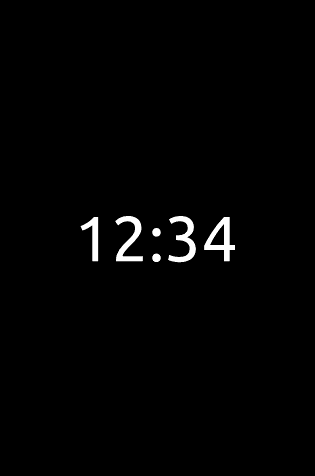
Now you can chose the font size for your clock display in the screen saver. There are 3 sizes available:
|
||
|
||

|
||
|
||
#### 72px
|
||
|
||

|
||

|
||
|
||
### 112px
|
||

|
||

|
||
|
||
|
||
### 192px
|
||

|
||
|
||
<!-- markdownlint-disable MD028 -->
|
||
> [!IMPORTANT]
|
||
> For this time to be displayed you must select a brightness higher than 0 on the device's page (under **Settings** > **Devices & Services** > **ESPHome**).
|
||
|
||
> [!ATTENTION]
|
||
> Some fonts may not support all the languages.
|
||
|
||
> [!ATTENTION]
|
||
> Bigger fonts may not fit well on your display and the selected time format.
|
||
> Please select a differnt font in that case.
|
||
<!-- markdownlint-enable MD028 -->
|
||
|
||
### Hardware buttons bars visible on all pages
|
||
Bars indicating statuses of entities controlled by hardware buttons are now visible on all pages, including screensaver.
|
||
Color customization for these bars is also available.
|
||

|
||
|
||
### User-Defined Decimal Separator
|
||
You can now select the decimal separator for displaying numbers on your NSPanel.
|
||
This feature allows for consistency with your regional number format preferences, improving the clarity of numerical information.
|
||
Simply go to the settings to choose between the dot (.) and comma (,) as your decimal separator for a display that matches your preference.
|
||
|
||

|
||
|
||
This update aims to enhance the flexibility and usability of the NSPanel interface for users worldwide.
|
||
|
||
### Page Light with Power Button
|
||
The page Light has been updated to include a power button, simplifying the process of toggling your light on or off.
|
||
This intuitive addition allows for quick adjustments directly from the page Light, enhancing the user experience by providing a straightforward control mechanism.
|
||
|
||

|
||
|
||
This enhancement streamlines light management, making it more accessible and convenient for everyday use.
|
||
|
||
### Page Fan with Oscillate Button
|
||
The Fan page now features an oscillate button, making it easier to control your fan's oscillation settings.
|
||
This convenient update enables users to activate or deactivate the oscillation function with a single tap, directly from the Fan page itself.
|
||
It's designed to improve the user experience by offering a simple and effective control option.
|
||
|
||

|
||
|
||
This update simplifies fan operation, enhancing accessibility and usability for all users.
|
||
|
||
### Streamlined Interface: No More Empty Pages
|
||
We've improved the NSPanel interface by ensuring that only populated pages are displayed, both for button and entities pages.
|
||
This update creates a more intuitive and clutter-free experience, automatically hiding any pages without assigned entities.
|
||
There's no need for additional setup; if a page has no entities linked to it, it simply won't appear on your panel, making navigation smoother and more efficient.
|
||
|
||
### Enhanced Localization: Translated Values
|
||
In a significant step towards a more localized user experience, the values displayed on the NSPanel are now translated using Home Assistant's `state_translated` function, introduced in HA v2024.3.0.
|
||
This means that not only are the project's strings translated, but also values provided by Home Assistant, such as those from text sensors or binary sensors.
|
||
This enhancement simplifies readability and usability for users interacting with the panel in different languages.
|
||
|
||
> [!NOTE]
|
||
> The translations are managed by Home Assistant and will correspond to the language settings
|
||
> specified under [**Settings** > **System** > **General**](https://my.home-assistant.io/redirect/general/).
|
||
|
||
### Introducing the Utilities Dashboard
|
||
The "Utilities Dashboard" is a versatile feature tailored to offer a straightforward overview of your chosen utility metrics.
|
||
It's designed for flexibility, allowing you to customize up to six data points, such as solar production, wind energy, EV charging status,
|
||
battery levels, water, and gas consumption, according to what's relevant to your home.
|
||
This customization ensures that the dashboard only displays the utilities you're monitoring, maintaining a clean and uncluttered interface.
|
||
|
||
<< ADD A PICTURE OF THE PAGE ON NSPANEL >>
|
||
<< ADD A SCREENSHOT OF THE BLUEPRINT >>
|
||
|
||
## Support
|
||
For support or more information about this update,
|
||
visit our [GitHub repository](https://github.com/Blackymas/NSPanel_HA_Blueprint)
|
||
or our [online documentation](https://github.com/Blackymas/NSPanel_HA_Blueprint/blob/main/docs/README.md).
|
||
|
||
## What's Next?
|
||
Discover our upcoming projects in our [Milestones](https://github.com/Blackymas/NSPanel_HA_Blueprint/milestones?direction=asc&sort=title&state=open).
|
||
|
||
## Special Thanks
|
||
*Details to be added.*
|
||
|
||
## Previous releases
|
||
- [v4.2.6 - Enhancing Stability and User Experience](https://github.com/Blackymas/NSPanel_HA_Blueprint/releases/tag/v4.2.6)
|
||
- [v4.2.5 - Celebrating 1000 Stars with Enhanced Functionality and UI Improvements](https://github.com/Blackymas/NSPanel_HA_Blueprint/releases/tag/v4.2.5)
|
||
- [v4.2.4 - Critical bug fixes](https://github.com/Blackymas/NSPanel_HA_Blueprint/releases/tag/v4.2.4)
|
||
- [v4.2.3 - Bug fixes and minor enhancements](https://github.com/Blackymas/NSPanel_HA_Blueprint/releases/tag/v4.2.3)
|
||
- [v4.2.2 - Bug fixes and minor enhancements](https://github.com/Blackymas/NSPanel_HA_Blueprint/releases/tag/v4.2.2)
|
||
- [v4.2.1 - Bug fixes](https://github.com/Blackymas/NSPanel_HA_Blueprint/releases/tag/v4.2.1)
|
||
- [v4.2 - Multi-Alarm Control, Dual Thermostat Functionality, and More](https://github.com/Blackymas/NSPanel_HA_Blueprint/releases/tag/v4.2)
|
||
- [v4.1.4 - Support to Home Assistant 2023.12.0](https://github.com/Blackymas/NSPanel_HA_Blueprint/releases/tag/v4.1.4)
|
||
- [v4.1.3 - Bug fixes](https://github.com/Blackymas/NSPanel_HA_Blueprint/releases/tag/v4.1.3)
|
||
- [v4.1.2 - Bug fixes and minor enhancements](https://github.com/Blackymas/NSPanel_HA_Blueprint/releases/tag/v4.1.2)
|
||
- [v4.1.1 - UI Enhancements and Reintroduction of `play_rtttl` Service](https://github.com/Blackymas/NSPanel_HA_Blueprint/releases/tag/v4.1.1)
|
||
- [v4.1 - Easier TFT transfer](https://github.com/Blackymas/NSPanel_HA_Blueprint/releases/tag/v4.1)
|
||
- [v4.0.2 - Bug fixes](https://github.com/Blackymas/NSPanel_HA_Blueprint/releases/tag/v4.0.2)
|
||
- [v4.0.1 - Bug fixes](https://github.com/Blackymas/NSPanel_HA_Blueprint/releases/tag/v4.0.1)
|
||
- [v4.0 - Alarm and Media player pages, Climate add-ons and a more robust panel](https://github.com/Blackymas/NSPanel_HA_Blueprint/releases/tag/v4.0)
|
||
- [v3.4.1 - Patch for issues when compiling with ESPHome 2023.7.0](https://github.com/Blackymas/NSPanel_HA_Blueprint/releases/tag/v3.4.1)
|
||
- [v3.4 - New climate page and some bug fixes](https://github.com/Blackymas/NSPanel_HA_Blueprint/releases/tag/v3.4)
|
||
- [v3.3 - New improvements and some issues fixed](https://github.com/Blackymas/NSPanel_HA_Blueprint/releases/tag/v.3.3)
|
||
- [v3.2.2 - fixed some bugs performance improvement](https://github.com/Blackymas/NSPanel_HA_Blueprint/releases/tag/v3.2.2)
|
||
- [v3.2.1 - New features and some fixes](https://github.com/Blackymas/NSPanel_HA_Blueprint/releases/tag/v3.2.1)
|
||
- [v3.2 - New features and custom configurations](https://github.com/Blackymas/NSPanel_HA_Blueprint/releases/tag/v.3.2)
|
||
- [v3.1.0 - New features and US Version](https://github.com/Blackymas/NSPanel_HA_Blueprint/releases/tag/v.3.1.0)
|
||
- [v3.0.0 - major update with many features and improvements](https://github.com/Blackymas/NSPanel_HA_Blueprint/releases/tag/v.3.0.0)
|
||
- [v2.2.0 - 25 new languages added](https://github.com/Blackymas/NSPanel_HA_Blueprint/releases/tag/v.2.2.0)
|
||
- [v2.1.0 - New Domains, Buttons and Button Page Label](https://github.com/Blackymas/NSPanel_HA_Blueprint/releases/tag/v2.1.0)
|
||
- [v2.0.2](https://github.com/Blackymas/NSPanel_HA_Blueprint/releases/tag/v2.0.2)
|
||
- [v2.0.1 - Bug Fixes](https://github.com/Blackymas/NSPanel_HA_Blueprint/releases/tag/v2.0.1)
|
||
- [v2.0.0](https://github.com/Blackymas/NSPanel_HA_Blueprint/releases/tag/v2.0.0)
|