
4.8 KiB
NSPanel ioBroker Integration
Features
- Thermostat Card
- Entity Card (Temperature, Switches and sensors, the script tries to figure the unit of measurement automatically)
- Detail Card (only switch and normal dimmer)
- Live update (when value was changed in the backend and the page is currently open)
- Screensaver Page with Time, Date and Weather Information.
Requirements
- ioBroker
- MQTT Broker/Client
- Javascript
- devices (default)
- all devices needs to be defined in the devices panel
- supported device roles are light, dimmer, blind, thermostat
Note
Currently the names are pulled from the objects data field common.name.de. If you use a different language please search and replace the "common.name.de" with your language. You can find this in the device raw settings.
Installation
- Import this script into the ioBroker javascript instance and choose Typescript.
- Find the config variable and update to your needs.
- The format strings are not used right now.
Update the screensaver string
The screensaver string which is send to the display looks something like this: weatherUpdate,?23?11 °C?26?54%?Batterie?4?12 %?PV?23?123W All fields are seperated by a question mark. In detail the fields are: weatherUpdate,?Icon?Text?Icon (default humidity)?Text next to the last icon?Text for the left icon on the right side?Icon?Text under the icon?Text for the right icon on the left side?Icon?Text under the icon There are several icons which joBr99 included into the display file. You can use all of them starting with position 0 on the left side.
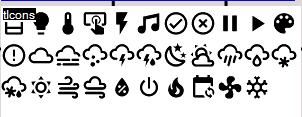
You can change the string in this function:
function HandleScreensaverUpdate(): void {
    if (config.weatherEntity != null && existsObject(config.weatherEntity)) {
        var icon = getState(config.weatherEntity + ".ICON").val;

        let temperature: string = getState(config.weatherEntity + ".TEMP").val;
        let humidity = getState(config.weatherEntity + ".HUMIDITY").val;
        let u1 = getState(config.batEntity).val;
        let u2 = getState(config.pvEntity).val;

        SendToPanel(<Payload>{ payload: "weatherUpdate,?" + GetAccuWeatherIcon(parseInt(icon)) + "?" + temperature.toString() + " " + config.temperatureUnit + "?26?" + humidity + " %?Batterie?4?" + u1 + "%?PV?23?" + u2 + "W" })
    }
}
The config element in the script which needs to be configured
var config: Config = {
    panelRecvTopic: "mqtt.0.tele.WzDisplay.RESULT",       // This is the object where the panel send the data to.
    panelSendTopic: "mqtt.0.cmnd.WzDisplay.CustomSend",   // This is the object where data is send to the panel.
    batEntity: "alias.0.Batterie.ACTUAL",                 // This is a state which can be used to display the battery state.
    pvEntity: "alias.0.Pv.ACTUAL",                        // This is a state which can be used to display the current solar yield.
                                                          // Both values are send via the HandleScreensaverUpdate() function, you need to update this string to your needs.
                                                          // Currently the icons are hardcoded.

    timeoutScreensaver: 15,                               // Timeout for screensaver
    dimmode: 8,                                           // Display dim
    locale: "de_DE",                                      // not used right now
    timeFormat: "%H:%M",                                  // not used right now
    dateFormat: "%A, %d. %B %Y",                          // not used right now
    weatherEntity: "alias.0.Wetter",

    temperatureUnit: "°C",                                // Unit to append on temperature sensors
    pages: [
        {
            "type": "cardEntities",                       // card type (cardEntities, cardThermo)
            "heading": "Testseite",                       // heading
            "items": [                                    // items array (up to 4 on cardEntities, 1 for cardThermo)
                "alias.0.Rolladen_Eltern",                // device which must be configured in the device panel. Use only the folder for the device, not the set, get states ...
                "alias.0.Erker",
                "alias.0.Küche",
                "alias.0.Wand"

            ]
        },
        {
            "type": "cardEntities",
            "heading": "Strom",
            "items": [
                "alias.0.Netz",
                "alias.0.Hausverbrauch",
                "alias.0.Pv",
                "alias.0.Batterie"

            ]
        },
        {
            "type": "cardThermo",
            "heading": "Thermostat",
            "item": "alias.0.WzNsPanel"                   // Needs to be a thermostat in the device panel
        }
    ]
};