 [](https://github.com/hacs/integration)

[](https://jessemillar.com/r/man-hours)
NsPanel Lovelace UI is a Firmware for the nextion screen inside of NSPanel in the Design of [HomeAssistant](https://www.home-assistant.io/)'s Lovelace UI Design.
EU Model and US Model supported (in portrait and landscape orientation)
Content of the screen is controlled by a AppDaemon Python Script installed on your HomeAssistant Instance.
(or a TypeScript on your ioBroker Instance in case you are an ioBroker User)
## Features
- Entities Page with support for cover, switch, input_boolean, binary_sensor, sensor, button, number, scenes, script, input_button and light, input_text (read-only)
- Grid Page with support for cover, switch, input_boolean, button, scenes, and light
- Detail Pages for Lights (Brightness, Temperature and Color of the Light) and for Covers (Position)
- Thermostat Page
- Media Player Card
- Alarm Control Panel
- Screensaver Page with Time, Date and Weather Information
- Localization possible (currently 38 languages)
- **Everything is dynamically configurable by a yaml config, no need to code or touch Nextion Editor**
It works with [Tasmota](https://tasmota.github.io/docs/) and MQTT.
To control the panel and update it with content from HomeAssistant there is an [AppDaemon](https://github.com/AppDaemon/appdaemon) App.
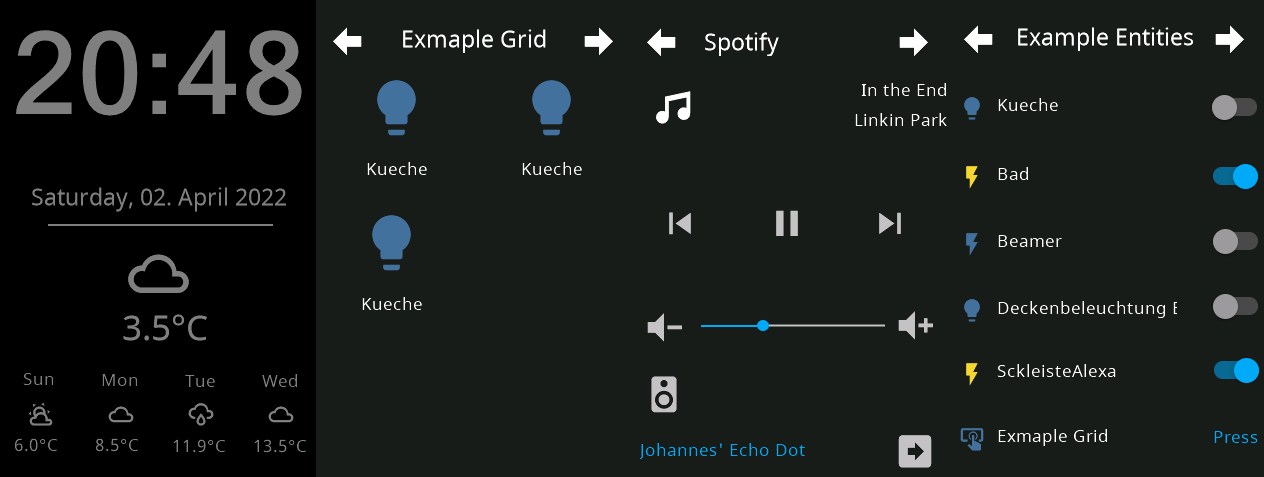
See the following picture to get an idea of the look of this firmware for NSPanel.
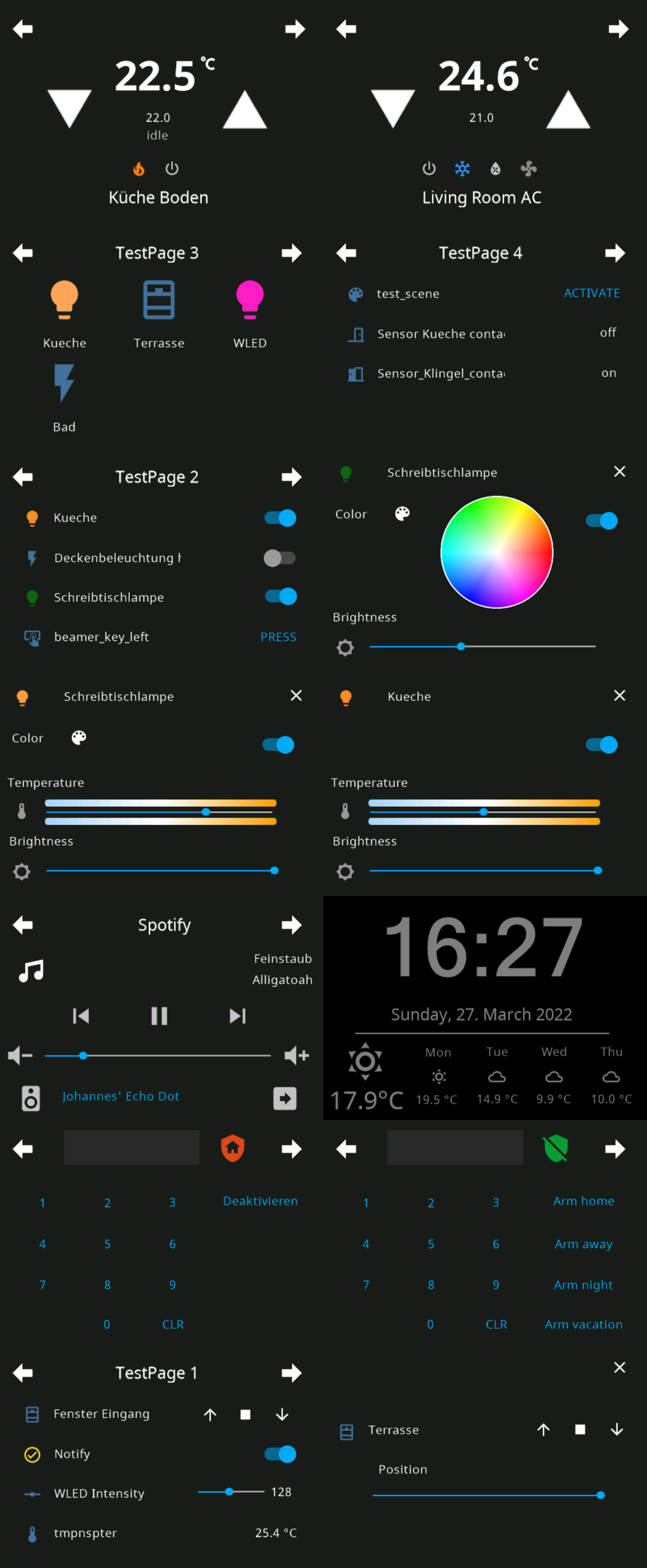
Some (not all) screenshots from the US Portrait Version:
## TLDR
1. Install Tasmota to NSPanel
2. Install Berry Driver in Tasmota and setup MQTT
3. Flash Nextion Firmware
4. Install AppDaemon, setup MQTT and install Backend Application
For more detailed Instructions see the following Sections:
- [How It Works](#how-it-works)
- [Requirements](#requirements)
- [Installation - Home Automation Part (Homeassistant)](#installation---home-automation-part-home-assistant)
- [Installing AppDaemon](#installing-appdaemon)
- [Installing Studio Code Server (optional, recommended)](#installing-studio-code-server-optional-recommended)
- [Installing HACS](#installing-hacs)
- [Installing AppDeamon Backend Application](#installing-appdeamon-backend-application)
- [Installation - Home Automation Part (IoBroker)](#installation---home-automation-part-iobroker)
- [Installation - NSPanel Part](#installation-nspanel-part)
- [Flash Tasmota to your NSPanel](#flash-tasmota-to-your-nspanel)
- [Configure Tasmota Template for NSPanel](#configure-tasmota-template-for-nspanel)
- [Setup your MQTT Server in Tasmota](#setup-your-mqtt-server-in-tasmota)
- [Upload Berry Driver to Tasmota](#upload-berry-driver-to-tasmota)
- [Flash Firmware to Nextion Screen](#flash-firmware-to-nextion-screen)
- [Configuration](#configuration)
- [Configuring the MQTT integration in AppDaemon](#configuring-the-mqtt-integration-in-appdaemon)
- [Configure your NSPanel in AppDaemon](#configure-your-nspanel-in-appdaemon)
- [How to update](#how-to-update)
- [FAQ](#faq---frequently-asked-questions)
## How It Works
The NSPanel has two components an esp32 which runs Tasmota in this project and the nextion display, which is controlled by the esp32 via serial.
This project contains a display firmware, which can be controlled over serial/mqtt.
It's controlled by an AppDaemon Application, which crafts the required commands from your HomeAssistant Instance.
For more details on how the display firmware works see the [README File in the HMI Folder](HMI/README.md)
## Requirements
- NSPanel
- USB to Serial TTL Adapter
- Running [Home Assistant Instance](https://www.home-assistant.io/installation/)
- Installed [MQTT Broker](https://www.home-assistant.io/docs/mqtt/broker) alongside Homeassistant
## Installation - Home Automation Part (Home Assistant)
### Installing AppDaemon
The recommended backend application for this firmware is written in a python for [AppDaemon](https://github.com/AppDaemon/appdaemon).
This means it requires a working and running version of AppDaemon.
The easiest way to install it is through Home Assistant's Supervisor Add-on Store, it will be automaticly connected to your Home Assistant Instance.

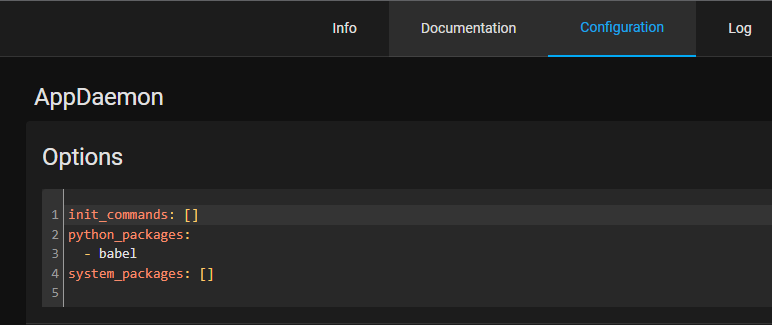
#### Add babel package to AppDaemon Container (Optional)
For localisation (date in your local language) you need to add the python package babel to your AppDaemon Installation.
### Installing Studio Code Server (optional, recommended)
You will need a way to edit the `apps.yaml` config file in the Appdaemon folder.
Install Studio Code Server from Home Assistant's Supervisor Add-on Store to easily edit configuration Files on your HomeAssistant Instance.
### Installing HACS
HACS is the Home Assistant Community Store and allows for community integrations and
automations to be updated cleanly and easily from the Home Assistant web user interface.
It's simple to install the AppDaemon app without HACS, but keeping up to date requires
manual steps that HACS will handle for you: you will be notified of updates, and they
can be installed by a click on a button.
If you want to use HACS, you will have to follow [their documentation on how to install HACS](https://hacs.xyz/docs/setup/download).
### Installing AppDaemon Backend Application
To install Lovelace UI Backend App with HACS, you will need to make sure that you enabled
AppDaemon automations in HACS, as these are not enabled by default:
1. Click on `Configuration` on the left menu bar in Home Assistant Web UI
2. Select `Devices & Services`
3. Select `Integrations`
4. Find `HACS` and click on `Configure`
5. In the window that opens, make sure that `Enable AppDaemon apps discovery & tracking`
is checked, or check it and click `Submit`
6. If you just enabled this (or just installed HACS), you might have to wait a few minutes
as all repositories are being fetched; you might hit a GitHub rate limit, which might
then require you to wait a few hours for HACS to be fully configured. In this case,
you won't be able to proceed to the next steps until HACS is ready.
Now, to install NSPanel Lovelace UI Backend with HACS, follow these steps:
1. Click on `HACS` on the left menu bar in Home Assistant Web UI
2. Click on `Automations` in the right panel
3. Click on `Explore & download repositories` in the bottom right corner
4. Search for `NSPanel`, and click on `NSPanel Lovelace UI Backend` in the list that appears
5. In the bottom right corner of the panel that appears, click on
`Download this repository with HACS`
6. A confirmation panel will appear, click on `Download`, and wait for HACS to
proceed with the download
6. The Backend Application is now installed, and HACS will inform you when updates are available
## Installation - Home Automation Part (IoBroker)
If you are looking for an ioBroker Integration instead of HomeAssistant take a look into the [Readme](ioBroker/README.md) of the iobroker folder.
Thanks to [britzelpuf](https://github.com/britzelpuf) for this integration.
## Installation - NSPanel Part
This section describes how to free your nspanel from stock firmware and get it ready for Lovelace UI 🎉
### Flash Tasmota to your NSPanel
You need to connect to your nspanel via serial and flash the [tasmota32-nspanel.bin](https://github.com/tasmota/install/raw/main/firmware/unofficial/tasmota32-nspanel.bin) to your NSPanel.
Make sure to come back to this guide, before uploading the nspanel.be/autoexec.be files.
For more deatils see the [NSPanel Page of the Tasmota Template Repository](https://templates.blakadder.com/sonoff_NSPanel.html).
### Configure Tasmota Template for NSPanel
Configure the NSPanel template for Tasmota. (Go to Configuration and Configure Other and paste the template there, make sure to tick the activate checkbox)
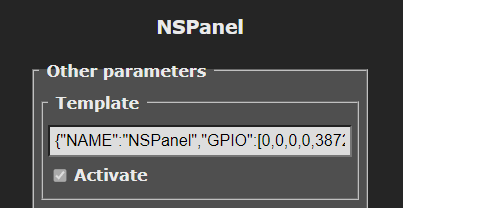
You can use the following template or copy the one on the [Tasmota Template Repo Site](https://templates.blakadder.com/sonoff_NSPanel.html).
`{"NAME":"NSPanel","GPIO":[0,0,0,0,3872,0,0,0,0,0,32,0,0,0,0,225,0,480,224,1,0,0,0,33,0,0,0,0,0,0,0,0,0,0,4736,0],"FLAG":0,"BASE":1,"CMND":"ADCParam 2,11200,10000,3950 | Sleep 0 | BuzzerPWM 1"}`
After a reboot of tasmota your screen will light up with the stock display firmware.
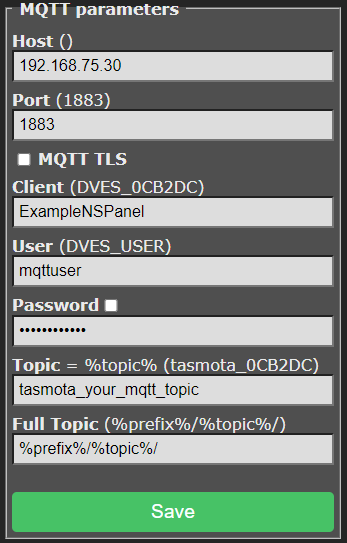
### Setup your MQTT Server in Tasmota
Configure your MQTT Server in Tasmota.
See Tasmota [MQTT Documentation](https://tasmota.github.io/docs/MQTT/) for more details.
### Upload Berry Driver to Tasmota
1. Download the autoexec.be from the repository: [Berry Driver](tasmota/autoexec.be)
2. Go to `Consoles` > `Manage File System` in Tasmota and upload the previously downloaded file.
3. Restart your NSPanel
### Flash Firmware to Nextion Screen
Note for ioBroker Users: Check the Release Notes, if the ioBroker Backend is not up to date with the current release there will be a note and you have to flash the latest compatible version from there.
#### Use your own Webserver
Upload the nspanel.tft from the lastest release to a Webserver (for example www folder of Home Assistant) and execute the following command in Tasmota Console. (Development Version: [tft file from HMI folder](HMI/nspanel.tft))
**Webserver must be HTTP, HTTPS is not supported, due to limitations of berry lang on tasmota**
`FlashNextion http://ip-address-of-your-homeassistant:8123/local/nspanel.tft`
#### Use my webserver
Due the limitations of Berry, it's not possible to download the tft file directly from github, so I'm also renting a small server where you can download the file via HTTP.
Use the one following commands to flash the latest release from this repository, just execute the following Command in Tasmota:
EU Version: `FlashNextion http://nspanel.pky.eu/lui-release.tft`
US Version Portrait: `FlashNextion http://nspanel.pky.eu/lui-us-p-release.tft`
US Version Landscape: `FlashNextion http://nspanel.pky.eu/lui-us-l-release.tft`
## Configuration
### Configuring the MQTT integration in AppDaemon
For the app to work you need a working MQTT Configuration in AppDaemon. Please add the configuration of your mqtt server, user and password to your existing `appdaemon.yaml`
NOTE: This are not the options of the AppDaemon Addon in HomeAssistant. You will find this file under: `config/appdaemon/appdeamon.yaml`
```yaml
---
secrets: /config/secrets.yaml
appdaemon:
latitude: 52.0
longitude: 4.0
elevation: 2
time_zone: Europe/Berlin
plugins:
HASS:
type: hass
MQTT:
type: mqtt
namespace: mqtt
client_id: "appdaemon"
client_host: 192.168.75.30
client_port: 1883
client_user: "mqttuser"
client_password: "mqttpassword"
client_topics: NONE
http:
url: http://127.0.0.1:5050
admin:
api:
hadashboard:
```
Please see [appdaemon.yaml](appdaemon/appdaemon.yaml) as an exmaple.
### Configure your NSPanel in AppDaemon
Confiure your NSPanel as you like, you need to edit the `apps.yaml` inside of your Appdaemon config folder.
You can have multiple nspanel sections. There are some more exmaples in the appdaemon folder of this repo.
```yaml
---
nspanel-1:
module: nspanel-lovelace-ui
class: NsPanelLovelaceUIManager
config:
panelRecvTopic: "tele/tasmota_your_mqtt_topic/RESULT"
panelSendTopic: "cmnd/tasmota_your_mqtt_topic/CustomSend"
updateMode: "auto-notify"
sleepTimeout: 20
#sleepBrightness: 10
sleepBrightness:
- time: "7:00:00"
value: 10
- time: "23:00:00"
value: 0
locale: "de_DE" # used for translations in translations.py and for localized date if babel python package is installed
screensaver:
entity: weather.k3ll3r
cards:
- type: cardEntities
entities:
- entity: switch.example_item
name: NameOverride
icon: lightbulb
- entity: light.example_item
- entity: cover.example_item
- entity: input_boolean.example_item
title: Example Entities 1
- type: cardEntities
entities:
- entity: switch.example_item
- entity: delete
- entity: cover.example_item
- entity: input_boolean.example_item
title: Example Entities 2
- type: cardEntities
entities:
- entity: binary_sensor.example_item
- entity: sensor.example_item
- entity: button.example_item
- entity: number.example_item
title: Example Entities 3
- type: cardEntities
entities:
- entity: scenes.example_item
- entity: script.example_item
- entity: button.example_item
- entity: input_button.example_item
title: Example Entities 4
- type: cardGrid
entities:
- entity: light.example_item
- entity: switch.example_item
- entity: delete
- entity: button.example_item
- entity: cover.example_item
- entity: delete # delete at the end is optional
title: Exmaple Gird
- type: cardThermo
entity: climate.example_item
- type: cardMedia
entity: media_player.example_item
- type: cardAlarm
entity: alarm_control_panel.alarmo
```
key | optional | type | default | description
-- | -- | -- | -- | --
`module` | False | string | | The module name of the app.
`class` | False | string | | The name of the Class.
`config` | False | complex | | Config/Mapping between Homeassistant and your NsPanel
Possible configuration values for config key:
key | optional | type | default | description
-- | -- | -- | -- | --
`panelRecvTopic` | False | string | `tele/tasmota_your_mqtt_topic/RESULT` | The mqtt topic used to receive messages.
`panelSendTopic` | False | string | `cmnd/tasmota_your_mqtt_topic/CustomSend` | The mqtt topic used to send messages.
`updateMode` | True | string | `auto-notify` | Update Mode; Possible values: "auto", "auto-notify", "manual"
`model` | True | string | `eu` | Model; Possible values: "eu", "us-l" and "us-p"
`sleepTimeout` | True | integer | `20` | Timeout for the screen to enter screensaver, to disable screensaver use 0
`sleepBrightness` | True | integer/complex | `20` | Brightness for the screen to enter screensaver, see example below for complex/scheduled config.
`sleepTracking` | True | string | None | Forces screensaver brightness to 0 in case entity state is not_home or off, can be a group, person or device_tracker entity.
`locale` | True | string | `en_US` | Used by babel to determinante Date format on screensaver, also used for localization.
`dateFormatBabel` | True | string | `full` | formatting options on https://babel.pocoo.org/en/latest/dates.html?highlight=name%20of%20day#date-fields
`timeFormat` | True | string | `%H:%M` | Time Format on screensaver. Substring after `?` is displayed in a seperate smaller textbox. Useful for 12h time format with AM/PM `"%I:%M ?%p"`
`dateFormat` | True | string | `%A, %d. %B %Y` | date format used if babel is not installed
`cards` | False | complex | | configuration for cards that are displayed on panel
`screensaver` | True | complex | | configuration for screensaver
`hiddenCards` | True | complex | | configuration for cards that can be accessed though navigate items
[](https://github.com/hacs/integration)

[](https://jessemillar.com/r/man-hours)
NsPanel Lovelace UI is a Firmware for the nextion screen inside of NSPanel in the Design of [HomeAssistant](https://www.home-assistant.io/)'s Lovelace UI Design.
EU Model and US Model supported (in portrait and landscape orientation)
Content of the screen is controlled by a AppDaemon Python Script installed on your HomeAssistant Instance.
(or a TypeScript on your ioBroker Instance in case you are an ioBroker User)
## Features
- Entities Page with support for cover, switch, input_boolean, binary_sensor, sensor, button, number, scenes, script, input_button and light, input_text (read-only)
- Grid Page with support for cover, switch, input_boolean, button, scenes, and light
- Detail Pages for Lights (Brightness, Temperature and Color of the Light) and for Covers (Position)
- Thermostat Page
- Media Player Card
- Alarm Control Panel
- Screensaver Page with Time, Date and Weather Information
- Localization possible (currently 38 languages)
- **Everything is dynamically configurable by a yaml config, no need to code or touch Nextion Editor**
It works with [Tasmota](https://tasmota.github.io/docs/) and MQTT.
To control the panel and update it with content from HomeAssistant there is an [AppDaemon](https://github.com/AppDaemon/appdaemon) App.
See the following picture to get an idea of the look of this firmware for NSPanel.

Some (not all) screenshots from the US Portrait Version:

## TLDR
1. Install Tasmota to NSPanel
2. Install Berry Driver in Tasmota and setup MQTT
3. Flash Nextion Firmware
4. Install AppDaemon, setup MQTT and install Backend Application
For more detailed Instructions see the following Sections:
- [How It Works](#how-it-works)
- [Requirements](#requirements)
- [Installation - Home Automation Part (Homeassistant)](#installation---home-automation-part-home-assistant)
- [Installing AppDaemon](#installing-appdaemon)
- [Installing Studio Code Server (optional, recommended)](#installing-studio-code-server-optional-recommended)
- [Installing HACS](#installing-hacs)
- [Installing AppDeamon Backend Application](#installing-appdeamon-backend-application)
- [Installation - Home Automation Part (IoBroker)](#installation---home-automation-part-iobroker)
- [Installation - NSPanel Part](#installation-nspanel-part)
- [Flash Tasmota to your NSPanel](#flash-tasmota-to-your-nspanel)
- [Configure Tasmota Template for NSPanel](#configure-tasmota-template-for-nspanel)
- [Setup your MQTT Server in Tasmota](#setup-your-mqtt-server-in-tasmota)
- [Upload Berry Driver to Tasmota](#upload-berry-driver-to-tasmota)
- [Flash Firmware to Nextion Screen](#flash-firmware-to-nextion-screen)
- [Configuration](#configuration)
- [Configuring the MQTT integration in AppDaemon](#configuring-the-mqtt-integration-in-appdaemon)
- [Configure your NSPanel in AppDaemon](#configure-your-nspanel-in-appdaemon)
- [How to update](#how-to-update)
- [FAQ](#faq---frequently-asked-questions)
## How It Works
The NSPanel has two components an esp32 which runs Tasmota in this project and the nextion display, which is controlled by the esp32 via serial.
This project contains a display firmware, which can be controlled over serial/mqtt.
It's controlled by an AppDaemon Application, which crafts the required commands from your HomeAssistant Instance.
For more details on how the display firmware works see the [README File in the HMI Folder](HMI/README.md)
## Requirements
- NSPanel
- USB to Serial TTL Adapter
- Running [Home Assistant Instance](https://www.home-assistant.io/installation/)
- Installed [MQTT Broker](https://www.home-assistant.io/docs/mqtt/broker) alongside Homeassistant
## Installation - Home Automation Part (Home Assistant)
### Installing AppDaemon
The recommended backend application for this firmware is written in a python for [AppDaemon](https://github.com/AppDaemon/appdaemon).
This means it requires a working and running version of AppDaemon.
The easiest way to install it is through Home Assistant's Supervisor Add-on Store, it will be automaticly connected to your Home Assistant Instance.

#### Add babel package to AppDaemon Container (Optional)
For localisation (date in your local language) you need to add the python package babel to your AppDaemon Installation.

### Installing Studio Code Server (optional, recommended)
You will need a way to edit the `apps.yaml` config file in the Appdaemon folder.
Install Studio Code Server from Home Assistant's Supervisor Add-on Store to easily edit configuration Files on your HomeAssistant Instance.
### Installing HACS
HACS is the Home Assistant Community Store and allows for community integrations and
automations to be updated cleanly and easily from the Home Assistant web user interface.
It's simple to install the AppDaemon app without HACS, but keeping up to date requires
manual steps that HACS will handle for you: you will be notified of updates, and they
can be installed by a click on a button.
If you want to use HACS, you will have to follow [their documentation on how to install HACS](https://hacs.xyz/docs/setup/download).
### Installing AppDaemon Backend Application
To install Lovelace UI Backend App with HACS, you will need to make sure that you enabled
AppDaemon automations in HACS, as these are not enabled by default:
1. Click on `Configuration` on the left menu bar in Home Assistant Web UI
2. Select `Devices & Services`
3. Select `Integrations`
4. Find `HACS` and click on `Configure`
5. In the window that opens, make sure that `Enable AppDaemon apps discovery & tracking`
is checked, or check it and click `Submit`
6. If you just enabled this (or just installed HACS), you might have to wait a few minutes
as all repositories are being fetched; you might hit a GitHub rate limit, which might
then require you to wait a few hours for HACS to be fully configured. In this case,
you won't be able to proceed to the next steps until HACS is ready.
Now, to install NSPanel Lovelace UI Backend with HACS, follow these steps:
1. Click on `HACS` on the left menu bar in Home Assistant Web UI
2. Click on `Automations` in the right panel
3. Click on `Explore & download repositories` in the bottom right corner
4. Search for `NSPanel`, and click on `NSPanel Lovelace UI Backend` in the list that appears
5. In the bottom right corner of the panel that appears, click on
`Download this repository with HACS`
6. A confirmation panel will appear, click on `Download`, and wait for HACS to
proceed with the download
6. The Backend Application is now installed, and HACS will inform you when updates are available
## Installation - Home Automation Part (IoBroker)
If you are looking for an ioBroker Integration instead of HomeAssistant take a look into the [Readme](ioBroker/README.md) of the iobroker folder.
Thanks to [britzelpuf](https://github.com/britzelpuf) for this integration.
## Installation - NSPanel Part
This section describes how to free your nspanel from stock firmware and get it ready for Lovelace UI 🎉
### Flash Tasmota to your NSPanel
You need to connect to your nspanel via serial and flash the [tasmota32-nspanel.bin](https://github.com/tasmota/install/raw/main/firmware/unofficial/tasmota32-nspanel.bin) to your NSPanel.
Make sure to come back to this guide, before uploading the nspanel.be/autoexec.be files.
For more deatils see the [NSPanel Page of the Tasmota Template Repository](https://templates.blakadder.com/sonoff_NSPanel.html).
### Configure Tasmota Template for NSPanel
Configure the NSPanel template for Tasmota. (Go to Configuration and Configure Other and paste the template there, make sure to tick the activate checkbox)

You can use the following template or copy the one on the [Tasmota Template Repo Site](https://templates.blakadder.com/sonoff_NSPanel.html).
`{"NAME":"NSPanel","GPIO":[0,0,0,0,3872,0,0,0,0,0,32,0,0,0,0,225,0,480,224,1,0,0,0,33,0,0,0,0,0,0,0,0,0,0,4736,0],"FLAG":0,"BASE":1,"CMND":"ADCParam 2,11200,10000,3950 | Sleep 0 | BuzzerPWM 1"}`
After a reboot of tasmota your screen will light up with the stock display firmware.
### Setup your MQTT Server in Tasmota
Configure your MQTT Server in Tasmota.
See Tasmota [MQTT Documentation](https://tasmota.github.io/docs/MQTT/) for more details.

### Upload Berry Driver to Tasmota
1. Download the autoexec.be from the repository: [Berry Driver](tasmota/autoexec.be)
2. Go to `Consoles` > `Manage File System` in Tasmota and upload the previously downloaded file.
3. Restart your NSPanel
### Flash Firmware to Nextion Screen
Note for ioBroker Users: Check the Release Notes, if the ioBroker Backend is not up to date with the current release there will be a note and you have to flash the latest compatible version from there.
#### Use your own Webserver
Upload the nspanel.tft from the lastest release to a Webserver (for example www folder of Home Assistant) and execute the following command in Tasmota Console. (Development Version: [tft file from HMI folder](HMI/nspanel.tft))
**Webserver must be HTTP, HTTPS is not supported, due to limitations of berry lang on tasmota**
`FlashNextion http://ip-address-of-your-homeassistant:8123/local/nspanel.tft`
#### Use my webserver
Due the limitations of Berry, it's not possible to download the tft file directly from github, so I'm also renting a small server where you can download the file via HTTP.
Use the one following commands to flash the latest release from this repository, just execute the following Command in Tasmota:
EU Version: `FlashNextion http://nspanel.pky.eu/lui-release.tft`
US Version Portrait: `FlashNextion http://nspanel.pky.eu/lui-us-p-release.tft`
US Version Landscape: `FlashNextion http://nspanel.pky.eu/lui-us-l-release.tft`
## Configuration
### Configuring the MQTT integration in AppDaemon
For the app to work you need a working MQTT Configuration in AppDaemon. Please add the configuration of your mqtt server, user and password to your existing `appdaemon.yaml`
NOTE: This are not the options of the AppDaemon Addon in HomeAssistant. You will find this file under: `config/appdaemon/appdeamon.yaml`
```yaml
---
secrets: /config/secrets.yaml
appdaemon:
latitude: 52.0
longitude: 4.0
elevation: 2
time_zone: Europe/Berlin
plugins:
HASS:
type: hass
MQTT:
type: mqtt
namespace: mqtt
client_id: "appdaemon"
client_host: 192.168.75.30
client_port: 1883
client_user: "mqttuser"
client_password: "mqttpassword"
client_topics: NONE
http:
url: http://127.0.0.1:5050
admin:
api:
hadashboard:
```
Please see [appdaemon.yaml](appdaemon/appdaemon.yaml) as an exmaple.
### Configure your NSPanel in AppDaemon
Confiure your NSPanel as you like, you need to edit the `apps.yaml` inside of your Appdaemon config folder.
You can have multiple nspanel sections. There are some more exmaples in the appdaemon folder of this repo.
```yaml
---
nspanel-1:
module: nspanel-lovelace-ui
class: NsPanelLovelaceUIManager
config:
panelRecvTopic: "tele/tasmota_your_mqtt_topic/RESULT"
panelSendTopic: "cmnd/tasmota_your_mqtt_topic/CustomSend"
updateMode: "auto-notify"
sleepTimeout: 20
#sleepBrightness: 10
sleepBrightness:
- time: "7:00:00"
value: 10
- time: "23:00:00"
value: 0
locale: "de_DE" # used for translations in translations.py and for localized date if babel python package is installed
screensaver:
entity: weather.k3ll3r
cards:
- type: cardEntities
entities:
- entity: switch.example_item
name: NameOverride
icon: lightbulb
- entity: light.example_item
- entity: cover.example_item
- entity: input_boolean.example_item
title: Example Entities 1
- type: cardEntities
entities:
- entity: switch.example_item
- entity: delete
- entity: cover.example_item
- entity: input_boolean.example_item
title: Example Entities 2
- type: cardEntities
entities:
- entity: binary_sensor.example_item
- entity: sensor.example_item
- entity: button.example_item
- entity: number.example_item
title: Example Entities 3
- type: cardEntities
entities:
- entity: scenes.example_item
- entity: script.example_item
- entity: button.example_item
- entity: input_button.example_item
title: Example Entities 4
- type: cardGrid
entities:
- entity: light.example_item
- entity: switch.example_item
- entity: delete
- entity: button.example_item
- entity: cover.example_item
- entity: delete # delete at the end is optional
title: Exmaple Gird
- type: cardThermo
entity: climate.example_item
- type: cardMedia
entity: media_player.example_item
- type: cardAlarm
entity: alarm_control_panel.alarmo
```
key | optional | type | default | description
-- | -- | -- | -- | --
`module` | False | string | | The module name of the app.
`class` | False | string | | The name of the Class.
`config` | False | complex | | Config/Mapping between Homeassistant and your NsPanel
Possible configuration values for config key:
key | optional | type | default | description
-- | -- | -- | -- | --
`panelRecvTopic` | False | string | `tele/tasmota_your_mqtt_topic/RESULT` | The mqtt topic used to receive messages.
`panelSendTopic` | False | string | `cmnd/tasmota_your_mqtt_topic/CustomSend` | The mqtt topic used to send messages.
`updateMode` | True | string | `auto-notify` | Update Mode; Possible values: "auto", "auto-notify", "manual"
`model` | True | string | `eu` | Model; Possible values: "eu", "us-l" and "us-p"
`sleepTimeout` | True | integer | `20` | Timeout for the screen to enter screensaver, to disable screensaver use 0
`sleepBrightness` | True | integer/complex | `20` | Brightness for the screen to enter screensaver, see example below for complex/scheduled config.
`sleepTracking` | True | string | None | Forces screensaver brightness to 0 in case entity state is not_home or off, can be a group, person or device_tracker entity.
`locale` | True | string | `en_US` | Used by babel to determinante Date format on screensaver, also used for localization.
`dateFormatBabel` | True | string | `full` | formatting options on https://babel.pocoo.org/en/latest/dates.html?highlight=name%20of%20day#date-fields
`timeFormat` | True | string | `%H:%M` | Time Format on screensaver. Substring after `?` is displayed in a seperate smaller textbox. Useful for 12h time format with AM/PM `"%I:%M ?%p"`
`dateFormat` | True | string | `%A, %d. %B %Y` | date format used if babel is not installed
`cards` | False | complex | | configuration for cards that are displayed on panel
`screensaver` | True | complex | | configuration for screensaver
`hiddenCards` | True | complex | | configuration for cards that can be accessed though navigate items
- `af_xx` - Afrikaans - `ar_xx` - Arabic - `bg_xx` - Bulgarian - `ca_xx` - Catalan - `cs_xx` - Czech - `da_xx` - Danish - `de_xx` - German - `el_xx` - Greek - `en_xx` - English - `es_xx` - Spanish - `et_xx` - Estonian - `fa_xx` - Persian - `fi_xx` - Finnish - `fr_xx` - French - `he_xx` - Hebrew - `hr_xx` - Croatian - `hu_xx` - Hungarian - `hy_xx` - Armenian - `id_xx` - Indonesian - `is_xx` - Icelandic - `it_xx` - Italian - `lb_xx` - Luxembourgish - `lt_xx` - Lithuanian - `lv_xx` - Latvian - `nb_xx` - Norwegian - `nl_xx` - Dutch - `nn_xx` - Norwegian - `pl_xx` - Polish - `pt_xx` - Portuguese - `ro_xx` - Romanian - `ru_xx` - Russian - `sk_xx` - Slovak - `sl_xx` - Slovenian - `sv_xx` - Swedish - `th_xx` - Thai - `tr_xx` - Turkish - `uk_xx` - Ukrainian - `vi_xx` - Vietnamese