three.js Zoom to fit part #555

Closed
opened 2021-10-12 22:57:57 +02:00 by Irev-Dev · 7 comments
Irev-Dev commented 2021-10-12 22:57:57 +02:00 (Migrated from github.com)

Parts like jscad-oil-pumpjack are cut off when they first load.
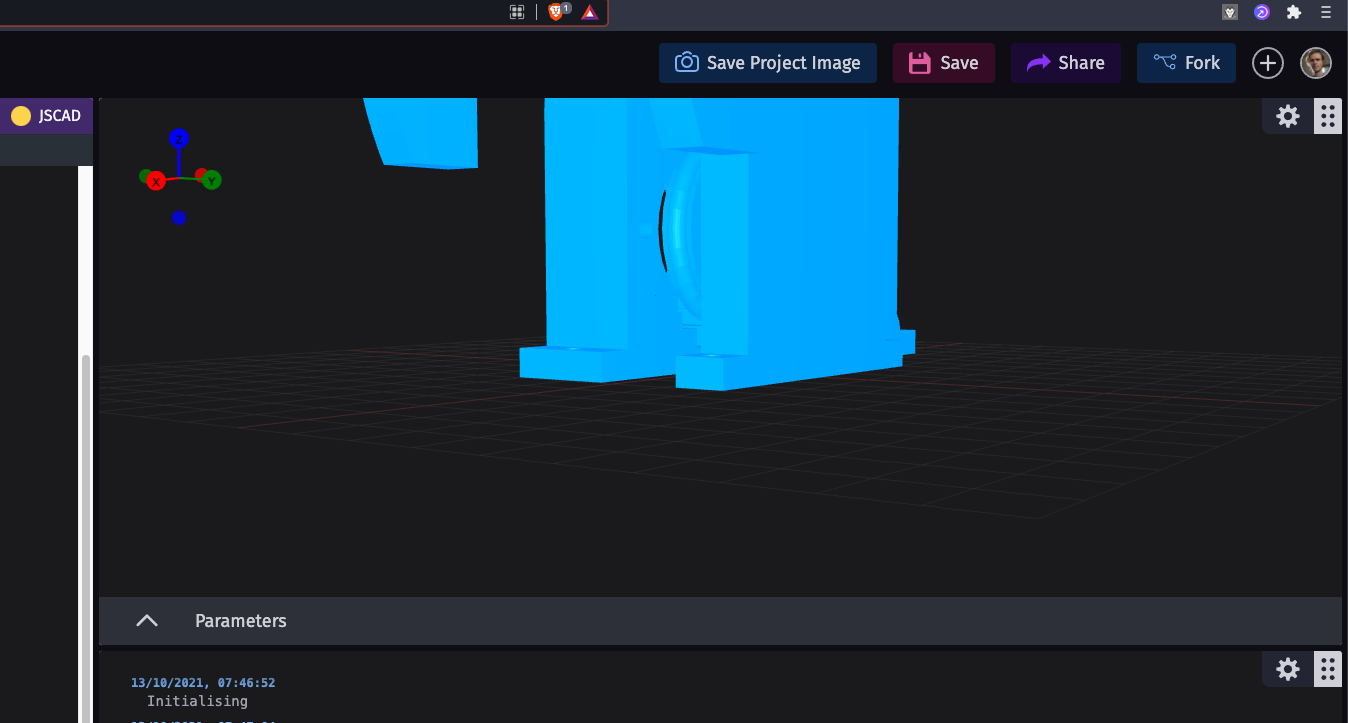
image

We instead want to change the zoom when the part first loads so that the whole parts is in view.
We're using react-three-fiber (react wrapper for three.js)

Here's a relevant discussion on how to do it with .getBoundingSphere: https://github.com/pmndrs/react-three-fiber/issues/67.

The file where this will most likely need to be implemented is app/web/src/components/IdeViewer/IdeViewer.tsx, the Controls function on line 56 is a good place to start since there is already camera related code there.

(FYI state-management is handled in app/web/src/helpers/hooks/useIdeState.ts I don't think you''ll need to make changes there, but is useful context for where state comes from.)

You should be away of one nuance, that when it's an openSCAD project, it loads images not 3d-meshes, so nothing should be done in these cases, for the most part you can ignore this detail and I can help fix it up later.

Follow the instructions in CONTRIBUTING.md to get setup, and of course ask for help here or in the dev-help discord channel.

If you'd like to contribute the CadHub but this issue is taken or you'd prefer something else, have a look at #535 to see if there's something else you would like

Parts like [jscad-oil-pumpjack](https://cadhub.xyz/u/matiasmiche/jscad-oil-pumpjack/ide) are cut off when they first load. ![image](https://user-images.githubusercontent.com/29681384/137027214-4eff8321-b0a1-4dbc-96c0-3dbb800cc4b6.png) We instead want to change the zoom when the part first loads so that the whole parts is in view. We're using `react-three-fiber` (react wrapper for three.js) Here's a relevant discussion on how to do it with `.getBoundingSphere`: https://github.com/pmndrs/react-three-fiber/issues/67. The file where this will most likely need to be implemented is `app/web/src/components/IdeViewer/IdeViewer.tsx`, the `Controls` function on line 56 is a good place to start since there is already camera related code there. (FYI state-management is handled in `app/web/src/helpers/hooks/useIdeState.ts` I don't think you''ll need to make changes there, but is useful context for where `state` comes from.) You should be away of one nuance, that when it's an openSCAD project, it loads images not 3d-meshes, so nothing should be done in these cases, for the most part you can ignore this detail and I can help fix it up later. Follow the instructions in [CONTRIBUTING.md](https://github.com/Irev-Dev/cadhub/blob/main/CONTRIBUTING.md) to get setup, and of course ask for help here or in the [dev-help discord channel](https://discord.gg/Vgmky37UtD). If you'd like to contribute the CadHub but this issue is taken or you'd prefer something else, have a look at #535 to see if there's something else you would like
lejara commented 2021-10-14 00:13:08 +02:00 (Migrated from github.com)

hello!
first time here
is it cool if i can take this on?

hello! first time here is it cool if i can take this on?
Irev-Dev commented 2021-10-14 09:22:28 +02:00 (Migrated from github.com)

I can see you've already forked it @lejara, how's it going so far?
Let me know if I can help in anyway.

I can see you've already forked it @lejara, how's it going so far? Let me know if I can help in anyway.
lejara commented 2021-10-14 23:07:33 +02:00 (Migrated from github.com)

so far i got the dev environment up and running
ill let you know if i need anything, ty!

so far i got the dev environment up and running ill let you know if i need anything, ty!
lejara commented 2021-10-15 21:13:12 +02:00 (Migrated from github.com)

okay i am stuck

i am having trouble getting the Object3D instance at line 56. in app/web/src/components/IdeViewer/IdeViewer.tsx

When consoling scene.children i can see that the meshes are not loaded yet when the first few calls of the Controls function is made. In the final call of the function, 4 meshes are listed.

When checking the state the state.objectData are still at its default values.

I feel like i am missing something, but i am not too sure...

okay i am stuck i am having trouble getting the `Object3D` instance at line 56. in `app/web/src/components/IdeViewer/IdeViewer.tsx` When consoling `scene.children` i can see that the meshes are not loaded yet when the first few calls of the `Controls` function is made. In the final call of the function, 4 meshes are listed. When checking the `state` the `state.objectData` are still at its default values. I feel like i am missing something, but i am not too sure...
Irev-Dev commented 2021-10-15 21:29:40 +02:00 (Migrated from github.com)

I'll take a look and see if I can get past this first hurdle.

I'll take a look and see if I can get past this first hurdle.
Irev-Dev commented 2021-10-16 01:17:35 +02:00 (Migrated from github.com)

Hey @lejara,

I think I might have lead you astray with the Controls function.
I did a little refactoring to simply things in kurt/zoom-to-fit I left a few comments in 0399ff01b4
Feel free to do what every with that branch, commit to it, branch off again.

Does that help?

Hey @lejara, I think I might have lead you astray with the `Controls` function. I did a little refactoring to simply things in `kurt/zoom-to-fit` I left a few comments in https://github.com/Irev-Dev/cadhub/commit/0399ff01b4d3850dcb1486ea27845068c1c04907 Feel free to do what every with that branch, commit to it, branch off again. Does that help?
lejara commented 2021-10-16 17:23:09 +02:00 (Migrated from github.com)

ah i see, it does!
i should have a PR later in the day!

ah i see, it does! i should have a PR later in the day!
Sign in to join this conversation.
No Label
1 Participants
Notifications
Due Date
No due date set.
Dependencies

No dependencies set.

Reference: h3n3/cadhub#555