social card capture not working #517

Closed
opened 2021-09-18 10:23:32 +02:00 by hrgdavor · 3 comments
hrgdavor commented 2021-09-18 10:23:32 +02:00 (Migrated from github.com)
https://cadhub.xyz/u/hrgdavor/Cookie-Shape-Surprise https://cards-dev.twitter.com/validator ![image](https://user-images.githubusercontent.com/2480762/133882117-8445b298-d89e-4513-a642-ff3118bd9d2d.png)
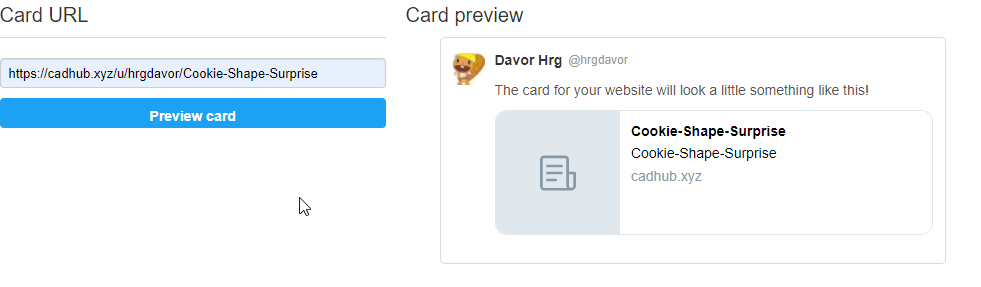
Irev-Dev commented 2021-09-18 22:02:59 +02:00 (Migrated from github.com)

The social card are a bit broken (just with how they look), I'll use this issue to fix that as well.

But in regards to what your raising directly in this issue, I appreciate you giving an example. There are a few things to consider so I'll list them.

  • Social media card showing up on different website depends on a pre-rendering service, which is because the app is a SPA twitter etc won't wait for js to load and then execute it, so a pre rendering service fills in the gap. However this means it will take 24-48 hours or things to update as that how long the pre-rendering service caches things for. this is not configureable with the current service.
  • Seeing if the image it's self is working can be done for looking for the og:image meta tag in the browser.
    image
    In this case ti looks like it's not working (http://res.cloudinary.com/irevdev/image/upload/c_scale,w_1200/v1/CadHub/u-hrgdavor-slash-p-Cookie-Shape-Surprise)
  • I suspect one way this might happen is if you change the project title as that would be used for the original url to the image, I'll verify if that's the case or not and see there's a fix to update the image url.
The social card are a bit broken (just with how they look), I'll use this issue to fix that as well. But in regards to what your raising directly in this issue, I appreciate you giving an example. There are a few things to consider so I'll list them. - Social media card showing up on different website depends on a pre-rendering service, which is because the app is a SPA twitter etc won't wait for js to load and then execute it, so a pre rendering service fills in the gap. However this means it will take **24-48 hours** or things to update as that how long the pre-rendering service caches things for. this is not configureable with the current service. - Seeing if the image it's self is working can be done for looking for the og:image meta tag in the browser. ![image](https://user-images.githubusercontent.com/29681384/133907116-0ff043ca-0268-44e4-b16a-cb495f36f10d.png) In this case ti looks like it's not working (http://res.cloudinary.com/irevdev/image/upload/c_scale,w_1200/v1/CadHub/u-hrgdavor-slash-p-Cookie-Shape-Surprise) - I suspect one way this might happen is if you change the project title as that would be used for the original url to the image, I'll verify if that's the case or not and see there's a fix to update the image url.
hrgdavor commented 2021-09-18 22:29:32 +02:00 (Migrated from github.com)

Yeas I changed the title :) that probaly caused it

this one is ok https://cadhub.xyz/u/matiasmiche/jscad-oil-pumpjack

Yeas I changed the title :) that probaly caused it this one is ok https://cadhub.xyz/u/matiasmiche/jscad-oil-pumpjack
Irev-Dev commented 2021-10-11 22:21:09 +02:00 (Migrated from github.com)

Things I'll come back to (will probably make a new issue) but listing while on my mind.

  • 3d view resets after capture 😢
  • Add save both button
  • Maybe link both thumbnail and social card cameras together? not sure if that will be janky
  • Automatically regenerate images when title or description changes
    • Capture camera position/view for the enable the above
    • Zoom to fit will be useful to have prior to as it will help make sure the capture still looks good even if the part size changes
  • Update card to center the title a little more vertically if there is no description
  • Figure out what to do with safari (html-to-image will not work with safari) inform user it won't work.
  • Talk to @franknoirot about a better design/layout for the tab
    • Maybe an arrow and text prompting the user to change the camera perspective
    • Maybe a little warning if the user is about to save a social card but hasn't added a description yet.
  • Add banner similar to fork for when the user hasn't saved images get.
    image
Things I'll come back to (will probably make a new issue) but listing while on my mind. - 3d view resets after capture 😢 - Add save both button - Maybe link both thumbnail and social card cameras together? not sure if that will be janky - Automatically regenerate images when title or description changes - Capture camera position/view for the enable the above - Zoom to fit will be useful to have prior to as it will help make sure the capture still looks good even if the part size changes - Update card to center the title a little more vertically if there is no description - Figure out what to do with safari (html-to-image will not work with safari) inform user it won't work. - Talk to @franknoirot about a better design/layout for the tab - Maybe an arrow and text prompting the user to change the camera perspective - Maybe a little warning if the user is about to save a social card but hasn't added a description yet. - Add banner similar to fork for when the user hasn't saved images get. ![image](https://user-images.githubusercontent.com/29681384/136850895-94e1152c-bfb6-422d-b4ec-4430296bbde5.png)
Sign in to join this conversation.
No Label
1 Participants
Notifications
Due Date
No due date set.
Dependencies

No dependencies set.

Reference: h3n3/cadhub#517