Create an internal CadHub IDE for future CAD package integrations #218

Closed
opened 2021-02-28 20:40:20 +01:00 by franknoirot · 23 comments
franknoirot commented 2021-02-28 20:40:20 +01:00 (Migrated from github.com)

Getting the container internalized is the first step in converting the IDE. After this step instead of hosting the CascadeStudio editor wholecloth, each of its editor's panes will be hosted within our IDE layout manager. This also allows us to use a more React-ecosystem solution for layout management than the golden-layout package they use.

Getting the container internalized is the first step in converting the IDE. After this step instead of hosting the CascadeStudio editor wholecloth, each of its editor's panes will be hosted within our IDE layout manager. This also allows us to use a more React-ecosystem solution for layout management than the `golden-layout` package they use.
franknoirot commented 2021-02-28 20:41:08 +01:00 (Migrated from github.com)

I've been looking around for layout manager replacements more in the React ecosystem and found these three that seem promising:

  1. React-Grid-Layout: https://www.npmjs.com/package/react-grid-layout
  2. React-Mosaic: https://www.npmjs.com/package/react-mosaic-component
  3. FlexLayout-React: https://www.npmjs.com/package/flexlayout-react

I ordered them in apparent maturity and adoption. Grafana and AWS Cloudfront use React-Grid-Layout so I'd like to explore it first if that's cool.

I've been looking around for layout manager replacements more in the React ecosystem and found these three that seem promising: 1. React-Grid-Layout: https://www.npmjs.com/package/react-grid-layout 2. React-Mosaic: https://www.npmjs.com/package/react-mosaic-component 3. FlexLayout-React: https://www.npmjs.com/package/flexlayout-react I ordered them in apparent maturity and adoption. Grafana and AWS Cloudfront use **React-Grid-Layout** so I'd like to explore it first if that's cool.
Irev-Dev commented 2021-02-28 21:35:12 +01:00 (Migrated from github.com)

I've had a quick look at them and starting out with the most mature makes sense ☑️

From looking at the demo of react-grid-layout, the showcase demo
https://strml.github.io/react-grid-layout/examples/0-showcase.html
shows a static window, good to see there are features like that in case we want to be opinionated with some part of the layout and lock it in place (not saying we will, just good it's there).

Two things come to mind:

  1. question around persisting the layout, after giving some thought I definitely think we should just have a default layout that the user can change, but just snaps back to default with a refresh, and maybe down the track we can look into persisting layouts if users are asking for it, it seems like there are too many edge cases for us to get it right without feedback eg If we are persisting do we persist the layout per part of the same layout for that user, if you edit someone else part and tweak the layout should we save that too?

  2. I doubt using one of these grid layouts will be a problem, but it doesn't work out. I would also be happy with a fairly simple split pain layout that only has resizing between the two panes. The codersandbox layout is pretty simple after all.

I've had a quick look at them and starting out with the most mature makes sense ☑️ From looking at the demo of `react-grid-layout`, the showcase demo https://strml.github.io/react-grid-layout/examples/0-showcase.html shows a static window, good to see there are features like that in case we want to be opinionated with some part of the layout and lock it in place (not saying we will, just good it's there). Two things come to mind: 1) question around persisting the layout, after giving some thought I definitely think we should just have a default layout that the user can change, but just snaps back to default with a refresh, and maybe down the track we can look into persisting layouts if users are asking for it, it seems like there are too many edge cases for us to get it right without feedback eg If we are persisting do we persist the layout per part of the same layout for that user, if you edit someone else part and tweak the layout should we save that too? 2) I doubt using one of these grid layouts will be a problem, but it doesn't work out. I would also be happy with a fairly simple split pain layout that only has resizing between the two panes. The codersandbox layout is pretty simple after all.
franknoirot commented 2021-02-28 23:48:58 +01:00 (Migrated from github.com)

I agree with both your points. Deciding policy and logic around saving layout will take some time so I think that should be a much later initiative. Yeah that's a good point if this avenue doesn't work a split pane solution will cover for a long time I bet.

I agree with both your points. Deciding policy and logic around saving layout will take some time so I think that should be a much later initiative. Yeah that's a good point if this avenue doesn't work a split pane solution will cover for a long time I bet.
franknoirot commented 2021-03-01 03:59:58 +01:00 (Migrated from github.com)

I have a rough implementation using react-grid-layout that shows an instance of @monaco-editor/react in the left pane of the layout and 2 dummy frames to the right. @Irev-Dev should I push these to an ide branch on here so you can see my progress?

I'm a little stuck on how to get CascadeStudio isolated to just one pane of the layout. The CascadeView.js file appears to be decoupled but really isn't, as it assumes an API for the view's container that is very specific to golden-layout (see this line for an example). I don't want any of the layout logic within CascadeView.js but want all the rendering and WebGL handling that's in there. I'm not sure what would be best, create a wrapper for the container that has those specific methods that this folder expects?

I have a rough implementation using `react-grid-layout` that shows an instance of `@monaco-editor/react` in the left pane of the layout and 2 dummy frames to the right. @Irev-Dev should I push these to an `ide` branch on here so you can see my progress? I'm a little stuck on how to get CascadeStudio isolated to just one pane of the layout. The `CascadeView.js` file appears to be decoupled but really isn't, as it assumes an API for the view's container that is very specific to `golden-layout` (see [this line](https://github.com/Irev-Dev/CascadeStudio/blob/aa352c5de68c75d06e2e1bb7a15767dd2bf91f4c/js/MainPage/CascadeView.js#L63) for an example). I don't want any of the layout logic within `CascadeView.js` but want all the rendering and WebGL handling that's in there. I'm not sure what would be best, create a wrapper for the container that has those specific methods that this folder expects?
franknoirot commented 2021-03-01 04:37:38 +01:00 (Migrated from github.com)

I've created an ide branch where progress can be tracked.

I've created an [`ide` branch](https://github.com/Irev-Dev/cadhub/tree/ide) where progress can be tracked.
Irev-Dev commented 2021-03-01 09:59:44 +01:00 (Migrated from github.com)

I've had a quick look at your branch. I'm guessing you didn't start making as changes to the CascadeStudio submodule? You've looked at CascadeView.js but not made any changes yet?

I've had a quick look at your branch. I'm guessing you didn't start making as changes to the CascadeStudio submodule? You've looked at `CascadeView.js` but not made any changes yet?
franknoirot commented 2021-03-01 14:50:02 +01:00 (Migrated from github.com)

Yeah exactly @Irev-Dev I was looking for a way to integrate without making changes to their code, just stuff outside it. But had their already been modification to these files? Because then I can go ahead and make it work with a few more, and we can figure out a solution with less technical debt in a bit.

Yeah exactly @Irev-Dev I was looking for a way to integrate without making changes to their code, just stuff outside it. But had their already been modification to these files? Because then I can go ahead and make it work with a few more, and we can figure out a solution with less technical debt in a bit.
Irev-Dev commented 2021-03-01 21:00:25 +01:00 (Migrated from github.com)

Yeah I could have made this clearer, (submodules don't make it super clear where the submodule comes from),
but basically my fork of CascadeStudio is here, and there are two important branches in the fork, kurt/webpack and cadhub-fork.

  • kurt/webpack is the branch that's in PR on cascadeStudio
  • cadhub-fork is the branch that checkout out in Cadhub (that's what we're using atm)

Originally I didn't want to start using the webpack work in Cadhub until it got merged (incase it didn't) but ultimately I decided that it was worth using if it didn't get merged as the integration without it was so much more hacky, and I had bugs, for one thing I had a race condition that I couldn't solve, basically if open the website on the homepage then navigated to the IDE evenything worked fine, but you when directly to IDE, or refresh on the IDE, the part would never generate I think because the order things loaded. Because so much loaded with just <srcipt src="" />s in the index.html they couldn't be controlled in the same way when your using modules/bundling.

Wanting to stay away from modifying CascadeStudio makes sense, but we may have to. There has been some progress on my webpack PR so it's probably best to wait and see what happens there. Having said that if you do start hacking on the CascadeStudio code, you'll become more familiar with how it hangs together and that mightn't be a bad thing.

Yeah I could have made this clearer, (submodules don't make it super clear where the submodule comes from), but basically my [fork of CascadeStudio is here](https://github.com/Irev-Dev/CascadeStudio), and there are two important branches in the fork, `kurt/webpack` and `cadhub-fork`. - `kurt/webpack` is the branch that's in PR on cascadeStudio - `cadhub-fork` is the branch that checkout out in Cadhub (that's what we're using atm) Originally I didn't want to start using the webpack work in Cadhub until it got merged (incase it didn't) but ultimately I decided that it was worth using if it didn't get merged as the integration without it was so much more hacky, and I had bugs, for one thing I had a race condition that I couldn't solve, basically if open the website on the homepage then navigated to the IDE evenything worked fine, but you when directly to IDE, or refresh on the IDE, the part would never generate I think because the order things loaded. Because so much loaded with just `<srcipt src="" />`s in the `index.html` they couldn't be controlled in the same way when your using modules/bundling. Wanting to stay away from modifying CascadeStudio makes sense, but we may have to. There has been some progress on my webpack PR so it's probably best to wait and see what happens there. Having said that if you do start hacking on the CascadeStudio code, you'll become more familiar with how it hangs together and that mightn't be a bad thing.
franknoirot commented 2021-03-03 01:48:18 +01:00 (Migrated from github.com)

Ah great thank you for the explanation! I was confused by the two branches, that's all understandable.

@Irev-Dev just an update, yesterday I started messing around with the possibility of editing CascadeMain.js and the other CascadeStudio state management pieces to make them work. I do think we'll need to do something of that sort, because it really does seem like they're all very interdependent other than CascadeWorker which is nicely decoupled, I was struggling even when allowing myself to edit directly. Worse comes to worst I think we can rewrite the initialization code and just work with the Worker pieces.

Although like you mentioned on Discord, I'm wondering if instead of working to get CascadeStudio working, I should pause this and start a Discussion about what API and features we want on the CadHub editor generally speaking? I have learned a fair bit about the events it needs to handle from digging in CascadeStudio, which I bet you have more insight into after explore the OpenSCAD integration and your work on CascadeStudio.

Ah great thank you for the explanation! I was confused by the two branches, that's all understandable. @Irev-Dev just an update, yesterday I started messing around with the possibility of editing `CascadeMain.js` and the other CascadeStudio state management pieces to make them work. I do think we'll need to do something of that sort, because it really does seem like they're all very interdependent other than CascadeWorker which is nicely decoupled, I was struggling even when allowing myself to edit directly. Worse comes to worst I think we can rewrite the initialization code and just work with the Worker pieces. Although like you mentioned on Discord, I'm wondering if instead of working to get CascadeStudio working, I should pause this and start a Discussion about what API and features we want on the CadHub editor generally speaking? I have learned a fair bit about the events it needs to handle from digging in CascadeStudio, which I bet you have more insight into after explore the OpenSCAD integration and your work on CascadeStudio.
franknoirot commented 2021-03-03 02:46:40 +01:00 (Migrated from github.com)

I can move this over to a Discussion if that's better, just need to get my initial thoughts on this editor's API down:

Layout

Managed by IdeContainer component, which employs react-grid-layout

  • onLayoutChange: needs to be written to automatically scale/move other panes to fill remaining space in reaction to dragged/resized item's new size and position.
  • All other state is managed within the RGL component

Editor

Managed by IdeEditor component (TODO), which employs @monaco-editor/react

  • onInitialize: hook to allow CAD package to initialize any language packages (CascadeStudio has some)
  • onCodeChange: hook that won't be used currently but may be with a live-updating CAD package
  • onError: hook to do any custom error highlighting (CascadeStudio has this, might just be okay to be owned by the editor not the CAD package?)

Viewer

Managed by IdeViewer component (TODO), which hooks into each CAD package via a tailored controller within /helpers/cadPackages/{cadePackageName} (maybe? open to other directory structures).

  • onRender: hook to run the render logic of the CAD package. Will connect to F5 keyboard listener, and potentially a UI button and save callback.
  • onCapture: hook to save an image of the CAD package's view. Will connect to Set Part Image button and potentially F6 keyboard listener (?).
  • onExport: hook to export model from CAD package's view. Will connect to Export button (and potentially a keyboard shortcut? I like the idea of every action having a keybinding).

Console

Managed by IdeConsole component (TODO), which is a standard React component

  • onMessage: hook to post a message within the console.
  • onError: hook to post error within the console.

Let me know any thoughts that gives you! I might be playing fast-and-loose with the term "hook", "event" might be a better term. The aim of this is to find a regular API to target when integrating any new CAD packages, like we don't care how they make it happen, but each of those events should be handled by the CAD package's controller script.

I can move this over to a Discussion if that's better, just need to get my initial thoughts on this editor's API down: ## Layout Managed by `IdeContainer` component, which employs `react-grid-layout` - onLayoutChange: needs to be written to automatically scale/move other panes to fill remaining space in reaction to dragged/resized item's new size and position. - All other state is managed within the RGL component ## Editor Managed by `IdeEditor` component (**TODO**), which employs `@monaco-editor/react` - onInitialize: hook to allow CAD package to initialize any language packages (CascadeStudio has some) - onCodeChange: hook that won't be used currently but may be with a live-updating CAD package - onError: hook to do any custom error highlighting (CascadeStudio has this, might just be okay to be owned by the editor not the CAD package?) ## Viewer Managed by `IdeViewer` component (**TODO**), which hooks into each CAD package via a tailored controller within `/helpers/cadPackages/{cadePackageName}` (maybe? open to other directory structures). - onRender: hook to run the render logic of the CAD package. Will connect to F5 keyboard listener, and potentially a UI button and save callback. - onCapture: hook to save an image of the CAD package's view. Will connect to Set Part Image button and potentially F6 keyboard listener (?). - onExport: hook to export model from CAD package's view. Will connect to Export button (and potentially a keyboard shortcut? I like the idea of every action having a keybinding). ## Console Managed by `IdeConsole` component (**TODO**), which is a standard React component - onMessage: hook to post a message within the console. - onError: hook to post error within the console. Let me know any thoughts that gives you! I might be playing fast-and-loose with the term "hook", "event" might be a better term. The aim of this is to find a regular API to target when integrating any new CAD packages, like we don't care how they make it happen, but each of those events should be handled by the CAD package's controller script.
Irev-Dev commented 2021-03-03 09:23:20 +01:00 (Migrated from github.com)

Nice, that's more or less how I was thinking about it. With input/callbacks like that we should be able to swap out the Cad-package pretty easily. Here's my visual interpretation
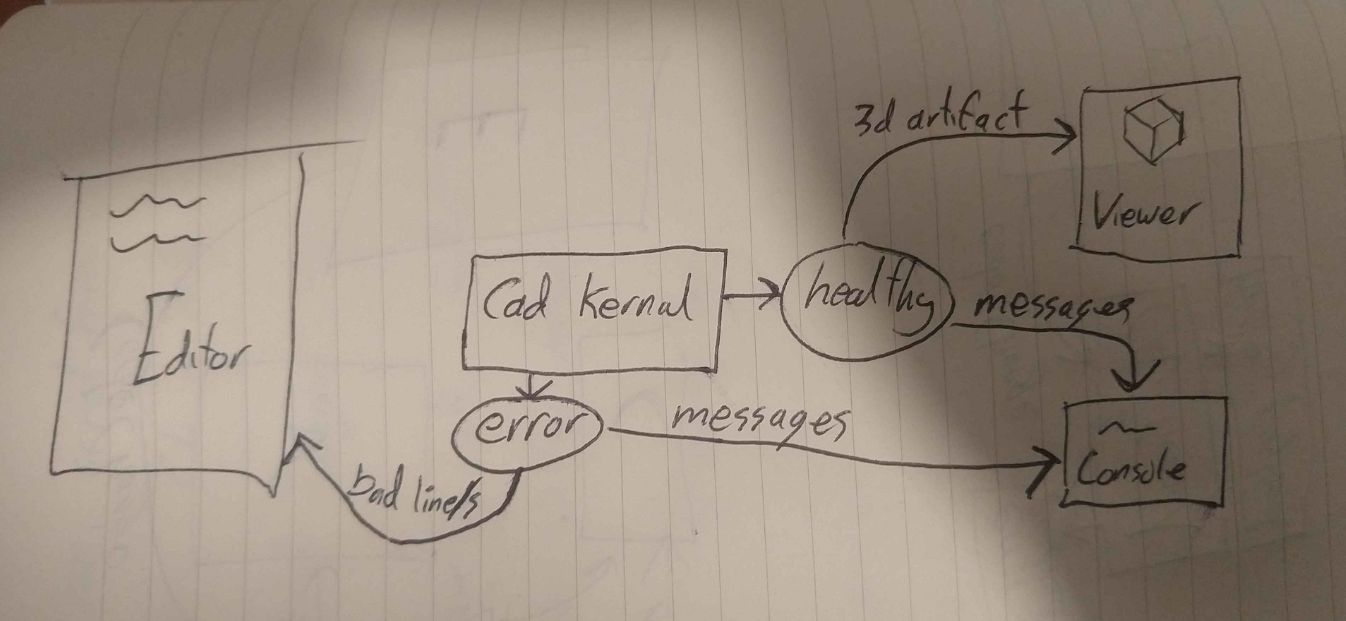
image
lol I missed a line going from the editor the kernal with "code change".

It's ignoring initialisation, but Basically the the Cad-kernal acts like a pure function taking code and spitting out a health or error payload, where the cad-kernal can be openscad, CascadeStudio, whatever, we'll just do what ever wrapping we need to, to make it has the same interface. Under the hood the openscad kernal can hit an endpoint and the cascadeStudio can fire off a worker, but the rest of the IDE doesn't have to care about how it's returning the result.

It might get a bit more complicated with multiple files, but I only in payload not conceptually, and if we ever do get interaction between editor and 3d (highlighting when mousing over the other) we'll have to add that, but I don't think that invalidates anything here.

I am a little confused by all the onX only because I normally read onX as a callback for components to send data back up the tree, but onError in the Console section for example is just a data prop? Maybe it does need to be an event since the logs should accumulate. About to eat, I'll have another look later.

Nice, that's more or less how I was thinking about it. With input/callbacks like that we should be able to swap out the Cad-package pretty easily. Here's my visual interpretation ![image](https://user-images.githubusercontent.com/29681384/109773418-48c60980-7c53-11eb-84b5-9dea311d053f.png) lol I missed a line going from the editor the kernal with "code change". It's ignoring initialisation, but Basically the the Cad-kernal acts like a pure function taking code and spitting out a health or error payload, where the cad-kernal can be openscad, CascadeStudio, whatever, we'll just do what ever wrapping we need to, to make it has the same interface. Under the hood the openscad kernal can hit an endpoint and the cascadeStudio can fire off a worker, but the rest of the IDE doesn't have to care about how it's returning the result. It might get a bit more complicated with multiple files, but I only in payload not conceptually, and if we ever do get interaction between editor and 3d (highlighting when mousing over the other) we'll have to add that, but I don't think that invalidates anything here. I am a little confused by all the `onX` only because I normally read `onX` as a callback for components to send data back up the tree, but `onError` in the Console section for example is just a data prop? Maybe it does need to be an event since the logs should accumulate. About to eat, I'll have another look later.
Irev-Dev commented 2021-03-03 10:57:33 +01:00 (Migrated from github.com)

I've had a bit of my own take, More because I was a little confused rather than thinking it's bad. Overall structure makes sense though. Having gone through it again I guess one thing that feels like it's missing is where the state for all this is. I mentioned previously that I haven't used any state-management tools yet since most of the app is pretty CRUD like (besides cascadeStudio itself which handles itself, I guess the CascadeController was a tiny little state manager on top), but maybe the IDE does need it since it's a very interactive part of the app. Though happy to start with the simple things that come with react like context and maybe useReducer. I think the state that overall ide component would manage would be nothing more than currentCode, logs for the console and last render?

Editor

Managed by IdeEditor component (TODO), which employs @monaco-editor/react

  • code: string or something more complex if/when we do multiple files (can either be only used when the editor initialises or the code itself can be controlled by the parent component, probably the former)
  • environment: "openscad" or "CascadeStudio" etc
  • onCodeChange: Callback that the editor fires (with code) when the user hits f5 or ctrl + s
  • errorLines: probably needs a better name, but bascially able to highlight lines that are reported as bad from the CAD-kernal (probably wont be supported by every kernal we use),
  • onError: I don't think we need this one TBH, because I think it's fine for the editor to handle it's own syntax error if editor is able to detect syntax error. Might be useful if we wanted to block a render though?

Viewer

I've just remember something about openscad, I'll add something to the bottom
Sounds like your proposing a viewer for each package, I was thinking we could use the same one, so long as we abstract the interface for each Cad-kernal to be the same (but I'll admit this idea immediately breaks on the first example (openscad))

  • object: Probably not the best name, but it's basically the 3d data for the viewer to display.
  • with onCapture and onExport does that mean the view is going to be the main GUI part of the app and we'll ditch the having a toolbar across the top and instead have it all in the viewer? (happy with shortcut for everything, need to add a reference somewhere though.

Console

Managed by IdeConsole component (TODO), which is a standard React component
not sure about the on part of these, I'd probably lean towards these messages being handled by a parent components state and it would take a single prop that's an array of objects

[
  {type: 'error', message:  'bad thing happened on line: 12'},
  {type: 'message', message: '5 CSG operations preformed'},
]

OpenSCAD Viewer

Openscad can get real slow real fast if your trying to render out an stl for each code-change, but it's quick to produce images (I think this is because they use the CPU and GPU respectively), so I think the only way for it to be a live editor (and not chew in server costs) is for it to be image based, ie the kernal sends back images which obviously breaks the viewer above so maybe we need to build something a little more bespoke for the openscad viewer. (but fine if we go with your idea if a viewer per package)
There's also the problem with the fact that it no longer feels 3d since the user can't drag the view around, I have a UI idea for how to make this a bit better, keen to hear your thoughts on it.

  • The viewer shows the latest images from the last code change.
  • When the user mouses over the viewer, the image becomes semi transparent and behind you can now see a cube, this cube is a 3d cube in a three.js canvas.
  • When the user clicks, holds down and starts draging the image becomes fully transparent (or maybe like 5%) but cube is rotating as they drag.
  • Once they stop holding down we render a new image from that perspective.
    This doesn't have to be part of the mvp, but I think this works because it's a) it's intuitive in the way it leads the user down the path with first semi-transparent to full transparency on click and b) the cube should act as a reference for when they want to change view.
    This should be possible from the arguments I can see for the openscad command line tool.
I've had a bit of my own take, More because I was a little confused rather than thinking it's bad. Overall structure makes sense though. Having gone through it again I guess one thing that feels like it's missing is where the state for all this is. I mentioned previously that I haven't used any state-management tools yet since most of the app is pretty CRUD like (besides cascadeStudio itself which handles itself, I guess the CascadeController was a tiny little state manager on top), but maybe the IDE does need it since it's a very interactive part of the app. Though happy to start with the simple things that come with react like context and maybe useReducer. I think the state that overall ide component would manage would be nothing more than currentCode, logs for the console and last render? ## Editor Managed by `IdeEditor` component (**TODO**), which employs `@monaco-editor/react` - code: string or something more complex if/when we do multiple files (can either be only used when the editor initialises or the code itself can be controlled by the parent component, probably the former) - environment: "openscad" or "CascadeStudio" etc - onCodeChange: Callback that the editor fires (with code) when the user hits f5 or ctrl + s - errorLines: probably needs a better name, but bascially able to highlight lines that are reported as bad from the CAD-kernal (probably wont be supported by every kernal we use), - onError: I don't think we need this one TBH, because I think it's fine for the editor to handle it's own syntax error if editor is able to detect syntax error. Might be useful if we wanted to block a render though? ## Viewer I've just remember something about openscad, I'll add something to the bottom Sounds like your proposing a viewer for each package, I was thinking we could use the same one, so long as we abstract the interface for each Cad-kernal to be the same (but I'll admit this idea immediately breaks on the first example (openscad)) - object: Probably not the best name, but it's basically the 3d data for the viewer to display. - with onCapture and onExport does that mean the view is going to be the main GUI part of the app and we'll ditch the having a toolbar across the top and instead have it all in the viewer? (happy with shortcut for everything, need to add a reference somewhere though. ## Console Managed by `IdeConsole` component (**TODO**), which is a standard React component not sure about the `on` part of these, I'd probably lean towards these messages being handled by a parent components state and it would take a single prop that's an array of objects ```javascript [ {type: 'error', message: 'bad thing happened on line: 12'}, {type: 'message', message: '5 CSG operations preformed'}, ] ``` ## OpenSCAD Viewer Openscad can get real slow real fast if your trying to render out an stl for each code-change, but it's quick to produce images (I think this is because they use the CPU and GPU respectively), so I think the only way for it to be a live editor (and not chew in server costs) is for it to be image based, ie the kernal sends back images which obviously breaks the viewer above so maybe we need to build something a little more bespoke for the openscad viewer. (but fine if we go with your idea if a viewer per package) There's also the problem with the fact that it no longer feels 3d since the user can't drag the view around, I have a UI idea for how to make this a bit better, keen to hear your thoughts on it. - The viewer shows the latest images from the last code change. - When the user mouses over the viewer, the image becomes semi transparent and behind you can now see a cube, this cube is a 3d cube in a three.js canvas. - When the user clicks, holds down and starts draging the image becomes fully transparent (or maybe like 5%) but cube is rotating as they drag. - Once they stop holding down we render a new image from that perspective. This doesn't have to be part of the mvp, but I think this works because it's a) it's intuitive in the way it leads the user down the path with first semi-transparent to full transparency on click and b) the cube should act as a reference for when they want to change view. This should be possible from the arguments I can see for the openscad command line tool.
franknoirot commented 2021-03-03 15:35:52 +01:00 (Migrated from github.com)

Excellent thank you for all this! It definitely needed help:

  • I like your state diagram and agree with your arrangement of the cad-kernal as the center of the integration, and that the viewer is not unique to each CAD package. I don't have a special preference it was just a lack of imagination; that error and healthy status is definitely the way to go.
  • ah thank you for clearing that up! I was stuck on this on thing while writing, but not all things are event callbacks lol.
  • yeah I'd like to see how far we can get with useReducer, I find the code pretty readable but I'm happy to try out a tool like Redux, I'll just need to learn a bit of it.
  • What kind of data is within object (or maybe objectData)? Just wondering if it should be image data ready to paint by that point or data to pass into a ThreeJS instance, because that'll hit a bump with OpenSCAD Viewer right? Or does the viewer default to accepting ThreeJS data unless swapped out like in the OpenSCAD case?
  • No I don't think the capture and export buttons should move into the viewer, just my sloppy understanding of the data model.
  • the way you've described IdeConsole makes so much more sense like that, thank you.

Yoo I love that interaction idea for the OpenSCAD Viewer! I'd love to think about how to represent pan and zoom in addition. I think having a Look At button could be really helpful for people to quickly get reoriented without access to the immediate feedback of a 3D viewer.

Excellent thank you for all this! It definitely needed help: - I like your state diagram and agree with your arrangement of the cad-kernal as the center of the integration, and that the viewer is not unique to each CAD package. I don't have a special preference it was just a lack of imagination; that `error` and `healthy` status is definitely the way to go. - ah thank you for clearing that up! I was stuck on this `on` thing while writing, but not all things are event callbacks lol. - yeah I'd like to see how far we can get with useReducer, I find the code pretty readable but I'm happy to try out a tool like Redux, I'll just need to learn a bit of it. - What kind of data is within `object` (or maybe `objectData`)? Just wondering if it should be image data ready to paint by that point or data to pass into a ThreeJS instance, because that'll hit a bump with OpenSCAD Viewer right? Or does the viewer default to accepting ThreeJS data unless swapped out like in the OpenSCAD case? - No I don't think the capture and export buttons should move into the viewer, just my sloppy understanding of the data model. - the way you've described `IdeConsole` makes so much more sense like that, thank you. Yoo I love that interaction idea for the OpenSCAD Viewer! I'd love to think about how to represent pan and zoom in addition. I think having a Look At button could be really helpful for people to quickly get reoriented without access to the immediate feedback of a 3D viewer.
Irev-Dev commented 2021-03-03 21:18:21 +01:00 (Migrated from github.com)

Let use use reducer, I'm happy to not pull in extra dependencies for the time being. I think that will mean that we won't be using props and callbacks, but instead consuming state and dispatching, but same conceptually as input output of each component.

I'm not exactly sure whats in objectData. It probably needs to be a little flexible since the input the viewer is probably not going to be 100% unifrom, ie CadQuery can ouput in three.js formate, where as openscad exports will be stl and maybe images. Could be just {type: 'stl', data: 'binary or whatever it happens to be'}

Yup we might have the a tool bar still, might be worth starting fresh with this one?

I think maybe the way to move forward is the get the shells of all of these components up with nothing more than the reducer and some dumby state, with a couple buttons in each of the them to fire the dispatches for what will come proper user interactions later just as a starting point? If we put this on a new page/route that's not accessible from within the app that there's no reason we can't get that committed into master.

Let use use reducer, I'm happy to not pull in extra dependencies for the time being. I think that will mean that we won't be using props and callbacks, but instead consuming state and dispatching, but same conceptually as input output of each component. I'm not exactly sure whats in `objectData`. It probably needs to be a little flexible since the input the viewer is probably not going to be 100% unifrom, ie CadQuery can ouput in three.js formate, where as openscad exports will be stl and maybe images. Could be just `{type: 'stl', data: 'binary or whatever it happens to be'}` Yup we might have the a tool bar still, might be worth starting fresh with this one? I think maybe the way to move forward is the get the shells of all of these components up with nothing more than the reducer and some dumby state, with a couple buttons in each of the them to fire the dispatches for what will come proper user interactions later just as a starting point? If we put this on a new page/route that's not accessible from within the app that there's no reason we can't get that committed into master.
Irev-Dev commented 2021-03-04 11:58:50 +01:00 (Migrated from github.com)

https://user-images.githubusercontent.com/29681384/109952868-75515280-7d33-11eb-8c1b-e4ae5e37d623.mov

I hope this is helpful and not . . . annoying and it's not supposed replace to your work if you've made a start, more as something to centre discussion around, and sometimes a bit of scaffolding for data can go a long way in helping me wrap my head around things.
I wanted to get this up tonight and regrettably I didn't have the time to go through and make the data match what we've talked about above.

https://github.com/Irev-Dev/cadhub/compare/kurt/ide-scaffold-or-ideas

some points are.

  • the render button shouldn't be in the editor, since were using context it's not hard to move things like this to another component
  • I made the toolbar the highest component in the hierarchy, I think 🤔 this make sense.
  • I'm using a middleware for the dispatch, the idea is to intercept async actions and deal with them separately. I like the separation of concerns, but I don't like the fact that you can access existing state in the seperate little reducer thing.
  • openscadController is supposed to be the Cad-kernal, it obviously would probably be a little more complex than that, but hopefully we can add more "kernal" and keep the input/output the same so we can slot different ones in.
https://user-images.githubusercontent.com/29681384/109952868-75515280-7d33-11eb-8c1b-e4ae5e37d623.mov I hope this is helpful and not . . . annoying and it's not supposed replace to your work if you've made a start, more as something to centre discussion around, and sometimes a bit of scaffolding for data can go a long way in helping me wrap my head around things. I wanted to get this up tonight and regrettably I didn't have the time to go through and make the data match what we've talked about above. https://github.com/Irev-Dev/cadhub/compare/kurt/ide-scaffold-or-ideas some points are. - the render button shouldn't be in the editor, since were using context it's not hard to move things like this to another component - I made the toolbar the highest component in the hierarchy, I think 🤔 this make sense. - I'm using a middleware for the dispatch, the idea is to intercept async actions and deal with them separately. I like the separation of concerns, but I don't like the fact that you can access existing state in the seperate little reducer thing. - openscadController is supposed to be the Cad-kernal, it obviously would probably be a little more complex than that, but hopefully we can add more "kernal" and keep the input/output the same so we can slot different ones in.
franknoirot commented 2021-03-04 19:06:11 +01:00 (Migrated from github.com)

No this is perfect thank you for starting the work on this! You have a better sense of what the framework needs to look like anyway. I took a break last night and just worked on making some models within CadHub.

  • Ah understood, so the render button would move up to the Toolbar in the built out version.
  • I totally think having the Toolbar be the highest component works. I could also see a Container component owning the context and state and the Toolbar and the Layout being components within that, but I think this makes equal sense and uses less components.
  • Ah does the fact that you can access reducer state within that middleware function make it possible to write tangling code, or cause some other issues? That's due to the closure right, being in the same scope as the reducer? I do like how it's written, if that's the only issue you foresee I think it's an okay tradeoff.
  • Yes I really like the openscadController. I think those controllers will be pretty bespoke and complex, but its worth it to keep that complexity managed in there.
  • One thought, I think in future the CAD package controllers could be imported together in an object, and a specific controller could be selected based on state.ideType. Then down in the middleware instead of calling renderOpenScad() you could call cadPackage[ideType].render(). Apologies if that was already your plan I just wanted to see how multiple CAD packages could work.
  • with openSCAD in particular the type wouldn't be STL would it, it'd be image or something?
  • Lol love the console messages.

This is so dang clean! I'm excited. I think once this thing is set up it'll be so much more straightforward to ask for dev help on. People can pick a CAD package to work on and know exactly the interface they need to target in their one controller file, right??

No this is perfect thank you for starting the work on this! You have a better sense of what the framework needs to look like anyway. I took a break last night and just worked on making some models within CadHub. - Ah understood, so the render button would move up to the Toolbar in the built out version. - I totally think having the Toolbar be the highest component works. I could also see a Container component owning the context and state and the Toolbar and the Layout being components within that, but I think this makes equal sense and uses less components. - Ah does the fact that you can access reducer state within that middleware function make it possible to write tangling code, or cause some other issues? That's due to the closure right, being in the same scope as the reducer? I do like how it's written, if that's the only issue you foresee I think it's an okay tradeoff. - Yes I really like the openscadController. I think those controllers will be pretty bespoke and complex, but its worth it to keep that complexity managed in there. - One thought, I think in future the CAD package controllers could be imported together in an object, and a specific controller could be selected based on `state.ideType`. Then down in the middleware instead of calling `renderOpenScad()` you could call `cadPackage[ideType].render()`. Apologies if that was already your plan I just wanted to see how multiple CAD packages could work. - with openSCAD in particular the type wouldn't be STL would it, it'd be `image` or something? - Lol love the console messages. This is so dang clean! I'm excited. I think once this thing is set up it'll be so much more straightforward to ask for dev help on. People can pick a CAD package to work on and know exactly the interface they need to target in their one controller file, right??
Irev-Dev commented 2021-03-04 20:36:51 +01:00 (Migrated from github.com)

I just had a look at CadHub to see what you'd been working on 🤣 haha that's great 🍩 ⚙️ .

Point 5) cadPackage[ideType].render() is exactly what I want to do. Glad we're on the same page 😁
Point 3) I just realised I made a critical typo, I meant to say "can't access state", and the main reason I think that's a problem because of the above where I'd like to have

case 'render':
   cadPackage[state.ideType].render().then(...)

but can't. Tool like redux have ways of dealing with async (like thunks), but it less clear what to do for useReducer. I found the to be useful break down of some options. https://gist.github.com/astoilkov/013c513e33fe95fa8846348038d8fe42
I went with option 3 but the state issues didn't occur to me until I started using it.
Point 6) yup will be image and sometimes stl.

How about I change that PR so that it's not just sitting on the homepage and instead on some inaccessible route and we can get it merged that should make it easier for us both to work on different components at the same time?

And yup exactly about the controller, I'm hoping if we hit a critical mass that some of the smaller cad packages will see the benefit of integrating with us and will help out in getting their tool working with CadHub.

I just had a look at CadHub to see what you'd been working on 🤣 haha that's great 🍩 ⚙️ . Point 5) `cadPackage[ideType].render()` is exactly what I want to do. Glad we're on the same page 😁 Point 3) I just realised I made a critical typo, I meant to say "can't access state", and the main reason I think that's a problem because of the above where I'd like to have ``` case 'render': cadPackage[state.ideType].render().then(...) ``` but can't. Tool like redux have ways of dealing with async (like thunks), but it less clear what to do for useReducer. I found the to be useful break down of some options. https://gist.github.com/astoilkov/013c513e33fe95fa8846348038d8fe42 I went with option 3 but the state issues didn't occur to me until I started using it. Point 6) yup will be image and sometimes stl. How about I change that PR so that it's not just sitting on the homepage and instead on some inaccessible route and we can get it merged that should make it easier for us both to work on different components at the same time? And yup exactly about the controller, I'm hoping if we hit a critical mass that some of the smaller cad packages will see the benefit of integrating with us and will help out in getting their tool working with CadHub.
Irev-Dev commented 2021-03-04 20:39:45 +01:00 (Migrated from github.com)

One other quick question, have you written any typescript?

I was thinking having state interacting in multiple files might benefit from having types.

One other quick question, have you written any typescript? I was thinking having state interacting in multiple files might benefit from having types.
Irev-Dev commented 2021-03-04 22:18:45 +01:00 (Migrated from github.com)
So I put this up https://github.com/Irev-Dev/cadhub/pull/223
franknoirot commented 2021-03-05 00:20:34 +01:00 (Migrated from github.com)

I haven't written much Typescript but I understand it pretty well, just need to learn a bit more about writing those interface blocks but I think that's a great idea.

Ohh it can't access that state! Fascinating. I read through that post and I have a dumb question. Is there anything stopping you from passing state into the middleware call like dispatchMiddleware(dispatch, state). Would cause some kind of circular dependency? Or would that maybe only have the initial state available to it?

I haven't written much Typescript but I understand it pretty well, just need to learn a bit more about writing those `interface` blocks but I think that's a great idea. Ohh it can't access that state! Fascinating. I read through that post and I have a dumb question. Is there anything stopping you from passing `state` into the middleware call like [`dispatchMiddleware(dispatch, state)`](https://github.com/Irev-Dev/cadhub/compare/kurt/ide-scaffold-or-ideas#diff-7dcc806ec942a276239fd127dc9d0af84bae8050a2387084d0b75559c3c2abedR68). Would cause some kind of circular dependency? Or would that maybe only have the initial state available to it?
Irev-Dev commented 2021-03-05 00:39:52 +01:00 (Migrated from github.com)

Ohh it can't access that state! Fascinating. I read through that post and I have a dumb question. Is there anything stopping you from passing state into the middleware call like dispatchMiddleware(dispatch, state). Would cause some kind of circular dependency? Or would that maybe only have the initial state available to it?

Genius, because it's a custom hook, it would get the new version of state every time it's run (I'm pretty sure), nice one 👏 .

> Ohh it can't access that state! Fascinating. I read through that post and I have a dumb question. Is there anything stopping you from passing `state` into the middleware call like [`dispatchMiddleware(dispatch, state)`](https://github.com/Irev-Dev/cadhub/compare/kurt/ide-scaffold-or-ideas#diff-7dcc806ec942a276239fd127dc9d0af84bae8050a2387084d0b75559c3c2abedR68). Would cause some kind of circular dependency? Or would that maybe only have the initial state available to it? Genius, because it's a custom hook, it would get the new version of state every time it's run (I'm pretty sure), nice one 👏 .
franknoirot commented 2021-08-11 21:18:15 +02:00 (Migrated from github.com)

Hey @Irev-Dev just checking through the Projects tab, would you consider this complete? So cool to read through this discussion and see the fruits of it with JSCAD and CadQuery coming to bear.

Hey @Irev-Dev just checking through the Projects tab, would you consider this complete? So cool to read through this discussion and see the fruits of it with JSCAD and CadQuery coming to bear.
Irev-Dev commented 2021-08-11 21:39:29 +02:00 (Migrated from github.com)

Yeah I think it's complete.

that project is probably pretty neglected hey!?

Yeah I think it's complete. that project is probably pretty neglected hey!?
Sign in to join this conversation.
No Label
1 Participants
Notifications
Due Date
No due date set.
Dependencies

No dependencies set.

Reference: h3n3/cadhub#218